How to Know If Your Car Has Built in GPS Navigation
Figuring out if your car has built-in GPS navigation is easier than you think. You can check your dashboard buttons, infotainment screen, or owner’s manual to find out. Whether your vehicle came with factory navigation or you are considering adding it, this guide covers everything you need to know. Let us walk through the simple steps to confirm what your car offers.
Have you ever sat in your car and wondered, “Does my car have navigation?” You are not alone. Many drivers buy used vehicles or even new models without fully understanding what tech features come standard. The built-in GPS navigation question comes up more often than you might think.
Knowing whether your car has navigation changes everything. It affects how you plan road trips, find new restaurants, and even navigate unfamiliar cities. Plus, it can impact your car’s resale value down the road. This guide will walk you through every simple method to find out if your vehicle has a car navigation system installed.
We will cover dashboard checks, infotainment system clues, owner’s manual tips, and what to do if your car does not have navigation. By the end, you will know exactly what your car offers and how to get the most out of it. Let us dive in.
Key Takeaways
- Look for a “Nav” or “GPS” button: This is the fastest way to check if your car has built-in GPS navigation.
- Check your infotainment screen: Navigation systems often have a dedicated map display that differs from standard audio screens.
- Read your owner’s manual: The manual will list all features and confirm whether navigation is included.
- Factory navigation is different from phone GPS: Built-in systems offer turn-by-turn directions without needing a phone connection.
- Aftermarket options exist: If your car lacks navigation, you can add it easily with standalone units or smartphone mounts.
- Navigation adds resale value: Cars with built-in GPS navigation are more attractive to used car buyers.
📑 Table of Contents
- What Does Built-in GPS Navigation Mean?
- How to Check If Your Car Has Navigation
- Signs Your Car Has a Navigation System
- What to Do If Your Car Does Not Have Navigation
- Benefits of Having Built-in GPS Navigation
- Common Mistakes People Make When Checking for Navigation
- Quick Tips for Using Your Car Navigation
- Expert Insights on Car Navigation Systems
- Key Takeaways
- Conclusion
What Does Built-in GPS Navigation Mean?
Before you start checking your car, let us clear up what built-in GPS navigation actually means. A factory navigation system is a dedicated unit inside your car that provides turn-by-turn directions using satellite signals. It works entirely on its own, without needing a phone or internet connection.
Think of it as a personal GPS driver built right into your dashboard. It shows you a map display, tells you when to turn, and recalculates routes if you miss a turn. Some advanced car navigation systems even offer real-time traffic updates and points of interest along your route.
How Factory Navigation Systems Work
A built-in GPS navigation system uses a small receiver inside your car. This receiver picks up signals from satellites orbiting the Earth. The system then calculates your exact location and plots it on a digital map stored in the unit’s memory.
Here is how the process works step by step:
- The GPS receiver locks onto satellite signals.
- The system determines your current location.
- You enter a destination address or select a point of interest.
- The unit calculates the best route.
- It provides voice-guided navigation with spoken turn instructions.
Unlike using your phone, a factory navigation unit does not drain your battery or eat up your data plan. It is always ready to go the moment you turn the key. That is a big reason why many car buyers look for this feature.
Difference Between Built-in Navigation and Phone GPS
Many people confuse phone GPS with built-in GPS navigation. They are not the same thing. Your phone uses cellular data and Wi-Fi to pull up maps. A factory car navigation system uses satellites and its own internal maps.
Here is a quick comparison:
- Phone GPS: Requires a data connection, can lose signal in remote areas, and depends on your phone battery.
- Built-in navigation: Works offline, uses dedicated hardware, and stays on even when the car is off (for a limited time).
Both have their uses. But if you want reliable route guidance without worrying about cell service, a factory-installed navigation system is the clear winner.
How to Check If Your Car Has Navigation
Now for the part you have been waiting for. How do you actually find out if your car has a navigation system? There are several easy methods you can try right now.
Look for the Navigation Button on Your Dashboard
The fastest way to check is to look at your dashboard controls. Sit in your car and examine the center console and steering wheel buttons. Do you see a button labeled “Nav,” “Navigation,” or “GPS”? If yes, your car almost certainly has built-in GPS navigation.
Some cars use a small icon that looks like a compass or a map pin. Others might label the button “Map” or “Route.” If you find any of these, press the button. If a map screen appears, you are golden.
Here is a quick checklist of buttons to look for:
- A button with “Nav” or “Navigation” written on it
- A compass icon on the dashboard
- A “Map” or “Routes” button near the infotainment controls
- A “Guidance” or “Direction” button on the steering wheel
Check the Infotainment Screen
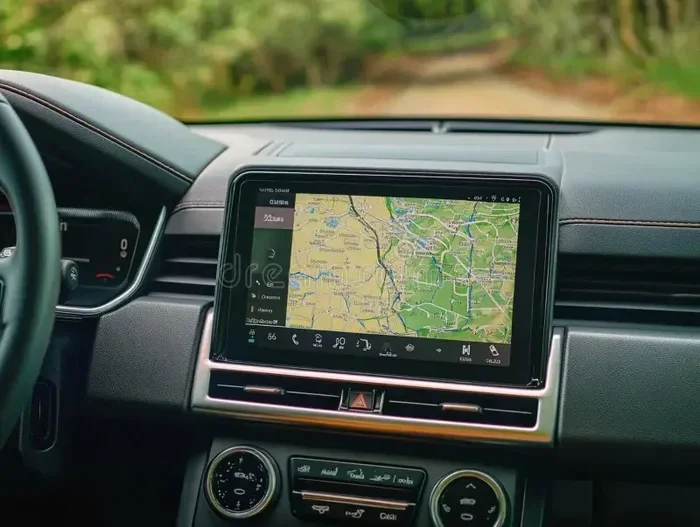
Your car’s infotainment system is the big screen in the center of the dashboard. If your car has built-in GPS navigation, this screen will behave differently than a standard audio display.
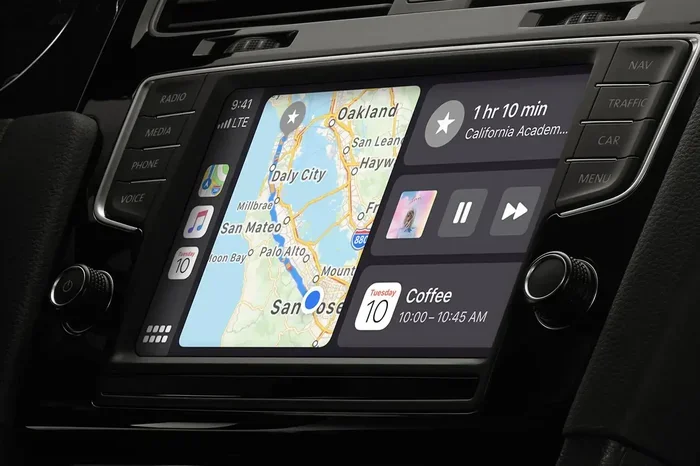
When you press the navigation button, does the screen switch to a full-color map? Does it show streets, landmarks, and a blue dot representing your location? If so, you have a car navigation system.
Some navigation screens also show:
- Estimated time of arrival
- Next turn distance and direction
- Points of interest like gas stations and restaurants
- Traffic overlays in newer systems
If your screen only shows radio stations or audio controls, your car might not have navigation. But do not worry. We will cover what to do in that case later.
Review Your Owner’s Manual
Your car’s owner’s manual is a goldmine of information. Flip through it and look for a section on navigation, GPS, or infotainment features. The manual will clearly state whether built-in GPS navigation came with your vehicle.
If you do not have the physical manual, you can usually find a digital version on the manufacturer’s website. Simply enter your car’s year, make, and model. The feature list will tell you if navigation is included.
Pro tip: Search for the word “navigation” in the manual’s table of contents. This saves you from flipping through hundreds of pages.
Signs Your Car Has a Navigation System
Sometimes the clues are subtle. You might not see a “Nav” button right away, but other signs point to a car navigation system being present. Here are the most common indicators.
The Screen Looks Different from Standard Displays
A standard car screen usually shows a few radio presets or a simple audio interface. A navigation screen looks much more advanced. It is typically larger, brighter, and capable of displaying detailed maps.
Look for these visual clues:
- A full-color, high-resolution display
- The ability to zoom in and out on a map
- A blue dot or arrow showing your current position
- Street names displayed in real time as you drive
- Turn arrows and distance markers on the screen
If your screen has these features, your car has GPS navigation built in. Even older models from the mid-2000s often had basic but functional navigation systems.
You See a “Nav” or “GPS” Button
This might sound obvious, but people often overlook it. Walk around your center console and check every button. Some cars hide the navigation button behind a flip cover or inside a submenu.
In some vehicles, the navigation feature is accessed through the infotainment home screen. Look for an icon shaped like a map or a compass. Tapping it might reveal a full navigation unit interface.
Voice Prompts for Directions
Does your car ever speak to you during a drive? If you have ever heard a calm voice say, “Turn left in 500 feet,” your car has built-in GPS navigation. This is one of the most recognizable features of a voice-guided navigation system.
These voice prompts are different from Bluetooth phone calls. Navigation voices give you turn-by-turn directions based on your set destination. If your car has ever done this, you have a navigation system.
What to Do If Your Car Does Not Have Navigation
Finding out your car lacks built-in GPS navigation can feel disappointing. But the good news is you have plenty of options. You do not need to do without direction assistance.
Aftermarket GPS Options
You can add navigation to almost any car with an aftermarket GPS unit. These standalone devices mount on your dashboard or windshield and provide the same turn-by-turn directions as factory systems.
Popular brands include Garmin, TomTom, and Magellan. These units come preloaded with maps and do not require a data connection. They are a reliable and affordable way to get GPS navigation in any vehicle.
Here is what to look for in an aftermarket unit:
- Preloaded maps for your region
- Lifetime map updates
- Voice-guided navigation
- A clear, readable map display
- Traffic alert features
Smartphone Mounts and Apps
Another great option is using your smartphone with a car navigation app. Apps like Google Maps, Apple Maps, and Waze offer excellent route guidance for free. All you need is a smartphone mount and a car charger.
This approach works well for most drivers. The downside is that it uses your phone’s data and battery. But for everyday driving, it is a practical and cost-effective solution.
Benefits of Having Built-in GPS Navigation
If your car does have built-in GPS navigation, you are already ahead of the curve. Let us look at why this feature is so valuable.
Turn-by-Turn Directions Without Your Phone
A factory navigation system gives you hands-free directions without needing to touch your phone. This makes driving safer and more convenient. You just set your destination and follow the voice-guided navigation prompts.
No fumbling with your phone. No worrying about a dying battery. Just clear directions right on your dashboard display.
Better Resale Value
Cars with built-in GPS navigation tend to sell for more on the used market. Buyers love the convenience of a factory car navigation system. It is a feature that sets your vehicle apart from similar models without it.
If you are thinking about selling or trading in your car, having navigation can make a real difference in the final price.
Built-In Reliability
Factory navigation systems are designed to last the life of the vehicle. They do not depend on software updates from an app store or a cellular signal. The GPS receiver works in remote areas where phone service might be weak or nonexistent.
This reliability is a huge advantage for road trips, especially in rural or mountainous areas.
Common Mistakes People Make When Checking for Navigation
Even careful car owners can make mistakes when trying to figure out if their car has built-in GPS navigation. Here are the most common errors to avoid.
Confusing a Standard Screen with a Navigation Screen
Many modern cars have large touchscreen displays that look like navigation screens but are not. These displays might show backup camera feeds, radio controls, or climate settings. They do not have map functionality.
To confirm navigation, actually press the navigation button or look for map features. Do not assume a big screen means you have GPS navigation.
Forgetting to Check the Steering Wheel Controls
Some cars put the navigation controls on the steering wheel, not the center console. Look for buttons with arrow icons or a “Nav” label on the wheel. These are strong indicators of a built-in navigation system.
Assuming All Trim Levels Include Navigation
Not every trim level of a car comes with navigation. The base model might not have it, while the premium trim does. Always check the specific features for your trim level. The owner’s manual or the manufacturer’s website will have this information.
Quick Tips for Using Your Car Navigation
Once you confirm you have built-in GPS navigation, here are a few tips to get the most out of it.
- Update your maps regularly: Outdated maps can lead to wrong directions. Check for map updates through your dealer or the manufacturer’s website.
- Use voice commands: Most navigation systems let you enter destinations by voice. This keeps your hands on the wheel.
- Keep the screen clean: A smudgy screen makes maps hard to read. Wipe it down regularly.
- Learn the shortcuts: Spend a few minutes learning how to zoom, reroute, and find nearby points of interest.
Expert Insights on Car Navigation Systems
Automotive experts agree that built-in GPS navigation remains one of the most useful features in any car. Even with smartphones so capable, a factory system offers reliability and seamless integration with the vehicle.
“A factory navigation system is designed to work with the car’s electrical system,” says automotive tech reviewer Mark Davis. “It does not drain your phone battery, it works offline, and it is built to last.”
The rise of connected car technology has made things even better. Many modern navigation systems now offer real-time traffic updates, weather alerts, and integration with streaming services. The car infotainment experience has come a long way in the last decade.
However, experts also note that aftermarket solutions have improved dramatically. A quality aftermarket GPS unit or a well-chosen smartphone app can match or even exceed the capabilities of older factory systems.
Key Takeaways
- Look for a “Nav” or “GPS” button: This is the fastest way to check if your car has built-in GPS navigation.
- Check your infotainment screen: Navigation systems often have a dedicated map display that differs from standard audio screens.
- Read your owner’s manual: The manual will list all features and confirm whether navigation is included.
- Factory navigation is different from phone GPS: Built-in systems offer turn-by-turn directions without needing a phone connection.
- Aftermarket options exist: If your car lacks navigation, you can add it easily with standalone units or smartphone mounts.
- Navigation adds resale value: Cars with built-in GPS navigation are more attractive to used car buyers.
Conclusion
Now you know exactly how to find out if your car has built-in GPS navigation. Whether you checked the dashboard buttons, explored the infotainment screen, or read through the owner’s manual, you have the tools to confirm what your car offers.
A car navigation system is a fantastic feature that makes driving easier, safer, and more enjoyable. If your car has one, take advantage of it. Update the maps, learn the shortcuts, and enjoy the turn-by-turn directions every time you hit the road.
If your car does not have navigation, do not worry. You have many affordable options to add this capability. From aftermarket GPS units to smartphone apps, getting route guidance has never been easier.
The most important thing is to stay informed about what your car can do. Understanding your vehicle’s features helps you drive smarter and get more value from every trip. So go ahead, explore your dashboard, and make the most of your navigation feature today.
Frequently Asked Questions
Can I add built-in GPS navigation to any car?
Yes, you can add navigation to almost any car. Aftermarket GPS units from brands like Garmin and TomTom are easy to install. You can also use a smartphone mount with a navigation app. These options work with vehicles of any age or model.
Does built-in GPS navigation work without internet?
Yes, factory navigation systems work entirely offline. They use satellite signals and preloaded maps to provide directions. You do not need a data connection or Wi-Fi to use the built-in GPS navigation feature in your car.
How much does it cost to install a navigation system?
Aftermarket GPS units range from about $100 to $400 depending on features. If you visit a dealership for a factory-installed unit, costs can be higher, typically $500 to $2,000. Smartphone apps are a free alternative that works with a simple mount.
Is phone GPS as good as built-in car navigation?
Phone GPS apps like Google Maps and Waze are very good and offer real-time traffic updates. However, factory car navigation systems are more reliable in remote areas and do not drain your phone battery. Both have their strengths depending on your needs.
How do I update maps on my car navigation system?
Most factory navigation systems allow map updates through the manufacturer’s website or a USB drive. Some newer cars offer over-the-air updates. Check your owner’s manual or contact your dealer for specific instructions on updating your maps.
Will having navigation increase my car’s resale value?
Yes, cars with built-in GPS navigation tend to have higher resale values. Buyers view navigation as a premium convenience feature. It can make your vehicle more appealing compared to similar models without this capability.