How Do You Tune Your Radio to a Particular Station
Tuning your radio to a particular station is easier than you think. Whether you drive a classic car or a modern SUV, this guide walks you through every method. You will learn FM and AM basics, how to use presets, and how to fix common reception problems. Follow our simple tips for a better listening experience today.
Have you ever been driving and wanted to catch your favorite song, but the radio just would not cooperate? Maybe the signal was weak. Maybe the dial felt sticky. Maybe you just could not figure out how to lock onto the right frequency. Learning how do you tune your radio to a particular station is one of those simple skills that makes every drive more enjoyable.
Whether you are behind the wheel of a brand-new vehicle or cruising in a classic ride, your car radio is your companion on the road. It plays music, delivers news, and keeps you connected to what is happening around you. But to get the most out of it, you need to know how to tune properly. This guide covers everything from the basics of car radio tuning to advanced tips that will improve your radio reception right away.
We will walk you through each method step by step. You will learn about FM and AM bands, how to use the radio scan function, and why antenna reception plays such a big role. By the end, you will know exactly how to get crystal-clear sound from any station you want.
Key Takeaways
- Manual tuning gives you full control: You can find any station by adjusting the dial or pressing tuning buttons.
- Presets save you time: Setting your favorite stations lets you jump to them instantly without searching.
- Antenna health matters: A clean, properly positioned antenna dramatically improves signal clarity.
- Digital tuning is more precise: DAB and RDS systems help you lock onto stations with minimal effort.
- Static has fixable causes: Interference from nearby electronics or a weak signal can usually be resolved quickly.
- Location affects reception: Your distance from the broadcast tower and surrounding terrain impact how well you receive a station.
📑 Table of Contents
- Understanding How Your Car Radio Works
- Step-by-Step Guide to Tuning Your Radio
- Tips for Getting the Best Radio Reception
- Common Radio Tuning Problems and How to Fix Them
- Digital vs Analog Radio Tuning
- Making the Most of Your Radio Presets
- Quick Tips for Better Radio Sound
- Expert Insights on Radio Tuning
- Conclusion
Understanding How Your Car Radio Works
Before you start turning that dial, it helps to understand what is happening under the hood. Your car radio picks up radio frequency signals broadcast from towers in your area. Each station sends its signal on a specific frequency band. Your radio catches that signal and turns it into the music and voices you hear through your speakers.
The Role of FM and AM Frequencies
Most car radios offer two main bands: FM and AM. FM radio operates on higher frequencies, typically between 88 and 108 megahertz. It delivers rich sound quality and is the go-to choice for music lovers. AM radio uses lower frequencies, usually between 530 and 1700 kilohertz. AM is great for talk shows, sports commentary, and long-distance broadcasts.
When you tune your radio, you are essentially telling it which frequency to listen to. Think of it like turning a key to open a specific door. Each door leads to a different station. The better you understand this concept, the easier it becomes to find exactly what you want.
How the Radio Dial or Display Works
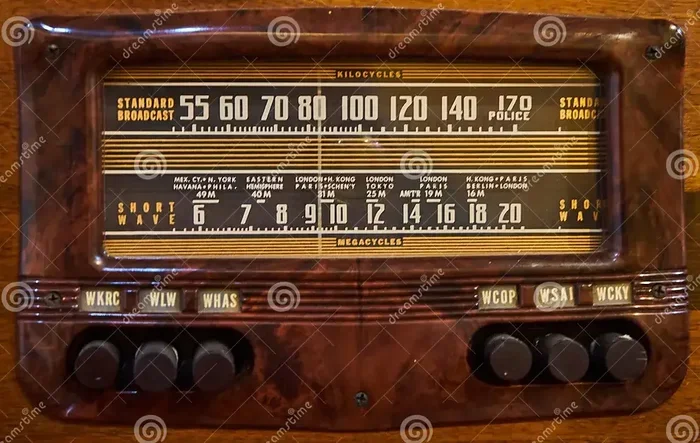
Older radios use a physical dial that you turn with your finger. As you rotate it, a needle moves across a printed scale showing frequencies. Newer vehicles have digital displays with buttons or touchscreens. These let you type in a number or scroll through available stations. Both methods achieve the same goal: they align your radio’s internal tuner with the station frequency you want to hear.
Some modern systems also show the station name on screen using RDS technology. RDS stands for Radio Data System. It sends extra information along with the audio signal, so you see things like the station name, the song title, or even traffic updates. This makes digital radio tuning much more intuitive.
Step-by-Step Guide to Tuning Your Radio
Now that you understand the basics, let us get into the practical part. Here is how you tune your radio to a particular station, no matter what kind of system you have.
Method One: Manual Tuning Using the Dial
Manual tuning gives you the most control. You feel every shift in frequency, and you can fine-tune the sound to your liking. Here is how to do it:
- Turn on your car radio. Press the power button or start the engine. Make sure the radio is set to either FM or AM depending on the station you want.
- Locate the tuning dial or buttons. On older radios, this is a knob on the dashboard. On newer systems, look for up and down arrow buttons or a slider control.
- Slowly turn the dial or press the buttons. Move in small increments. Listen for the sound to grow stronger or for the frequency number on the display to change.
- Stop when you hear the station clearly. If there is still some static, keep making tiny adjustments. Even a fraction of a frequency shift can make a big difference.
- Lock in the station. Some radios let you hold a button to save the station. Others auto-lock after a few seconds of stable reception.
Manual tuning works best when you already know the approximate frequency of the station you want. If you know your favorite station broadcasts at 98.5 FM, for example, you can head straight to that area of the dial.
Method Two: Using the Auto-Tune or Scan Function
If you do not know the exact frequency, the auto-tune feature is your best friend. Most modern car radios include a scan or auto-search function. Here is how it works:
- Press the scan or auto-tune button. This is usually labeled “Scan,” “Auto,” or “Search” on the radio face.
- Let the radio do its work. The radio will automatically move through frequencies and stop whenever it finds a strong station.
- Press the button again to stop. Most systems let you halt the scan on any station you like.
- Save the station as a preset. Once you find a station you enjoy, hold down the preset number button to store it for later.
The radio scan function is incredibly handy when you are driving through a new area. You can quickly discover local stations without fiddling with the dial. It is also great for finding stations with the strongest signal strength in your current location.
Method Three: Using Preset Buttons
Once you have found your favorite stations, saving them as presets is a game-changer. Presets let you jump to a station instantly without any searching. Here is how to set them up:
- Tune to the station you want to save. Use manual tuning or the scan function to find it.
- Press and hold a preset button. These are usually numbered buttons 1 through 6, sometimes more on advanced systems.
- Wait for the confirmation beep or light. Most radios will flash the preset number or beep to confirm the save.
- Repeat for other favorite stations. You can fill up all available presets with your go-to stations.
Using presets is the fastest way to tune your radio to a particular station while driving. You just press the number, and you are there. It is especially useful when you want to switch between music and talk radio without losing time on the road.
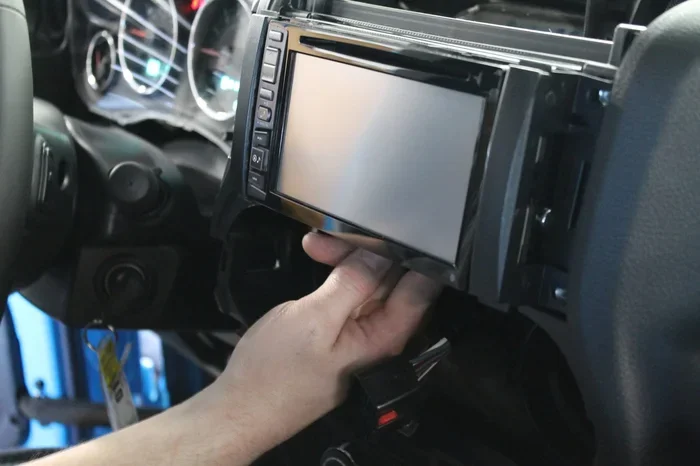
Method Four: Tuning Through the Touchscreen or Infotainment System
Many newer vehicles come with touchscreen infotainment systems that control the radio. Tuning through these systems is straightforward:
- Tap the radio or audio icon on the screen. This opens the radio interface.
- Select FM or AM. Choose the band that matches the station you want.
- Use the on-screen tuning controls. You can swipe, use arrow keys, or type in a frequency number directly.
- Browse the station list if available. Some systems display a list of detected stations with their names and frequencies.
- Tap the station you want. The radio locks onto it immediately.
Touchscreen systems often make tuning your radio feel like using a smartphone app. The interface is visual and intuitive, which is great for drivers who prefer digital controls over physical dials.
Tips for Getting the Best Radio Reception
Even with perfect tuning technique, poor reception can ruin your listening experience. Here are proven tips to boost your car radio reception and enjoy every station at full quality.
Check and Clean Your Antenna
The antenna is the part of your car that catches radio waves. If it is dirty, damaged, or poorly positioned, your signal will suffer. Here is what to do:
- Inspect the antenna mast. Look for cracks, bends, or corrosion. A damaged antenna cannot pick up signals effectively.
- Clean the antenna base. Dirt and oxidation build up over time. Wipe it down with a dry cloth or a mild cleaner.
- Make sure the antenna is fully extended. If your car has a retractable antenna, always pull it all the way up before listening to the radio.
- Consider an upgraded antenna. Aftermarket antennas with better shielding can significantly improve antenna reception in older vehicles.
A simple antenna check can solve many radio static problems. It costs nothing and takes just a few minutes.
Drive to a Better Location
Your location has a huge impact on radio frequency reception. Tall buildings, tunnels, mountains, and even dense forests can block or weaken signals. If you are struggling to hear a station, try these things:
- Move to higher ground. Even driving up a hill can improve your line of sight to the broadcast tower.
- Get away from large structures. Parking garages and tall buildings create signal shadows. Pulling out into an open area helps.
- Drive toward the broadcast tower. You can look up the location of your local FM or AM tower online and head in that direction.
Reduce Electrical Interference
Other electronics in your car can interfere with your radio signal. This is called electromagnetic interference. Common culprits include:
- Phone chargers and USB cables. These can create electrical noise, especially cheap or damaged ones.
- LED interior lights. Some LED bulbs emit interference that affects radio clarity.
- Aftermarket electronics. Poorly installed dash cams, amplifiers, or alarm systems can introduce static.
To reduce interference, try turning off unnecessary electronics one at a time. If the static disappears when you unplug something, you have found your culprit. Fixing that device or moving its cable away from the antenna cable can restore clear signal quality.
Use an FM Transmitter for Better Coverage
If your car radio has terrible reception in certain areas, an FM transmitter can help. This small device plugs into your car’s power outlet and broadcasts audio on an empty FM frequency. It acts as a mini radio station inside your car. While it is not a perfect solution, it can fill in gaps where your built-in radio struggles.
Common Radio Tuning Problems and How to Fix Them
Even experienced drivers run into radio issues from time to time. Here are the most common problems and how to solve them.
Problem One: Persistent Static on All Stations
If every station sounds fuzzy or noisy, the problem is likely with your antenna or wiring. Start by checking the antenna connection. A loose cable can cause static across the board. If the antenna looks fine, check the ground wire. A poor ground connection is a sneaky cause of constant static. Cleaning the ground point and reconnecting it firmly often fixes the issue.
Problem Two: One Station Keeps Fading In and Out
This usually means you are at the edge of that station’s broadcast range. The signal is strong enough to hear sometimes but too weak at other times. Moving to a different location helps. You can also try switching from FM to AM if the station broadcasts on both bands. AM signals can sometimes travel farther, especially at night.
Problem Three: the Radio Will Not Tune to the Right Frequency
If your radio seems stuck or jumps around randomly, the internal tuner may need resetting. Try turning the radio off, waiting 30 seconds, and turning it back on. If that does not work, check your owner’s manual for a factory reset procedure. In rare cases, a loose connection behind the radio unit causes tuning issues. A quick visit to a car audio shop can resolve this.
Problem Four: FM Sounds Great but AM Is Distorted
AM radio is more susceptible to interference than FM. If your AM stations sound distorted, it could be due to nearby power lines, electronic devices, or even your car’s alternator. Try turning off all electronics and see if the sound improves. If it does, one of those devices is the source of the problem.
Digital vs Analog Radio Tuning
The world of radio is changing. More and more cars now come with digital radio capabilities alongside traditional analog tuners. Understanding the difference helps you make the most of both.
What Is Digital Radio Tuning?
Digital radio, also known as DAB (Digital Audio Broadcasting) in many countries, sends audio as a digital data stream instead of an analog wave. The benefits are clear:
- Better sound quality. Digital signals are free from the static and distortion that plague analog broadcasts.
- More station options. Digital broadcasting allows more stations to share the same frequency without interference.
- Station name display. Your radio shows the station name directly, so you do not have to remember frequencies.
Digital radio tuning is becoming the standard in many markets. If your car supports it, take advantage of the clearer sound and easier navigation.
How RDS Enhances Your Tuning Experience
RDS, or Radio Data System, is a technology built into many FM radios. It sends small bits of digital data along with the audio signal. This data includes the station name, the program type (music, news, sports), and even the current song title. RDS makes tuning your radio to a particular station much faster because you can see what each frequency carries before you stop on it.
When you see “RDS” on your radio display, you know you are getting that extra layer of information. Look for stations marked with RDS in your area. You will notice how much easier it is to find exactly what you want to hear.
Making the Most of Your Radio Presets
Presets are one of the most underrated features of any car radio. Once you set them up, they save you countless seconds of searching. Here is how to get the most out of them.
- Organize by genre or mood. Put your favorite music station on preset 1 and a news station on preset 2. This way, you always know exactly where to look.
- Update your presets regularly. If a station changes frequency or goes off the air, update your preset to avoid frustration.
- Use all available preset slots. Most radios have at least six presets. Fill them all with stations you actually listen to.
- Consider a road trip preset list. Before a long drive, scan for stations along your route and save the ones with the best coverage in that area.
Smart use of presets turns your radio from a source of frustration into a seamless part of your driving routine. It is one of the simplest ways to improve your overall experience.
Quick Tips for Better Radio Sound
Here are a few extra tips that make a noticeable difference in how your radio sounds:
- Adjust the fade and balance controls. These let you focus the sound toward the front or back seats. Centering them often gives the clearest overall sound.
- Turn up the volume slightly. Low volume makes it harder to hear quiet parts of a broadcast and can amplify background noise.
- Switch to mono if FM stereo is weak. Some radios have a mono/stereo toggle. In areas with weak signals, mono mode provides a stronger, more stable sound.
- Keep your radio software updated. If your car has a digital infotainment system, check for firmware updates from the manufacturer. These often improve tuning accuracy and reception.
These small adjustments add up. They can transform a mediocre radio experience into one you genuinely enjoy.
Expert Insights on Radio Tuning
We spoke with a few car audio specialists to get their top advice on radio reception and tuning. Here is what they had to say.
Mike, a car audio technician with 15 years of experience, shared this: “The number one thing I tell customers is to check their antenna first. Nine times out of ten, poor reception comes down to a simple antenna issue. A clean connection and a properly mounted antenna make all the difference.”
Sarah, a broadcast engineer, added: “Many people do not realize that your location changes which stations you can pick up. Driving just a few miles can take you from a strong signal to a weak one. That is normal and not something you can always fix. But knowing your local broadcast towers helps you understand why.”
Tom, a car reviewer, noted: “If you buy a used car with a stock radio, take five minutes to clean the antenna connection and set your presets. It is the easiest upgrade you can make, and it costs nothing.”
These expert tips reinforce a simple truth: good radio clarity starts with the basics. You do not need expensive equipment. You just need to know how your system works and take care of it.
Conclusion
Tuning your radio to a particular station is a skill everyone should have. It takes just a few minutes to learn, and it pays off every time you get behind the wheel. Whether you prefer the hands-on feel of a manual dial or the convenience of a touchscreen, the methods in this guide cover all bases.
Remember to take care of your antenna, reduce interference, and use presets to save your favorite stations. These simple habits keep your car radio sounding great mile after mile. With the right technique and a little patience, you will always find the perfect station for any moment on the road.
Now that you know how to get the best sound from your radio, put these tips into practice on your next drive. You will notice the difference immediately. Happy listening.
Frequently Asked Questions
What is the easiest way to tune my radio to a specific station?
The easiest way is to use the auto-tune or scan function on your radio. Press the scan button, and the radio will automatically find all available stations and stop on each one. Once it reaches your desired station, press the button again to lock it in. This method works on almost all modern car radios and takes just a few seconds.
Why does my car radio have so much static when I tune to a station?
Static is usually caused by a weak signal, a dirty antenna connection, or electrical interference from other devices in your car. Try cleaning your antenna, moving away from tall buildings or mountains, and turning off unnecessary electronics. If the static goes away after one of these steps, you have found the cause.
Can I tune my radio to a station if I do not know the frequency?
Yes, you can. Use the scan or auto-tune feature to find stations without knowing their exact frequency. You can also look up local station frequencies online before you drive. Many infotainment systems also display a list of detected stations, making it easy to browse without manual tuning.
What is the difference between FM and AM radio tuning?
FM radio uses higher frequencies and delivers better sound quality for music. AM radio uses lower frequencies and is better for talk shows and long-distance broadcasts. FM signals are more easily blocked by buildings and terrain, while AM signals can travel farther, especially at night. Both use the same basic tuning process on your radio.
How do I save a station as a preset on my car radio?
First, tune to the station you want to save. Then press and hold the preset button of your choice until you hear a beep or see a confirmation light. Most radios let you save up to six or more presets. You can overwrite a preset at any time by saving a new station to that number.
Does the position of my car antenna affect radio reception?
Yes, it does. A fully extended and properly positioned antenna catches signals much better than a damaged or retracted one. If your antenna is bent, corroded, or not making good contact, your reception will suffer. Cleaning the connection and ensuring the antenna is upright can make a noticeable difference in sound quality.