How Do I Turn Off Automatic High Beams On Your Vehicle
Turning off automatic high beams is simple once you know where to look. Most vehicles hide the control in the dashboard settings, steering column stalk, or infotainment system. This guide walks you through every method so you can disable auto high beams in minutes.
Driving at night can be a real challenge. You are cruising down a dark highway, and suddenly a wave of blinding light hits you from your own headlights. That is the automatic high beam system doing its job. For many drivers, this feature is helpful. But there are times when it becomes annoying or even distracting. Maybe you are driving in the city with lots of streetlights. Maybe you just prefer full control over your vehicle lighting. Whatever the reason, knowing how to turn off automatic high beams is an essential skill every driver should have.
The good news is that disabling this feature is usually straightforward. Most modern vehicles give you several ways to switch off the auto high beam system. Whether you drive a Toyota, Ford, Honda, or a luxury brand like BMW or Mercedes, the process is similar once you know where to look. In this article, we will walk you through every method step by step. You will learn about the different control locations, what to do if the system keeps turning back on, and how to get the best experience with your headlights.
Let us dive right in and help you take back control of your vehicle lighting system.
Key Takeaways
- Multiple locations: The auto high beam toggle can be found on the steering column stalk, dashboard controls, or infotainment screen depending on your vehicle.
- Quick toggle method: Most cars let you flip the stalk or press a button to instantly disable automatic high beams.
- Menu-based systems: Newer vehicles with digital displays often require navigating through the vehicle settings menu to turn off the feature.
- Sensor location matters: Understanding where the light sensor sits helps you troubleshoot if the system keeps reactivating.
- Model-specific steps: Different car brands use different methods, so knowing your specific make and model helps you find the right fix fast.
- Safety first: Even when you turn off auto high beams, you can still manually switch between low and high beams as needed.
📑 Table of Contents
- What Is the Automatic High Beam System?
- Why Would You Want to Turn Off Automatic High Beams?
- How to Turn Off Automatic High Beams: Step-by-Step Methods
- Common Problems When Turning Off Automatic High Beams
- Quick Tips for Managing Your Vehicle Lighting System
- How Auto High Beams Work With Other Safety Features
- Brand-Specific Tips for Disabling Auto High Beams
- When to Keep Automatic High Beams On
- Conclusion
What Is the Automatic High Beam System?
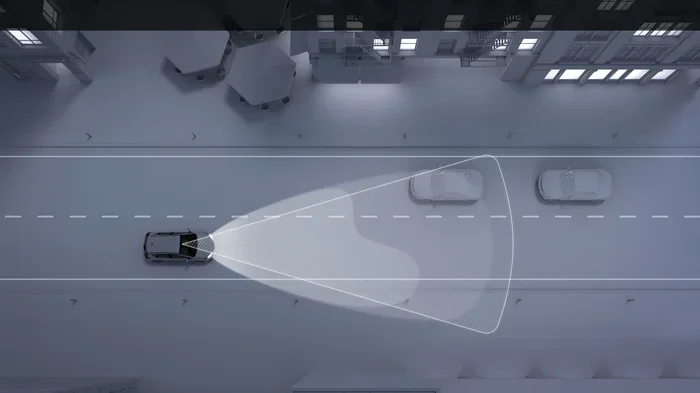
Before we get into the how, let us quickly talk about the what. The automatic high beam system is a smart feature found in most newer vehicles. It uses a sensor, usually mounted near the rearview mirror, to detect light from other cars. When there is no oncoming traffic or vehicle ahead, the system switches your headlights to high beam automatically. When it detects light from another vehicle, it dims back down to low beam. This gives you better visibility without blinding other drivers.
The system relies on a light sensor module and sometimes a camera to work properly. It is part of the broader vehicle lighting system that many modern cars come equipped with. While this is a great safety feature for highway driving, it can feel unnecessary in well-lit urban areas. That is exactly when you would want to know how to turn it off.
Why Would You Want to Turn Off Automatic High Beams?
There are several perfectly valid reasons to disable automatic high beams. Understanding these reasons helps you make an informed decision about whether to keep the feature on or off.
Frequent City Driving
If you spend most of your time driving in the city, automatic high beams can feel more like a nuisance than a help. Streetlights, neon signs, and traffic all create enough ambient light. The system may keep switching between high and low beam unnecessarily, which can be distracting and annoying.
Sensor Malfunctions
Sometimes the light sensor gets dirty or misaligned. A dirty sensor can cause the system to malfunction. It might keep the high beams on even when there is oncoming traffic. This creates a dangerous situation for everyone on the road. If you notice your automatic brightness system acting up, turning it off until you can fix the sensor is a smart move.
Personal Preference
Some drivers simply prefer to control their headlights manually. They want to decide when to use high beams and when to use low beams. Disabling the auto system gives you full control over your vehicle lighting and gives you peace of mind.
Fog or Adverse Weather
In heavy fog, rain, or snow, automatic high beams can actually reduce your visibility. The light bounces off the moisture in the air and creates a glare. Turning off the auto system and using low beams manually is often the safer choice during bad weather.
How to Turn Off Automatic High Beams: Step-by-Step Methods
Now for the part you have been waiting for. The exact method to disable automatic high beams depends on your vehicle make and model. Below are the most common methods used across different car brands and models.
Method 1: The Steering Column Stalk
This is the most common method, especially in vehicles from brands like Toyota, Honda, Ford, and Nissan. The auto high beam toggle is usually located on the steering column stalk, which is the lever behind your steering wheel that controls your turn signals and windshield wipers.
Here is how to do it:
- Step 1: Turn on your vehicle ignition.
- Step 2: Look at the steering column stalk on the left side.
- Step 3: You will see a small lever or button near the base of the stalk.
- Step 4: Push the lever or press the button to toggle the automatic high beam system off.
- Step 5: Check your dashboard for a confirmation light or message.
On many vehicles, when the auto high beam is active, you will see a green or blue indicator light on the dashboard. When you turn it off, that light goes away. Some cars also display a message on the instrument cluster that says “Auto High Beam Off” or something similar.
Method 2: The Dashboard Control Panel
Some vehicles, especially those from European brands like BMW, Audi, and Mercedes, use a button or knob on the dashboard or center console to control the automatic high beam system.
Here is what to do:
- Step 1: Park your vehicle or keep it in a safe stationary position.
- Step 2: Look at the dashboard control panel on the left side of the steering column or on the center console.
- Step 3: Find the headlight control section.
- Step 4: Look for a button labeled with a headlight icon and an “A” or “Auto” symbol.
- Step 5: Press and hold the button for a few seconds until the auto high beam function is disabled.
On some models, you may need to rotate a knob to switch from “Auto” to “Off” or to manual low beam mode. The exact position varies by vehicle, so always check your owner manual for the specific layout.
Method 3: The Infotainment Screen
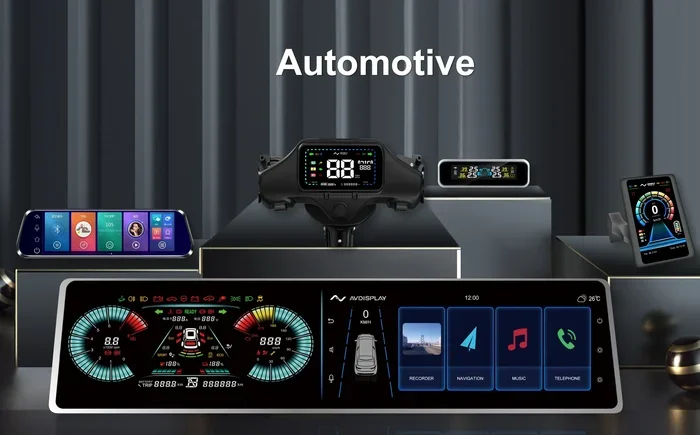
Newer vehicles with advanced digital displays often let you control the automatic high beam system through the infotainment system. This method is common in vehicles from brands like Tesla, Volvo, Subaru, and many 2020 and newer models.
Here is how to navigate the vehicle settings menu:
- Step 1: Start the vehicle and wake up the infotainment screen.
- Step 2: Go to the “Settings” or “Vehicle Settings” menu.
- Step 3: Look for a section called “Lighting,” “Headlights,” or “Driver Assistance.”
- Step 4: Find the “Automatic High Beams” option.
- Step 5: Toggle it off and confirm the change.
This method gives you the most control because you can often adjust related settings too. For example, you might be able to adjust the sensitivity of the light sensor or set the system to stay in low beam mode permanently.
Method 4: Using the Headlight Switch Dial
Some older vehicles and certain models use a rotary headlight switch on the dashboard. In these cases, the automatic high beam system is tied directly to the headlight switch position.
To turn it off:
- Step 1: Turn the headlight dial from the “Auto” position to the “Off” position or to the low beam position.
- Step 2: The automatic high beam function will deactivate automatically.
- Step 3: You can then manually switch between low and high beams using the lever on the steering column.
This method is simple but means you lose the auto low beam feature as well. You will need to manually switch to high beam whenever you want it.
Common Problems When Turning Off Automatic High Beams
Sometimes the process is not as smooth as it should be. Here are some common issues drivers face and how to fix them.
The System Keeps Turning Back On
If you have turned off automatic high beams but the system keeps reactivating, the most likely cause is a dirty or obstructed light sensor. The sensor is usually a small black dome or dot on the windshield near the rearview mirror. Clean it gently with a soft microfiber cloth. If the sensor is covered by a sticker, mount, or other object, remove the obstruction.
No Dashboard Indicator Changes
Sometimes you turn off the auto high beam but the dashboard light stays the same. This can be confusing. In this case, try turning the vehicle off and back on. The system should reset and reflect your new setting. If the indicator still does not change, consult your owner manual or visit a certified service center.
Dashboard Menu Does Not Show the Option
If you are looking through the infotainment menu and cannot find the automatic high beam setting, your vehicle might not have this feature. Some older or base model vehicles do not include automatic high beams at all. In that case, you are already using manual high beams and do not need to turn anything off.
Quick Tips for Managing Your Vehicle Lighting System
Here are some practical tips to help you get the most out of your headlights and the automatic high beam feature:
- Keep the sensor clean: A dirty sensor causes erratic behavior in the automatic switching system. Wipe it down regularly.
- Check your owner manual: Every vehicle is different. The owner manual is the best resource for exact instructions on your specific model.
- Use manual high beams when needed: Even with auto high beams turned off, you can still manually switch to high beam using the steering column lever.
- Update your vehicle software: Some newer vehicles receive software updates that improve the automatic brightness and headlight control systems.
- Consider glare reduction: If you are sensitive to light, consider anti-reflective coatings on your windshield or polarized sunglasses for daytime driving.
- Know your vehicle model: Search for your specific vehicle model and year to find the exact steps for disabling auto high beams.
How Auto High Beams Work With Other Safety Features
The automatic high beam system does not work in isolation. It is part of a larger ecosystem of driver assistance and safety features. Understanding how it interacts with other systems can help you use your vehicle more effectively.
For instance, many modern vehicles pair the auto high beam system with adaptive headlights. These headlights swivel based on your steering input, giving you better visibility around curves. The automatic brightness control works hand in hand with adaptive headlights to provide the best possible illumination without blinding other drivers.
Some vehicles also integrate the light sensor with the daytime running lights system. When the automatic high beam is disabled, the daytime running lights remain active, ensuring your vehicle is still visible to others on the road. This is an important safety consideration that many drivers overlook.
If your vehicle has a driver assistance package, the auto high beam system may be linked to the camera system near the rearview mirror. This camera helps detect oncoming traffic and vehicles ahead. Keeping this camera clean and unobstructed ensures both the auto high beam feature and any related safety systems work properly.
Brand-Specific Tips for Disabling Auto High Beams
Different car brands have slightly different approaches. Here is a quick overview of how some popular brands handle the auto high beam toggle.
- Toyota and Lexus: Look for a lever on the steering column with an “Auto” button. Push it to toggle the system off.
- Honda and Acura: Use the headlight switch on the steering column stalk. Push the indicator to the “Auto” off position.
- Ford and Lincoln: Use the steering column controls or the infotainment screen under vehicle settings.
- BMW and Mercedes: Navigate through the iDrive or MBUX infotainment system to find the lighting settings.
- Chevrolet and GMC: Look for the headlight control on the turn signal lever or the dashboard panel.
- Nissan and Infiniti: Use the steering column stalk or the vehicle settings menu on the display screen.
These are general guidelines. Always refer to your specific vehicle owner manual for the exact steps. If you are still unsure, a quick search for your vehicle model and year combined with “turn off automatic high beams” will usually bring up the exact method.
When to Keep Automatic High Beams On
While this article focuses on how to turn off the feature, it is worth noting that automatic high beams are genuinely useful in many situations. If you frequently drive on dark, rural highways with no streetlights, keeping the auto system on is a great idea. The system will automatically switch to high beam when the road is clear and dim down when another vehicle approaches.
This is especially helpful for driver visibility during nighttime highway driving. The automatic switching removes the need for you to constantly flip between high and low beams, reducing driver fatigue and keeping your attention on the road.
The key is knowing when the feature helps you and when it gets in the way. Now that you know how to turn it off, you have full control over that decision.
Conclusion
Knowing how to turn off automatic high beams on your vehicle gives you greater control and a better driving experience. Whether you use the steering column stalk, dashboard controls, or the infotainment menu, the process is simpler than most people think. The key is finding the right method for your specific vehicle make and model.
Remember to keep your light sensor clean, consult your owner manual when in doubt, and always prioritize safety on the road. With the steps outlined in this guide, you can confidently manage your vehicle lighting system and drive with comfort and control. Take a few minutes today to locate the auto high beam toggle in your car. You will be glad you did the next time you are behind the wheel at night.
Frequently Asked Questions
Can I turn off automatic high beams on any vehicle?
Most vehicles with an automatic high beam system allow you to turn it off. However, some base model or older vehicles may not have this feature at all. Check your owner manual or look for the auto high beam indicator on your dashboard to confirm your vehicle has the system.
Will turning off auto high beams affect my regular headlights?
No, turning off the automatic high beam system does not affect your regular headlights. You can still manually switch between low beam and high beam using the steering column lever or headlight controls. The auto feature simply stops controlling the switch for you.
Where is the automatic high beam sensor located?
The sensor is typically a small black dome or dot on the windshield, mounted near the rearview mirror. Some vehicles use a camera integrated into the rearview mirror area. Keeping this sensor clean ensures the system works properly when it is enabled.
How do I know if my automatic high beams are turned off?
Look at your dashboard for the auto high beam indicator light. When the system is active, you will see a green or blue light with a headlight icon. When you turn it off, the indicator light should disappear or change to show manual mode. Your vehicle owner manual will show the exact icon for your model.
Can a dirty sensor cause the auto high beam to stay on?
Yes, a dirty or obstructed sensor can cause the system to malfunction. Dirt, snow, or even a sticker on the windshield near the sensor can interfere with its ability to detect oncoming traffic. Clean the sensor gently with a microfiber cloth to resolve this issue.
Do all new cars come with automatic high beams?
Not all new cars come with automatic high beams as standard equipment. Many newer vehicles include them, especially in higher trim levels or optional packages. If your vehicle does not have the feature, you are already using manual high beams and do not need to turn off any auto system.
=== CONCLUSION ===
Turning off automatic high beams is a quick and easy process once you know where to look. Whether your vehicle uses a steering column stalk, dashboard button, or infotainment menu, the steps are straightforward and take just a few minutes. The automatic high beam system is a great feature for highway driving and dark rural roads, but it is not always ideal for city streets or adverse weather conditions. By following the methods in this guide, you can switch between auto and manual mode with confidence. Keep your vehicle lighting system in top shape, stay safe on the road, and enjoy a better driving experience every time you get behind the wheel.