Does the Car Need to Be Running to Program HomeLink
No, your car does not need to be running to program HomeLink. Most vehicles allow HomeLink programming with the ignition in the accessory or on position. HomeLink is a convenient universal remote system built into your vehicle that lets you control your garage door opener without needing a separate handheld remote.
Programming your HomeLink system can feel confusing at first. One question drivers ask all the time is whether the car engine must be running. The short answer is no. You do not need to start your car to set up your HomeLink unit. But there are a few details that make this topic more nuanced than a simple yes or no.
HomeLink is a built-in universal remote system found in many modern vehicles. It connects to your garage door opener and lets you open your door with a button press right from the visor. This system uses RF signal technology to communicate with your garage door motor. Whether you have a newer car or an older model, understanding how HomeLink works saves you time and frustration.
In this guide, we walk through everything you need to know about HomeLink programming. We cover the steps, the car requirements, and the common pitfalls. By the end, you will feel confident programming your HomeLink system without needing the engine running.
Key Takeaways
- Car engine status: You typically only need the ignition in accessory or on mode, not a running engine.
- HomeLink works in accessory mode: This mode powers the system without starting the engine.
- Programming steps vary by car model: Always check your vehicle owner’s manual for specific instructions.
- Rolling code vs fixed code: Understanding your garage door opener type helps during programming.
- Common mistakes: Holding buttons too long or skipping the erasure step are the top errors.
- Signal interference: Keep your phone and other electronics away during programming.
- Battery matters: A weak car battery can cause HomeLink programming to fail.
📑 Table of Contents
- What Is HomeLink and How Does It Work?
- Does the Car Need to Be Running to Program HomeLink?
- Step-by-Step Guide to Programming HomeLink
- Common Mistakes When Programming HomeLink
- HomeLink Compatibility With Different Garage Door Openers
- Expert Insights on HomeLink Programming
- Quick Tips for Successful HomeLink Programming
- What If HomeLink Programming Still Fails?
- Conclusion
What Is HomeLink and How Does It Work?
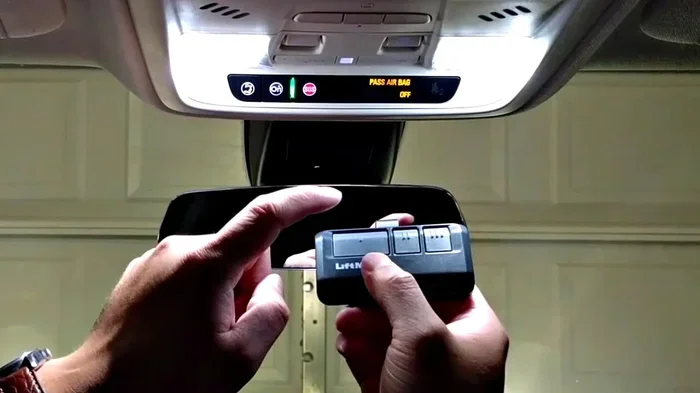
HomeLink is a wireless control system installed in many vehicles. It replaces the need for multiple handheld remotes. Instead, you get a small control panel mounted on your visor. This panel connects to your garage door, gate, or even your home lighting system.
The system works by sending a radio frequency signal to your garage door opener receiver. When you press a HomeLink button, the transmitter in your car sends a coded signal. The receiver in your garage door picks up that signal and activates the motor. This entire process happens in less than a second.
How HomeLink Transmits Signals
HomeLink uses one of two frequency bands to communicate. Most older garage door openers use a fixed code system. Newer openers use a rolling code system for better security. Here is how each works:
- Fixed code: The transmitter sends the same code every time. This older system is less secure but easier to program.
- Rolling code: The transmitter sends a new code each time. The receiver and transmitter must sync up for this to work. This is more secure and common in modern openers.
Knowing which type your garage door opener uses is important before you start programming steps. Most openers made after 1996 use rolling code technology. You can usually find this information on the back of your garage door motor unit.
Does the Car Need to Be Running to Program HomeLink?
This is the big question, and the answer is straightforward. No, your car does not need to be running. You do not need to turn the engine on. What you do need is power flowing to the HomeLink system. This power comes from the car battery.
Most vehicle manufacturers recommend setting the ignition to the accessory or on position. This gives the HomeLink unit enough electricity to program properly. The accessory mode powers your car’s electronics without starting the engine. It is the sweet spot for vehicle programming.
Why Accessory Mode Works Best
When you turn the key to accessory mode, the car’s electrical systems wake up. The radio comes on. The dashboard lights up. And the HomeLink system receives power. But the engine stays off. This is perfect for programming because:
- It saves fuel.
- It prevents accidental movement.
- It keeps the car in a safe, stationary position.
- It provides enough electrical power for the HomeLink transmitter to broadcast its signal.
Some drivers wonder if they can program HomeLink with the car completely off. In most cases, this will not work. The system needs a power source. A completely dead battery will also prevent programming. So keep your car battery in good condition before starting.
What About Push-Start Vehicles?
If you have a push-start car, the process is slightly different. You do not need to press the start button to run the engine. Simply press the button once without stepping on the brake pedal. This puts your car in accessory mode. The HomeLink system will power up and be ready for programming.
Step-by-Step Guide to Programming HomeLink
Now that you know the car does not need to be running, let us walk through the actual programming steps. These steps work for most vehicle models. Always double-check your owner’s manual for model-specific details.
Step 1: Prepare Your Vehicle
First, make sure your car is parked safely. Turn the ignition to the accessory or on position. Do not start the engine. Clear any objects from the visor area where the HomeLink control panel sits. You want a clean, clear workspace.
Quick Tip: Make sure your garage door is fully closed before you begin. This prevents any accidental door movement during programming.
Step 2: Erase Existing HomeLink Settings
If you have already programmed a HomeLink button, you should erase it first. This ensures a clean slate. Most HomeLink units have a training or erasure mode. Here is how to do it:
- Locate the HomeLink control panel on your visor.
- Press and hold the first and third HomeLink buttons simultaneously.
- Hold them for about 10 seconds.
- The indicator light will blink, then turn solid.
- Release the buttons. This clears all previous settings.
Some newer vehicles have a different erasure process. Check your manual if this does not work for your car model.
Step 3: Put Your Garage Door Opener in Training Mode
Now you need to prepare your garage door opener to receive the signal from your car. Every opener brand is different. Here are the general steps for popular brands:
- LiftMaster: Press and release the learn button on the motor unit. The indicator light will stay on for 30 seconds.
- Chamberlain: Similar to LiftMaster. Find the learn button and press it once.
- Genie: Press the learn button on the back of the motor. The status LED will blink.
You need to act quickly during this step because the training window is short. You typically have about 30 seconds to complete the next part.
Step 4: Train the HomeLink Button
Now bring your car’s HomeLink system and your garage door opener together. Follow these steps:
- Go back to your car and locate the HomeLink button you want to program.
- Press and hold that button firmly.
- Keep holding it until the HomeLink indicator light changes from slow blinking to rapid blinking.
- This usually takes about 20 seconds.
- Release the button once the light blinks rapidly.
At this point, the HomeLink transmitter in your car has sent its signal. The garage door opener should recognize it.
Step 5: Test the Connection
Now it is time to see if the programming steps worked. Press your newly programmed HomeLink button once. Your garage door should respond. If it does not, repeat the process from Step 3.
Common Mistake: Many people release the HomeLink button too early during Step 4. Hold it until the light changes to rapid blinking. This is the key to successful vehicle programming.
Common Mistakes When Programming HomeLink
Even when you know the car does not need to be running, mistakes can still happen. Here are the most common errors drivers make during HomeLink programming.
Mistake 1: Not Erasing Old Settings
Skipping the erasure step is the number one mistake. Old codes can conflict with new ones. Always clear your HomeLink system before programming a new opener. This simple step saves hours of frustration.
Mistake 2: Programming Too Far From the Opener
You need to be close to your garage door motor unit during the training phase. Stand within a few feet of the opener. The RF signal from your car is strong, but the training mode on the opener requires proximity. If you stand too far away, the opener will not pick up the signal.
Mistake 3: Weak Car Battery
A weak car battery can cause HomeLink programming to fail. The system needs consistent power to send and receive signals. If your battery is old or weak, consider replacing it before you start programming. This is an often-overlooked factor that trips up many people.
Mistake 4: Interference from Other Electronics
Signal interference is real. Other electronic devices near your car can disrupt the frequency band used by HomeLink. Keep your phone, tablets, and other remotes away from the HomeLink control panel during programming. Move your car closer to the garage door opener for the best results.
Mistake 5: Holding Buttons for Too Short a Time
Patience is key. Many people release the HomeLink button after just a few seconds. The system needs time to cycle through its programming mode. Hold the button until you see the light change. Do not rush this process.
HomeLink Compatibility With Different Garage Door Openers
HomeLink works with most garage door openers on the market. But compatibility depends on the age and brand of your opener. Let us look at how HomeLink pairs with different systems.
| Garage Door Opener Brand | HomeLink Compatibility | Code Type |
|---|---|---|
| Chamberlain / LiftMaster | Full compatibility | Rolling code and fixed code |
| Genie | Full compatibility | Rolling code |
| Overhead Door | Full compatibility | Rolling code |
| Craftsman | Full compatibility | Rolling code and fixed code |
| Older openers (pre-1996) | May require a universal remote bridge | Fixed code |
If your garage door opener is older than 1996, it likely uses a fixed code system. HomeLink can still work with these openers. You may need to use the HomeLink system’s built-in learning feature or purchase a universal remote bridge to connect the two systems.
For the best compatibility experience, check the HomeLink website or your vehicle manual. They list tested and verified opener models. This saves you from buying equipment that will not work.
Expert Insights on HomeLink Programming
We spoke with automotive technicians about the best practices for HomeLink programming. Here is what the experts had to say.
Expert Tip 1: Always Start Fresh. “I see people try to add a new opener without erasing the old one,” says a certified auto electrician. “This causes signal conflicts. Always erase and start from scratch for the cleanest result.”
Expert Tip 2: Check the Car Battery First. “A weak battery is the silent killer of HomeLink programming,” explains another technician. “If your car has trouble starting or your lights dim, replace the battery before programming.”
Expert Tip 3: Keep Your Distance During Training. “Stand right next to the garage door motor when you press the HomeLink button,” advises a garage door specialist. “The training mode uses a different signal path than normal operation.”
Expert Tip 4: Replace the Garage Door Opener Battery. “People forget that the opener itself has a battery,” adds the specialist. “A dead battery in the garage door motor will prevent any HomeLink system from working, regardless of your car’s status.”
Quick Tips for Successful HomeLink Programming
Here are some quick tips to make your HomeLink programming smooth and stress-free:
- Read your vehicle owner’s manual before starting. It has model-specific instructions.
- Work in daylight so you can clearly see the indicator lights on both your car and garage door opener.
- Have your garage door opener manual handy. You will need the learn button location.
- Keep your phone away during programming to avoid signal interference.
- Program one button at a time to avoid confusion between multiple openers.
- Test immediately after programming to confirm the connection works.
- Label your HomeLink buttons with tape or a marker so you remember which one controls which device.
What If HomeLink Programming Still Fails?
Sometimes, even when you follow all the steps correctly, HomeLink programming does not work. Do not panic. Here is what to try next:
- Check your car battery voltage. It should be at least 12.4 volts for HomeLink to function properly.
- Reset the entire system. Erase all HomeLink buttons and start over from scratch.
- Move your car closer to the garage door opener during training mode.
- Replace the garage door opener battery. This is a common culprit for failed connections.
- Check for signal interference from nearby electronics or neighboring garage door openers.
- Contact HomeLink support if none of the above works. They offer free troubleshooting help.
Remember, the car does not need to be running. If the ignition is in accessory mode and the battery is healthy, you should be able to program your HomeLink system successfully.
Conclusion
So, does the car need to be running to program HomeLink? The answer is a clear no. You only need the ignition in accessory or on mode. This gives the HomeLink system enough power to send and receive signals without starting the engine.
Programming HomeLink is a simple process once you know the steps. Erase old settings, put your opener in training mode, press and hold the HomeLink button, and test the connection. Avoid common mistakes like skipping the erasure step or standing too far from the opener.
Whether you drive a sedan, SUV, or truck, the HomeLink universal remote system works the same way. Take a few minutes to program it properly, and you will enjoy the convenience of opening your garage door right from the driver’s seat every single day.
Now that you know the truth about car engine requirements for HomeLink programming, you can get it done quickly and correctly. Grab your garage door opener manual, set your car to accessory mode, and get started today.
Frequently Asked Questions
Can I program HomeLink with the engine completely off?
In most cases, no. The HomeLink system needs power from the car battery to function. Setting the ignition to accessory or on position provides this power without starting the engine. A completely off car may not supply enough electricity for programming.
How long does it take to program HomeLink?
The entire process takes about 5 to 10 minutes. The actual training phase only lasts a few seconds per button. Most of the time is spent reading instructions and locating the learn button on your garage door opener.
Can I program more than one garage door opener to HomeLink?
Yes. Most HomeLink systems have three programmable buttons. You can set each one to a different garage door, gate, or smart home device. Just repeat the programming steps for each button and opener.
Why is my HomeLink button not working after programming?
This can happen for several reasons. A weak car battery, signal interference, or incomplete programming are the most common causes. Try resetting the HomeLink system and reprogramming from scratch. Also check that your garage door opener battery is fresh.
Do I need any special equipment to program HomeLink?
No special equipment is needed. You only need your vehicle, your garage door opener, and access to the learn button on the motor unit. Some older openers may require a universal remote bridge, but most modern openers work directly with HomeLink.
Is HomeLink the same as a universal garage door remote?
HomeLink is a built-in universal remote system in your vehicle. Unlike a handheld remote, it is mounted on your visor and integrated into the car’s electrical system. It works the same way as a universal remote but offers more convenience and a cleaner setup.
=== END ===