Does Key Fob Need Reprogramming After Battery Replacement
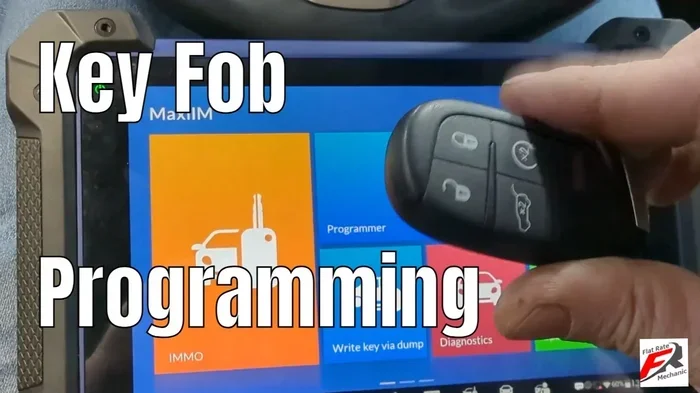
Most key fobs do not need reprogramming after a simple battery swap. The internal memory stays intact when you change the key fob battery, so your remote should work right away. However, some vehicles may require a quick reset or sync process. This guide walks you through everything you need to know about key fob reprogramming after battery replacement with clear, easy steps.
Key Takeaways
- No reprogramming needed in most cases: A simple battery change keeps your key fob settings intact.
- Know your vehicle type: Some cars with advanced security may need a quick sync after battery swap.
- Use the right battery: Always match the battery type to your fob model for best performance.
- Follow basic replacement steps: Opening the fob, swapping the battery, and snapping it back is usually all it takes.
- Troubleshoot if issues persist: Signal problems after a battery change are often easy to fix at home.
- Seek help when needed: Complex systems or repeated failures may require a professional diagnostician.
📑 Table of Contents
How Key Fobs Work and Why Battery Changes Matter
Your key fob is a small but powerful device. It talks to your car using radio signals. These signals lock, unlock, and even start your vehicle. All of this happens in seconds. But what keeps the fob working? A tiny battery inside.
Like any remote device, your remote key fob needs power to send signals. When that power runs low, things get tricky. The range shrinks. Buttons become sluggish. Sometimes the fob stops working entirely. That is when most people open up the fob and swap in a fresh battery.
But here is the big question. Does the key fob need reprogramming after replacing the battery? The short answer is usually no. But the full answer depends on your car, your fob type, and a few other factors. Let us dig into how this all works.
The Role of the Battery in Your Key Fob
The battery in your car key fob does one main job. It powers the radio transmitter. This transmitter sends a coded signal to your car. The car receives the signal and responds. It might unlock the doors or start the engine.
Most key fobs use a small coin cell battery. The most common type is the CR2032. This battery lasts about two to four years. When it starts to fade, you will notice the signal getting weaker. Some fobs have a warning light on the dashboard. Others just stop responding at a distance.
Replacing the battery is simple. You pop open the fob casing. Swap out the old battery. Put in a new one. That is it. The internal computer chip in the fob does not lose its memory. It remembers the code it was programmed with. So no reprogramming is needed in the vast majority of cases.
What Happens When the Battery Dies Completely
When the key fob battery dies completely, the fob goes silent. It cannot send any signal to the car. You might still have a backup metal key hidden inside the fob. This is common in most remote key fob models. You can use the metal key to unlock the door manually.
Once you replace the battery, the fob should wake back up. It picks up right where it left off. The code stored in the chip remains unchanged. This is why most people never need to reprogram their fob after a battery change. The memory is non-volatile. It does not need power to stay saved.
Does the Key Fob Need Reprogramming After Battery Replacement?
This is the question most car owners want answered. And the answer is not always a simple yes or no. Let us break it down by different situations. This way you will know exactly what to expect.
Most Key Fobs Do Not Need Reprogramming
For the majority of vehicles, replacing the battery does not trigger any need for key fob reprogramming. The fob stores its identity code in a small memory chip. This chip does not erase when the battery dies or is removed.
Think of it like a bookmark in a book. You open the book, remove the bookmark, put in a new battery, and the bookmark stays where it was. The information is preserved. Your car still recognizes the fob as the real one.
Popular brands like Ford, Toyota, Honda, and Chevrolet follow this pattern. Their key fob battery replacement process is straightforward. You change the battery. You test the fob. It works. No extra steps needed.
Here are some common examples where reprogramming is not needed:
- Toyota and Lexus fobs with standard CR2032 batteries
- Ford key fobs from most model years
- Honda remote key fobs with simple battery swaps
- Chevrolet and GMC fobs using coin cell batteries
- Hyundai and Kia fobs with accessible battery compartments
When Reprogramming Might Be Necessary
Now, there are some situations where you might need to do a bit more. These are less common but still important to know about.
Some vehicles with advanced vehicle security systems may need a quick re-sync after a battery change. This is especially true for luxury brands or newer models with complex computer systems. In these cases, the car may not recognize the fob right away after a fresh battery is installed.
Here are situations where you might need to take extra steps:
- Push button start systems that require fob proximity detection
- Luxury vehicles with multiple fob profiles stored in memory
- Aftermarket key fobs that were never factory programmed
- Older vehicles where the fob battery has been dead for a long time
- Cars with transponder keys that link the fob to the ignition system
In these cases, the process is usually simple. You might need to sit in the car with the fob. Turn the ignition on and off a few times. Or hold the lock and unlock buttons together for a few seconds. The car relearns the fob signal. This is not full reprogramming. It is more of a quick resync.
Step-by-Step Guide to Replacing Your Key Fob Battery
Replacing the battery in your key fob is easy. You do not need special tools or technical skills. Most fobs open with a small screwdriver or by pressing a release tab. Follow these simple steps to get it done right.
Tools You Will Need
Before you start, gather these few items. You will not need much:
- A CR2032 battery (or the type listed in your owner manual)
- A small flathead screwdriver or a coin
- A clean, soft cloth
- A well-lit workspace
Make sure you buy the right battery. Check the label on your old battery before you toss it. The number on the battery tells you the exact type. Using the wrong battery can damage the fob or cause it to malfunction.
The Replacement Process
Follow these steps carefully for a smooth battery swap:
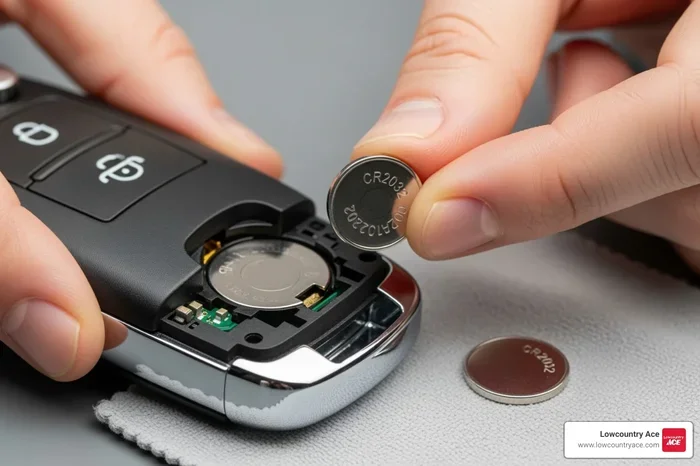
- Open the fob casing. Look for a small seam or groove along the edge. Insert your screwdriver or coin there. Gently twist until the two halves separate.
- Remove the old battery. Note which side faces up. Take a photo if you are unsure. Use a plastic tool to pop the battery out. Avoid using metal objects that could short the circuit.
- Insert the new battery. Place the new battery in the same orientation as the old one. The positive side usually faces up. Push it gently into place until it clicks.
- Snap the fob back together. Align the two halves. Press firmly around the edges until they click shut. Do not force it. If it does not close easily, check that the battery is seated correctly.
- Test the fob. Stand near your car. Press the lock and unlock buttons. Check the range. Walk a few steps back and test again. The fob should work normally.
That is all there is to it. In most cases, your key fob reprogramming after battery replacement is complete. The fob works immediately. No computer or dealer visit is needed.
Common Problems After Battery Replacement
Sometimes things do not go as smoothly as you hope. The fob might still not work after a new battery. This can be frustrating. But most issues have simple solutions. Let us look at the most common problems and how to fix them.
Key Fob Still Not Working After Battery Swap
This is the most common complaint. You put in a new battery. You press the buttons. Nothing happens. What went wrong?
First, check the battery orientation. The positive and negative sides must match the old battery position. A backwards battery will not power the circuit. This is the number one mistake people make during a battery replacement.
Second, check for corrosion. Old batteries can leak a white or greenish substance. This residue can block the electrical contacts. Use a cotton swab dipped in vinegar or rubbing alcohol to clean the contacts gently. Let them dry completely before inserting the new battery.
Third, make sure the fob casing is fully closed. If the two halves are not aligned properly, the buttons will not press down on the circuit board. This breaks the connection and the fob will not send any signal.
Reduced Signal Range After Battery Change
Sometimes the fob works but only up close. You have to be right next to the car for it to respond. This is not normal after a battery change. A fresh battery should give you full range.
Check the battery brand. Cheap or expired batteries may not deliver full power. Stick with trusted brands like Energizer or Duracell. Also, make sure the battery is not loose inside the fob. A rattling battery means it is not making proper contact with the terminals.
If the range is still weak, try resetting the fob. Take the battery out. Wait 30 seconds. Put it back in. This clears any temporary glitch in the circuit. Your key fob signal should return to normal.
Expert Tips to Keep Your Key Fob Running Smoothly
A little maintenance goes a long way with your remote key fob. Follow these simple tips to avoid problems and extend the life of your fob.
Preventive Maintenance Tips
- Replace the battery every two to three years. Do not wait until it dies completely. Proactive changes prevent lockouts.
- Keep spare batteries on hand. Store a CR2032 or whatever type your fob uses in your glove box. You never know when you will need it.
- Avoid extreme temperatures. Heat and cold drain batteries faster. Do not leave your fob on the dashboard in direct sunlight.
- Clean the contacts regularly. A quick wipe with a dry cloth keeps the connection strong. Dirt and moisture can corrode the contacts over time.
- Handle the fob gently. Dropping it can damage the internal circuit board. A cracked casing lets moisture in, which causes bigger problems.
When to Replace the Entire Key Fob
Sometimes the battery is not the problem. If you replace the battery and the fob still does not work, the issue may be deeper. The internal circuit board could be damaged. The buttons might be worn out. The antenna inside the fob could be broken.
In these cases, you may need a full key fob replacement. You can buy a new fob online or from a dealership. Some aftermarket fobs come pre-programmed. Others require key fob programming before use. Always check compatibility with your vehicle before purchasing.
A new fob typically costs between 50 and 200 dollars depending on the brand and features. Programming at a dealership may add another 50 to 150 dollars. But many people learn to program their own fobs at home using simple instructions in the owner manual.
When to Seek Professional Help
Most key fob troubleshooting can be done at home. But some situations call for a professional touch. Knowing when to ask for help saves time and money.
If you have replaced the battery and the fob still does not respond, try the steps above first. Clean the contacts. Check the orientation. Reset the fob. If none of that works, it is time to call in the experts.
A locksmith or dealership can diagnose deeper issues. They have specialized tools to read the fob signal and reprogram it if needed. They can also check whether the problem is with the car side. Sometimes the car receiver has a fault, not the fob itself.
Do not delay getting help if your push button start system stops recognizing the fob. A non-functioning fob can leave you stranded. Quick action prevents bigger headaches down the road.
Conclusion
The good news is that key fob reprogramming after battery replacement is rarely needed. For most vehicles, a simple battery swap does the job. Your fob remembers its code. Your car recognizes it instantly. No extra steps required.
That said, it helps to know the exceptions. Luxury vehicles and advanced security systems may need a quick resync. Aftermarket fobs sometimes require programming. Being prepared for these scenarios keeps you from getting caught off guard.
The best approach is simple. Change your battery on schedule. Use quality batteries. Keep your fob clean and dry. And know the basic troubleshooting steps when things go wrong. With this knowledge, you will handle any key fob battery issue with confidence.
Take a few minutes today to check your fob battery. A fresh battery means reliable access to your car. It means no standing outside in the rain trying to unlock your door. Small maintenance like this makes a big difference in your daily life.
Frequently Asked Questions
How long does a key fob battery usually last?
Most key fob batteries last between two and four years. The exact lifespan depends on how often you use the fob and the quality of the battery. If you notice the signal getting weaker, it is a good time to replace it before it dies completely.
Can I use any CR2032 battery for my key fob?
You should use a quality CR2032 battery from a trusted brand. Cheap or expired batteries may not deliver consistent power. Always check the voltage rating on the package. A fresh 3-volt battery ensures the best performance for your remote key fob.
What should I do if my car does not recognize the fob after a battery change?
First, double-check that the battery is inserted correctly. Make sure the fob casing is fully closed. Try standing closer to the car and pressing the buttons. If the issue persists, consult your owner manual for a quick reset procedure. Some vehicles require a simple re-sync after battery replacement.
Is it safe to open my key fob to replace the battery?
Yes, it is completely safe. Key fobs are designed to be user-serviceable. Use a plastic tool or a coin to open the casing. Avoid metal tools that could damage the circuit board. Be gentle when separating the two halves to prevent cracking the plastic.
How much does it cost to reprogram a key fob at a dealership?
The cost varies by brand and model. Dealership programming typically runs between 50 and 150 dollars. Some dealers do it for free if you bought the fob from them. Independent locksmiths often charge less. Always ask for a price quote before committing to any service.
Will replacing the battery erase my key fob settings?
No. The internal memory chip in your key fob retains all settings when the battery is removed. Your programmed buttons, security codes, and vehicle preferences stay saved. This is why most people never need to reprogram their fob after a simple battery swap.