Can You Upgrade Toyota Entune A Complete Step by Step Guide
Yes, you can upgrade Toyota Entune, and it is simpler than most owners think. This guide walks you through every method, from software updates to hardware swaps. Whether you own an older model or a newer Toyota, you will find the right path to modernize your infotainment system. We cover Entune 3.0, Entune 4.0, and all the features that come with each version.
Your Toyota came with an infotainment system that felt pretty good when you bought it. But technology moves fast. New features like wireless Apple CarPlay and Android Auto make your daily drive more connected and enjoyable. If you have been wondering whether you can upgrade your Toyota Entune system, the answer is a clear yes.
Upgrading your Toyota Entune system opens up a world of possibilities. You get better navigation, faster response times, and access to the latest apps. Whether you drive a Corolla or a Tacoma, there is an upgrade path that fits your needs and budget. In this guide, we break down every option step by step so you can make the best choice for your vehicle.
The process is not as complicated as it might seem. Some upgrades are free and happen over Wi-Fi. Others require a visit to the dealership or a simple hardware swap. We will cover all of it in plain language. By the end of this article, you will know exactly what to do and how to get the most out of your Toyota’s audio and navigation system.
Key Takeaways
- Multiple upgrade paths exist: You can update software, swap hardware, or even use aftermarket solutions.
- Entune 3.0 and 4.0 offer big improvements: Newer versions bring wireless Apple CarPlay and Android Auto.
- Dealer upgrades cost more but are reliable: Certified technicians handle everything for you.
- DIY upgrades save money: With the right tools, you can update your system at home.
- Compatibility matters: Not every Toyota model supports every Entune version.
- Regular updates keep your system fresh: Staying current improves performance and adds new features.
📑 Table of Contents
- What Is Toyota Entune and Why Upgrade It?
- Understanding the Different Entune Versions
- How to Upgrade Toyota Entune: Step by Step Methods
- What You Need Before Upgrading
- Comparing Upgrade Options
- Benefits of Upgrading Your Toyota Entune
- Common Mistakes to Avoid When Upgrading Toyota Entune
- Expert Tips for the Best Upgrade Experience
- How Often Should You Update Your Toyota Entune?
- Is It Worth Upgrading an Older Toyota?
- Final Thoughts on Upgrading Toyota Entune
What Is Toyota Entune and Why Upgrade It?
Toyota Entune is the brand name for Toyota’s infotainment platform. It controls your audio, navigation, phone connectivity, and more. The system has evolved over the years, with each version bringing better features and smoother performance.
Early versions of Entune were basic. They offered AM/FM radio, a simple touchscreen, and maybe Bluetooth calling. Today’s versions support streaming music, voice commands, and real-time traffic updates. If your Toyota came with an older Entune version, you are missing out on these modern conveniences.
Why Most Owners Choose to Upgrade
There are several reasons drivers look into Toyota Entune upgrade options:
- Better connectivity: Newer versions offer seamless smartphone integration.
- Improved navigation: Updated maps and faster routing make trips easier.
- Enhanced audio quality: Newer systems support high-resolution audio formats.
- Safety features: Some updates add or improve safety-related functions.
- Longer system life: Keeping your software current prevents it from becoming outdated too quickly.
Think of it like updating your phone. You do it because new features make life better and smoother. The same logic applies to your Toyota’s infotainment system.
Understanding the Different Entune Versions
Toyota has released several versions of Entune over the years. Knowing which version you currently have helps you decide the best upgrade path.
Entune 1.0 and 2.0
These are the older versions found in Toyotas from roughly 2011 to 2018. Entune 1.0 and 2.0 use a CD-based navigation system or a basic touchscreen. They support Bluetooth audio streaming and basic phone pairing. However, they lack modern features like wireless smartphone integration and app stores.
If your Toyota runs Entune 1.0 or 2.0, you will likely see a significant improvement after upgrading. The newer versions feel much more responsive and offer far more functionality.
Entune 3.0
Entune 3.0 arrived around 2018 and marked a big leap forward. It introduced a faster processor, better graphics, and support for Apple CarPlay and Android Auto. Many Toyota owners with Entune 3.0 can still receive software updates through their dealer or via the Toyota app.
This version remains popular because it strikes a good balance between features and reliability. It also supports Toyota Connect services, which include remote start, vehicle diagnostics, and emergency assistance.
Entune 4.0 and Beyond
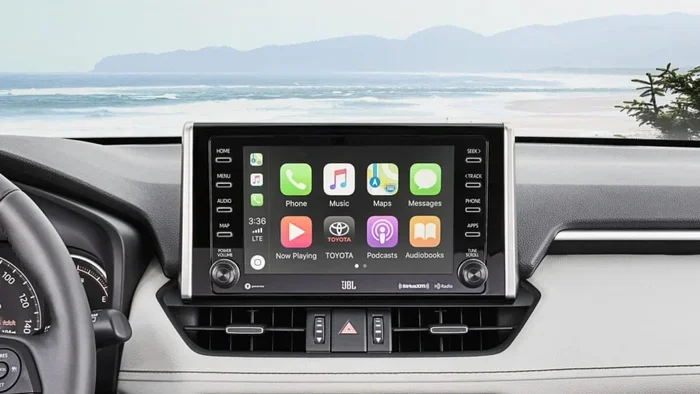
The latest versions bring even more power. Entune 4.0 features a larger touchscreen, wireless Apple CarPlay, wireless Android Auto, and built-in Wi-Fi hotspots. Some newer Toyotas also include Amazon Alexa integration and over-the-air software updates.
If you want the full modern experience, targeting an upgrade to Entune 4.0 or the latest available version is the way to go.
How to Upgrade Toyota Entune: Step by Step Methods
Now that you understand the versions, let us look at the actual upgrade methods. There are three main paths you can take.
Method 1: Software Update via Dealer
The easiest and most reliable way to update your Toyota Entune system is through a Toyota dealer. Here is how it works:
- Call your local Toyota dealership and ask about available software updates.
- Schedule a service appointment or visit during walk-in hours.
- A technician connects your vehicle to their diagnostic computer.
- The system checks for available updates and installs them.
- The process usually takes 30 minutes to an hour.
This method is free or low-cost in most cases. It ensures your system is updated correctly and safely. The downside is that you need to visit the dealer, which takes time.
Method 2: Over-the-Air (OTA) Updates
Some newer Toyota models support over-the-air updates. This means your system can download and install updates wirelessly, just like your phone. To check if your vehicle supports OTA updates:
- Go to your vehicle’s settings menu.
- Look for a “Software Update” or “System Update” option.
- If available, connect to Wi-Fi and follow the on-screen prompts.
OTA updates are the most convenient option. You do not need to visit a dealer or do anything special. The system handles everything in the background.
Method 3: DIY Hardware Upgrade
For older Toyotas that do not support software updates, a hardware upgrade might be the answer. This involves replacing the existing head unit with a newer compatible model. Here is what you need to know:
Step 1: Research compatible head units for your Toyota model and year. Brands like Pioneer, Kenwood, and Sony offer units that work with Toyota dashboards.
Step 2: Purchase the new head unit. Make sure it supports Apple CarPlay and Android Auto for the best experience.
Step 3: Gather the right tools. You typically need a dash removal kit, wiring harness adapter, and antenna adapter.
Step 4: Follow a detailed installation guide for your specific Toyota model. Many YouTube tutorials walk you through the process step by step.
Step 5: Test the new system thoroughly before driving. Make sure Bluetooth connects, audio plays clearly, and all controls work properly.
DIY hardware upgrades save a lot of money compared to dealer installations. However, they require some technical comfort and patience.
What You Need Before Upgrading
Before you start any upgrade process, gather these items and information:
- Your Toyota model and year: This determines which upgrades are compatible.
- Your current Entune version: Check your system settings to find this information.
- A stable Wi-Fi connection: Needed for OTA updates and downloading software.
- Your vehicle identification number (VIN): The dealer uses this to check compatibility.
- Basic tools (for DIY): Screwdrivers, trim removal tools, and wiring adapters.
Having all of this ready before you start saves time and prevents frustration. It also ensures you do not purchase incompatible parts or software.
Comparing Upgrade Options
Not sure which upgrade path is right for you? Use this comparison to decide.
| Option | Cost | Difficulty | Best For |
|---|---|---|---|
| Dealer Software Update | Free or low cost | Very Easy | Owners with Entune 3.0 or newer |
| OTA Update | Free | Very Easy | Newer Toyota models with Wi-Fi |
| DIY Hardware Swap | $200-$800 | Moderate | Older Toyotas wanting modern features |
| Dealer Hardware Install | $500-$1,500 | Easy (for you) | Those who want professional installation |
Each option has its place. The dealer software update is perfect if your current system just needs a fresh software refresh. The DIY hardware swap is ideal if you want major new features at a lower cost. Choose the method that matches your budget, skills, and goals.
Benefits of Upgrading Your Toyota Entune
Once you complete your Toyota Entune upgrade, you will notice several improvements right away:
- Faster system performance: Newer software and hardware respond more quickly to your inputs.
- Better phone integration: Wireless Apple CarPlay and Android Auto make hands-free driving safer and more convenient.
- Updated maps and navigation: Current maps mean fewer wrong turns and better route suggestions.
- Improved audio quality: Newer systems deliver clearer sound with better bass and treble control.
- Access to new apps: Streaming services, weather apps, and traffic updates keep you informed and entertained.
- Higher resale value: A vehicle with modern tech features attracts more buyers and commands better prices.
These benefits add up quickly. Even a simple software update can transform how you interact with your vehicle every day.
Common Mistakes to Avoid When Upgrading Toyota Entune
Upgrading your system is straightforward, but a few common mistakes can cause problems:
- Skipping compatibility checks: Not every upgrade works with every Toyota model. Always verify compatibility first.
- Ignoring the owner’s manual: Your manual contains specific instructions and warnings for your model.
- Using cheap aftermarket parts: Low-quality head units or adapters can cause connectivity issues and poor performance.
- Interrupting an update: Never turn off your vehicle or disconnect during a software update. This can damage the system.
- Forgetting to back up settings: Before a major upgrade, note your preferred radio stations and Bluetooth pairings.
Avoiding these mistakes keeps your upgrade process smooth and stress-free. Take your time and follow each step carefully.
Expert Tips for the Best Upgrade Experience
Here are some insider tips from experienced Toyota owners and technicians:
- Check for updates regularly: Toyota releases new software several times a year. Set a reminder to check every few months.
- Use genuine Toyota parts for hardware upgrades: They are designed specifically for your vehicle and offer the best reliability.
- Ask about promotions: Many Toyota dealers offer free or discounted software updates during service campaigns.
- Join online Toyota forums: Communities like Toyota Nation and Toyota Forum share real-world upgrade experiences and tips.
- Consider your needs first: If you mostly use your phone for music, prioritize wireless CarPlay and Android Auto support.
These small steps make a big difference in the long run. They help you get the most value from your upgrade investment.
How Often Should You Update Your Toyota Entune?
Toyota recommends checking for software updates at least once every six months. Some owners update more frequently, especially when new features are released. The good news is that most modern systems make this process very simple.
If your Toyota supports OTA updates, your system will notify you when an update is available. You can choose to install it immediately or schedule it for a convenient time. For older systems, a quick visit to the dealer once or twice a year keeps everything running smoothly.
Regular updates also improve security. They patch vulnerabilities and keep your connected features safe from potential threats. Think of it as routine maintenance for your digital experience.
Is It Worth Upgrading an Older Toyota?
This is a question many owners ask, especially those with older models. The answer depends on your goals and budget. If you love your Toyota and plan to keep it for years, an upgrade is absolutely worth it. It brings modern features that make daily driving more enjoyable and convenient.
On the other hand, if you plan to sell your Toyota soon, the upgrade might not pay for itself. However, a modernized infotainment system can increase your vehicle’s appeal to buyers. It shows that the car has been well maintained and updated.
For most owners, the upgrade is a smart investment. It enhances your daily driving experience and extends the useful life of your vehicle’s technology.
Final Thoughts on Upgrading Toyota Entune
Upgrading your Toyota Entune system is one of the best things you can do for your vehicle. It brings your infotainment experience into the modern era with better connectivity, sharper graphics, and smarter features. Whether you choose a free software update or a full hardware swap, the process is more accessible than ever.
Start by checking your current Entune version. Then decide which upgrade path fits your budget and needs. Follow the steps in this guide, and you will be enjoying a better system in no time. Do not let outdated technology hold you back from the full Toyota experience you deserve.
Take action today. Your Toyota is ready for an upgrade, and the results will speak for themselves every time you get behind the wheel.
Frequently Asked Questions
Can I upgrade Toyota Entune myself without going to a dealer?
Yes, you can upgrade Toyota Entune yourself in many cases. If your vehicle supports over-the-air updates, you can download and install new software wirelessly from your car’s settings menu. For hardware upgrades, a DIY head unit swap is possible with basic tools and online guides. However, dealer visits are still the safest option for software updates on older models.
What is the difference between Entune 3.0 and Entune 4.0?
Entune 4.0 offers significant improvements over Entune 3.0. The newer version features a larger touchscreen, wireless Apple CarPlay, wireless Android Auto, built-in Wi-Fi, and faster processing speeds. Entune 3.0 still supports wired smartphone connections and basic navigation, but it lacks the wireless convenience and modern features of version 4.0.
How much does it cost to upgrade Toyota Entune?
Costs vary depending on the upgrade method. Software updates through a dealer are usually free or very low cost. Over-the-air updates are completely free. DIY hardware upgrades range from $200 to $800 for the head unit alone. Professional dealer installation for a new head unit can cost between $500 and $1,500 including parts and labor.
Can I add Apple CarPlay and Android Auto to my older Toyota?
Yes, you can add Apple CarPlay and Android Auto to many older Toyotas. The easiest way is a DIY head unit replacement with a compatible aftermarket unit. Many Pioneer, Kenwood, and Sony head units fit Toyota dashboards and support both wireless Apple CarPlay and Android Auto. Some dealers also offer retrofit kits for specific models.
How long does a Toyota Entune software update take?
A Toyota Entune software update typically takes between 20 and 60 minutes. The exact time depends on the size of the update and your internet connection speed. You should never turn off your vehicle or disconnect during the process, as this can cause serious system issues.
Will upgrading Toyota Entune void my warranty?
Software updates from Toyota or your dealer will not void your warranty. However, aftermarket hardware modifications like head unit swaps may affect related warranty coverage. If you plan a DIY hardware upgrade, check with your dealer first to understand any potential warranty implications for your specific Toyota model.
=== CONCLUSION ===
Upgrading your Toyota Entune system is a smart move for any Toyota owner. It brings your vehicle into the modern age with better connectivity, sharper visuals, and features you use every day. Whether you go the dealer route, use an OTA update, or tackle a DIY hardware swap, the results are well worth the effort.
Start with the method that fits your budget and comfort level. Check compatibility, gather what you need, and follow the steps carefully. The upgrade process is designed to be accessible to everyone, not just tech experts.
Your Toyota is more than just transportation. It is your daily companion, and its technology should work as hard as you do. Upgrade your Toyota Entune today and enjoy a smarter, smoother, and more connected driving experience every single time you hit the road.