Can You Turn Off Toyota Radar Cruise Control And How
Yes, you can turn off Toyota Radar Cruise Control using the steering wheel buttons, the infotainment system, or by pulling the fuse. This guide shows you exactly how to disable Toyota Radar Cruise Control in any Toyota model, with safety tips and common mistakes to avoid.
Yes, you can turn off Toyota Radar Cruise Control, and it only takes a few seconds. Whether you need to disable Toyota Radar Cruise Control for maintenance, safety, or personal preference, this guide covers every method. You’ll learn how to cancel the system using steering wheel buttons, the infotainment display, or even the fuse box. We’ll also explore when it’s smart to turn off Toyota Radar Cruise Control and how to avoid common pitfalls.
Driving a Toyota comes with advanced safety and convenience features, and Toyota Radar Cruise Control is one of the most useful ones. This system uses a radar sensor to maintain a set speed and safe following distance, making long drives less tiring. But there are times when you might want to turn off Toyota Radar Cruise Control completely. Maybe you’re heading through heavy traffic, cleaning the sensor, or just prefer manual control. Whatever the reason, knowing how to disable it is essential for every Toyota owner.
Key Takeaways
- Multiple Ways to Turn It Off: You can cancel Toyota Radar Cruise Control with a steering wheel button, the infotainment screen, or by removing the cruise control fuse.
- It’s Simple and Quick: Most methods take just a second and require no tools or technical knowledge.
- Safety First: Disabling the system is smart in heavy traffic, poor weather, or when the radar sensor is dirty.
- Know the Difference Between Cancel and Off: Cancel temporarily pauses the system, while turning it off fully disables it until you restart.
- Model-Specific Steps: Toyota Camry, RAV4, Highlander, and Tacoma all have slight variations in the process.
- Common Mistakes Are Easy to Avoid: Don’t ignore the radar warning light, and remember to resume the system when conditions are safe again.
📑 Table of Contents
How Toyota Radar Cruise Control Works
Before you learn how to turn off Toyota Radar Cruise Control, it helps to understand what it does. The system uses a radar sensor mounted behind the front grille to detect vehicles ahead. It then adjusts your speed to keep a safe following distance. This feature is often part of Toyota Safety Sense and is sometimes called dynamic radar cruise control. It can handle stop-and-go traffic on some models, bringing the car to a full stop and resuming when traffic moves.
The radar sensor works by emitting radio waves that bounce off objects. The system then calculates the distance and speed of the vehicle in front. If you set a speed of 65 mph and the car ahead slows to 55 mph, your Toyota will gently slow down. When the road clears, it accelerates back to your set speed. This adaptive cruise control system is designed to reduce driver fatigue on highways and long trips.
What the Radar Sensor Does
The radar sensor is the brain of the system. It constantly scans the road ahead, even in low visibility. If the sensor gets blocked by dirt, snow, or a misplaced object, the system may warn you or disengage automatically. Keeping the sensor clean is one of the best ways to ensure Toyota Radar Cruise Control works properly. A small camera or sensor cover near the rearview mirror often works alongside the radar for full functionality.
Can You Turn Off Toyota Radar Cruise Control?
The short answer is yes. You can turn off Toyota Radar Cruise Control in several ways depending on your model and what you need. Some methods are temporary, while others fully disable the system until you choose to reactivate it. Below is a quick comparison of the main methods.
| Method | Steps | Best For | Pros | Cons |
|---|---|---|---|---|
| Steering Wheel Button | Press the Cancel button on the left side of the steering wheel | Quick temporary pause | Fast, easy, no tools needed | System may resume if you press the Resume button |
| Infotainment Screen | Go to Settings > Driver Assistance > Cruise Control > Off | Full disable until you turn it back on | Permanent off until manually re-enabled | Takes a few more taps; varies by model year |
| Fuse Box | Locate the cruise control fuse in the engine bay or cabin fuse box and remove it | Maintenance or sensor cleaning | Completely disables the system electrically | Requires fuse puller; you lose all cruise functions |
Most drivers will only need the steering wheel button method. It’s the fastest way to turn off Toyota Radar Cruise Control while driving. The infotainment method is great if you want the system completely off for a long period, such as during a road trip with a passenger who prefers manual driving. The fuse method is more advanced and should only be used when you need to service the radar sensor or related wiring.
The Simple Steering Wheel Button Method
Every Toyota with Toyota Radar Cruise Control has a Cancel button on the left side of the steering wheel. It’s usually marked with a cruised car icon and the word Cancel. When you press it, the system immediately disengages. Your speed will return to whatever the engine is producing at that moment. The set speed memory is erased, so you’ll need to press Resume if you want the system back on later.
This method is perfect for quick adjustments. For example, if you need to slow down for a sharp curve or heavy rain, a single tap of the Cancel button gives you full manual control. The system will not try to accelerate or brake on its own. Once the road clears, you can press Resume to return to your previous set speed, or you can set a new speed entirely.
Using the Infotainment Screen to Fully Disable It
If you want to completely turn off Toyota Radar Cruise Control through the vehicle’s settings, you can do so on most newer models. Navigate to the home screen, then tap the Settings icon. Look for Driver Assistance or Vehicle Settings. Find the Cruise Control or Dynamic Radar Cruise Control option and toggle it off. On some Toyota models, you’ll see a switch that says “Adaptive Cruise Control” — simply turn it off.
This method keeps the system off until you go back into the menu and turn it on again. It’s especially useful if you’re lending your car to someone who doesn’t use adaptive cruise control or if you’re driving in an area with heavy radar interference. Just remember that turning it off this way does not affect other safety features like lane tracing or pre-collision braking.
Quick Tip for the Infotainment Method
Quick Tip: If you can’t find the cruise control setting, try searching for “cruise” in the settings search bar on the infotainment screen. Toyota models from 2018 onward often have a search function that makes this even faster. This works on the Toyota Camry, RAV4, Highlander, and Tacoma.
Pulling the Cruise Control Fuse
For a hard disable, you can remove the cruise control fuse. The fuse box location varies by model. In most Toyota trucks and SUVs, it’s under the hood near the battery. In sedans like the Camry, there’s often a second fuse box under the dashboard on the driver’s side. You’ll need your owner’s manual to identify the exact fuse labeled “Cruise Control” or “ECU.”
Pulling the fuse completely cuts power to the radar sensor and the cruise control module. This is the most thorough way to turn off Toyota Radar Cruise Control for maintenance. You can safely clean the sensor, check wiring, or perform repairs without the system accidentally activating. Always replace the fuse when you’re done to restore full functionality.
Step-by-Step: How to Turn Off Toyota Radar Cruise Control
Now let’s walk through the exact steps for the most popular Toyota models. The process is very similar across the lineup, but small differences exist.
For Toyota Camry and RAV4
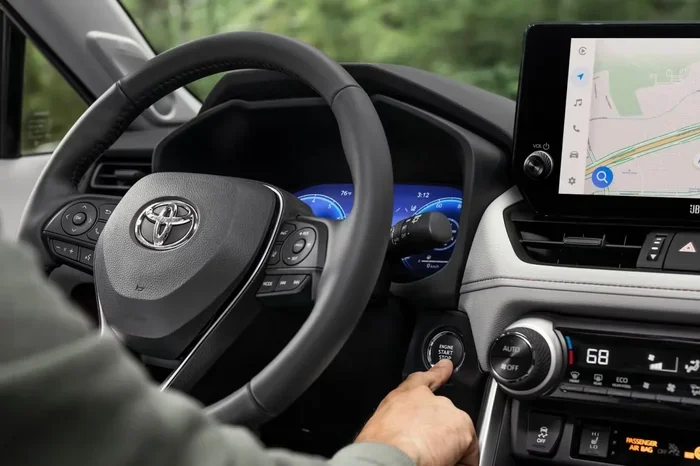
To turn off Toyota Radar Cruise Control on a Camry or RAV4, start by pressing the Cancel button on the steering wheel. The cruise indicator light on the dashboard will turn off. If you want to fully disable the system, press the Vehicle Settings button on the steering wheel or touchscreen. Go to Driver Assistance, then select Dynamic Radar Cruise Control and switch it to Off. On older models, you may need to hold the Cancel button for a few seconds until the system fully powers down.
For the RAV4, the infotainment screen layout is slightly different. Tap the Settings icon, then scroll to Driver Assistance. Look for “Adaptive Cruise Control” and toggle it off. The system will confirm with a message on the screen. You can also use the steering wheel controls to access the cruise menu quickly. Press the Cruise button on the steering wheel to open the cruise settings, then select Off.
For Toyota Highlander and Tacoma
The Highlander and Tacoma follow a similar pattern but with a few extra steps. On the Highlander, you can use the touchscreen to go to Settings > Driver Assistance > Cruise Control > Off. On the Tacoma, the process often involves the steering wheel controls. Press and hold the Cancel button for two seconds to fully disable the system. The Tacoma also has a cruise control ON/OFF switch on the steering wheel — simply flip it to the Off position.
If you need to remove the fuse on a Tacoma, open the hood and locate the fuse box near the battery. The cruise control fuse is usually labeled “CRUISE” or “ECU-B.” Use a fuse puller to remove it. On the Highlander, the fuse box is under the hood on the driver’s side. Refer to the fuse diagram on the lid of the box to find the correct fuse.
Quick Tips for Each Model
- Toyota Camry: If the radar sensor is dirty, the system may not turn off smoothly. Clean the sensor area behind the front grille first.
- Toyota RAV4: Some RAV4 models have a “Low Speed Follow” feature. Turning off cruise control also disables this feature.
- Toyota Highlander: The Highlander’s Toyota Safety Sense includes pre-collision braking. Disabling cruise control does not affect this safety feature.
- Toyota Tacoma: Always check the fuse box diagram before pulling any fuse. The Tacoma has multiple fuse boxes, and the correct one is under the hood.
When Should You Turn Off Toyota Radar Cruise Control?
There are several situations where disabling Toyota Radar Cruise Control is the smart choice. Understanding these scenarios helps you drive more safely and keep the system in good working order.
Safety Reasons to Disable It
Heavy rain, fog, or snow can interfere with the radar sensor. The system may not detect vehicles correctly in poor weather, which could lead to unexpected braking or acceleration. In these conditions, it’s best to turn off Toyota Radar Cruise Control and drive manually. The same applies in very dense traffic where stop-and-go patterns are too frequent. While the system can handle low-speed following, it may still cause unnecessary wear on the brakes if traffic is constantly stopping and starting.
Another safety reason is when the radar sensor is obstructed. A bike rack, trailer, or even a thick layer of snow on the front grille can block the radar signal. The system will often display a warning light on the dashboard — a small car icon with radar waves. If you see this light, pull over safely and turn off Toyota Radar Cruise Control until the obstruction is cleared.
Maintenance and Sensor Cleaning
Regular maintenance includes keeping the radar sensor clean. The sensor is located behind the front bumper, near the center. Dirt, mud, or ice can cover it and cause the system to malfunction. When you wash your Toyota, avoid high-pressure sprays directly at the sensor area. If you need to clean it thoroughly, you can temporarily turn off Toyota Radar Cruise Control by pulling the fuse or using the infotainment screen. This prevents the system from trying to operate while the sensor is wet or covered in cleaning solution.
Driving in Heavy Traffic or Poor Weather
In stop-and-go city traffic, some drivers prefer to disable adaptive cruise control entirely. The system can be overly sensitive in these conditions, causing uncomfortable speed fluctuations. Manual driving gives you smoother control and can reduce fatigue in congested areas. Similarly, on winding mountain roads or in construction zones, the radar may misread lane markings or roadside objects. Turning the system off in these scenarios is a wise precaution.
Common Mistakes When Disabling Cruise Control
Even though turning off Toyota Radar Cruise Control is simple, drivers sometimes make mistakes that cause confusion or system errors. Here are the most common ones and how to avoid them.
Forgetting to Resume After Clearing the Obstruction
If you turned off the system because of a dirty sensor or a bike rack, you might forget to turn it back on when the road is clear. This means you’ll miss out on the convenience of adaptive cruise control for the rest of your trip. Make it a habit to check the infotainment screen or the steering wheel controls after you’ve removed the obstruction. A quick tap of the Resume button brings the system back to life.
Confusing Cancel with Off
Pressing the Cancel button only temporarily pauses the system. The set speed memory is still stored. If you press the Resume button later, the car will return to the previous speed. Many drivers think Cancel turns the system off completely, but it doesn’t. To fully disable Toyota Radar Cruise Control, you need to use the infotainment menu or the ON/OFF switch. Understanding this difference helps you use the system more effectively.
Ignoring the Radar Sensor Warning Light
If the dashboard shows a radar sensor warning light, it means the system has detected a problem. Common causes include a dirty sensor, a misaligned radar unit, or a wiring issue. Ignoring this light and continuing to use Toyota Radar Cruise Control can reduce safety. Instead, pull over, turn the system off, and inspect the sensor area. If the light persists, visit a Toyota service center for a diagnostic check.
Not Checking the Fuse After a Battery Disconnect
If you recently disconnected the battery for maintenance, the cruise control system may not reset automatically. You’ll need to go into the infotainment settings and re-enable the system, or simply turn the ignition off and on again. Some models require a short drive cycle for the radar sensor to recalibrate. Always refer to your owner’s manual after any electrical work.
Expert Insights and Final Thoughts
What Toyota Engineers Say: According to Toyota’s technical service bulletins, the radar cruise control system is designed to be user-friendly and safe. Engineers recommend keeping the system active for highway driving but disabling it in conditions that can interfere with radar performance. They also emphasize that the Cancel button is the fastest way to regain manual control in an emergency. If you ever feel unsure, a simple tap of Cancel overrides the system instantly.
Maintenance Tip from Experts: Toyota recommends inspecting the radar sensor area every 10,000 miles or during regular service visits. A quick visual check for dirt, damage, or loose connections can prevent many cruise control issues. Keeping the sensor clean ensures that Toyota Radar Cruise Control operates at peak performance and provides accurate following distances.
In summary, turning off Toyota Radar Cruise Control is easy, safe, and sometimes necessary. Whether you use the steering wheel button, the infotainment screen, or the fuse box, you now have the knowledge to manage the system confidently. Remember to always re-enable the system when conditions are safe, and keep the radar sensor clean for the best experience. With this guide, you can enjoy the benefits of Toyota Radar Cruise Control while knowing exactly how and when to disable it.
Frequently Asked Questions
How do I turn off Toyota Radar Cruise Control on a 2022 Camry?
On a 2022 Camry, press the Cancel button on the left side of the steering wheel for a quick pause. To fully disable it, go to the touchscreen, tap Settings, then Driver Assistance, and toggle Dynamic Radar Cruise Control to Off. The system will confirm with a message on the screen.
Can turning off the cruise control affect other safety features?
No. Turning off Toyota Radar Cruise Control only disables the adaptive speed and following distance functions. Other safety features like lane tracing assist, pre-collision braking, and automatic emergency braking remain fully active. These systems operate independently for your protection.
Why does my Toyota Radar Cruise Control keep turning off by itself?
This usually happens because the radar sensor is dirty or obstructed. Snow, mud, or even a dirty front grille can block the signal. Clean the sensor area and ensure no objects are blocking the view behind the front bumper. If the problem continues, a fuse or wiring issue may be present, and a visit to the dealer is recommended.
Is it safe to drive without Toyota Radar Cruise Control in heavy rain?
Yes, it is safe and often recommended. Heavy rain can interfere with the radar signal, causing the system to behave unpredictably. Driving manually in such conditions gives you better control. You can turn the system back on once the weather improves and the sensor is clear.
Where is the cruise control fuse located on a Toyota RAV4?
On a Toyota RAV4, the cruise control fuse is typically located in the under-hood fuse box near the battery. Look for a fuse labeled “CRUISE” or “ECU.” Always consult your owner’s manual for the exact fuse box diagram and amperage rating before pulling any fuse.
How do I know if Toyota Radar Cruise Control is completely off?
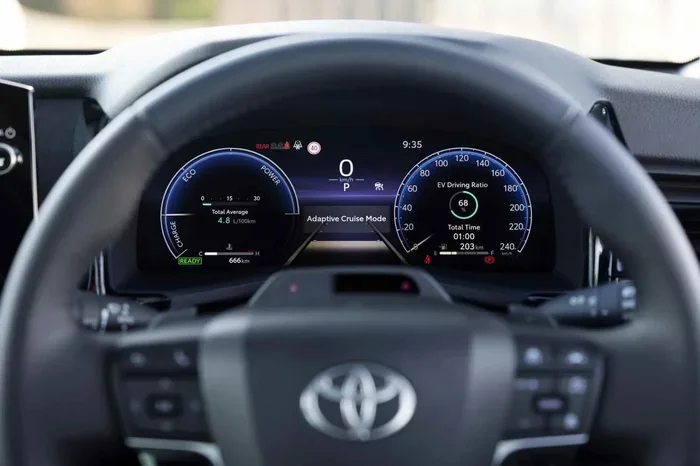
When the system is fully off, the cruise indicator light on the dashboard will be completely dark. You may also see a message on the infotainment screen stating that cruise control is disabled. If you press the Resume button and nothing happens, the system is off.