Can You Install CarPlay in Any Car with This Helpful Guide
Yes, you can install CarPlay in most cars, but the method depends on your vehicle’s year, make, and current infotainment system. Newer cars often come with built-in CarPlay already, while older models may need an aftermarket head unit or a CarPlay adapter. This guide walks you through every option so you can make the right choice for your car.
Have you ever sat in your car and wished you could use your iPhone’s apps right on the big screen? Maybe you saw a friend with Apple CarPlay glowing on their dashboard and thought, “I want that too.” The good news is that adding CarPlay to your vehicle is more accessible than ever. But can you install CarPlay in any car? The short answer is yes, with some important caveats. This guide breaks down every option, from factory-installed systems to budget-friendly adapters, so you can find the best solution for your ride.
Whether you drive a brand-new sedan or a classic truck from the 2000s, there is a way to get CarPlay compatible functionality. The method you choose depends on your car’s current infotainment system, your budget, and how much tech-savvy you are. Let’s dive into everything you need to know about adding Apple CarPlay to any vehicle.
Key Takeaways
- Not every car supports CarPlay natively: Your vehicle’s age and infotainment system determine what options are available.
- Built-in CarPlay is the best experience: Factory-installed systems offer seamless integration and fewer compatibility issues.
- Aftermarket head units work great for older cars: You can retrofit CarPlay into almost any vehicle with a compatible stereo upgrade.
- CarPlay adapters are a budget-friendly option: These small devices add wireless or wired CarPlay without replacing your entire system.
- Wireless CarPlay is more convenient: It eliminates cables but may require additional hardware depending on your car.
- Installation difficulty varies: Some setups are DIY-friendly, while others benefit from a professional installer.
- Compatibility matters: Always check your car model and stereo brand before buying any CarPlay solution.
📑 Table of Contents
- What Is Apple CarPlay and Why Do People Want It?
- Which Cars Come with Built-in CarPlay?
- Can You Add CarPlay to Older Cars?
- How to Install CarPlay: Step-by-Step Options
- Wireless vs Wired CarPlay: What You Need to Know
- Common Mistakes to Avoid When Installing CarPlay
- Expert Insights: Getting the Most Out of Your CarPlay Setup
- Key Takeaways
- Conclusion
What Is Apple CarPlay and Why Do People Want It?
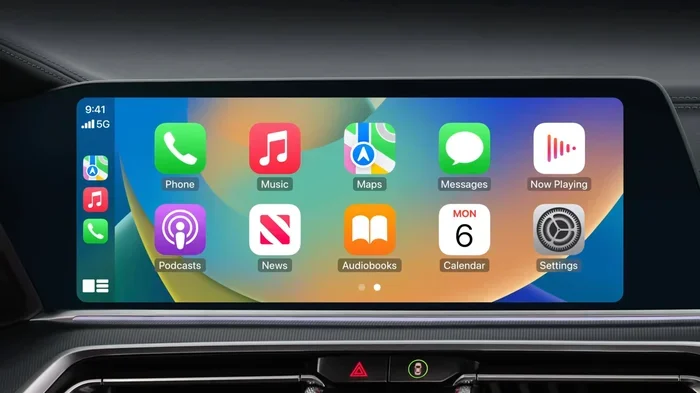
Apple CarPlay is a smart system that mirrors key features from your iPhone onto your car’s display. Once connected, you can access maps, music, messages, and calls without taking your hands off the wheel. It uses Siri voice control so you can keep your eyes on the road and your focus on driving.
People love CarPlay because it makes the driving experience safer and more enjoyable. Instead of fumbling with your phone, you get a familiar interface right on the dashboard. Navigation apps like Google Maps and Waze work beautifully through CarPlay navigation, and streaming services like Spotify and Apple Music come to life on the big screen.
How Does CarPlay Work?
CarPlay connects your iPhone to your car’s car multimedia system through a USB cable or wirelessly. Once paired, the car’s display takes over with a simplified, driver-friendly interface. You can use touch controls, steering wheel buttons, or voice commands to navigate. Wireless CarPlay uses Bluetooth and Wi-Fi to connect without any cables, which is a huge convenience upgrade.
Why Is CarPlay So Popular?
The popularity of Apple CarPlay comes down to one word: convenience. Most of us spend hours in our cars every week, and our phones hold everything we need. Maps, podcasts, phone calls, and texts are all at our fingertips. CarPlay brings all of that into the car safely. It also means you do not need to buy a separate GPS device or a fancy stereo system. Your phone becomes the brain of the operation.
Which Cars Come with Built-in CarPlay?
Many modern vehicles already include factory CarPlay as part of their infotainment package. If you bought a car in the last five to seven years, there is a good chance it supports CarPlay compatible features. Automakers like Ford, Toyota, Honda, BMW, and Hyundai have made built-in CarPlay standard or available in most of their lineup.
How to Check if Your Car Has CarPlay
The easiest way to find out is to look at your car’s manual or check the infotainment screen. If you see a CarPlay icon or a smartphone symbol, your car likely supports it. You can also search for your car model and year online, along with the words “CarPlay support.” Most manufacturer websites list which trim levels include Apple CarPlay and which do not.
Benefits of Factory-Installed CarPlay
When CarPlay comes built into your car, everything works smoothly. The integration is seamless, the display is optimized for your specific model, and updates happen automatically. You also get better microphone quality for calls and more reliable connections. Factory CarPlay simply provides the best overall experience because the automaker designed the system around it from the start.
Can You Add CarPlay to Older Cars?
This is where things get exciting. If your car was built before CarPlay became common, you can still add it. The answer to “can you install CarPlay in any car” is a strong yes for most vehicles, even older ones. You just need the right approach and the right hardware.
Option 1: Replace the Head Unit
The most popular way to add CarPlay to an older car is by replacing the factory head unit with an aftermarket head unit that supports Apple CarPlay. Brands like Pioneer, Sony, Alpine, and Kenwood make CarPlay compatible stereos that fit a wide range of vehicles. This option gives you the best performance and the most features.
A car stereo upgrade with CarPlay support typically costs between $200 and $500 for the unit itself. Installation can be DIY if you are comfortable working with car electronics, or you can pay a professional. The result is a fully integrated CarPlay experience that feels like it belongs in the car.
Option 2: Use a CarPlay Adapter
If you do not want to replace your entire stereo, a CarPlay adapter is a great alternative. These small devices plug into your existing car infotainment system and add CarPlay capability. Popular options include the Carlinkit adapter and the AA CarPlay adapter. They range from $50 to $200 and are easy to install.
CarPlay adapters work by taking the signal from your iPhone and sending it to your car’s screen. Some adapters support wireless CarPlay, which means no cables are needed after the initial setup. This is a fantastic retrofit CarPlay solution for drivers who want the benefits without the cost of a full stereo replacement.
Option 3: Upgrade the Entire Infotainment System
For a more premium approach, you can replace the entire car multimedia system. This includes the screen, the audio processor, and sometimes even the amplifier. Companies like Alpine and Pioneer offer complete infotainment system upgrades that include CarPlay, backup cameras, and premium audio. This option is more expensive but delivers the best results.
Which Option Is Right for You?
Your choice depends on your budget and your car’s current setup. If your car has a basic but functional stereo, a CarPlay adapter is the simplest and most affordable path. If your stereo is outdated or broken, a full aftermarket head unit makes more sense. For those who want the ultimate experience, a complete infotainment system upgrade is the way to go.
How to Install CarPlay: Step-by-Step Options
Installing CarPlay does not have to be scary. Depending on the method you choose, the process can be surprisingly simple. Let us walk through the main installation paths.
Installing a CarPlay Adapter (Easiest Method)
- Buy a CarPlay adapter that matches your car’s stereo brand and model.
- Locate the USB port behind your car’s stereo or glove box.
- Connect the adapter to the USB port and pair it with your iPhone.
- Follow the on-screen prompts to complete the CarPlay setup.
- Test the connection and enjoy your new CarPlay features.
This method usually takes less than 30 minutes. No wiring or technical skills are required for most adapters. Just plug it in and go.
Replacing the Head Unit (Moderate Difficulty)
- Purchase a CarPlay compatible aftermarket head unit that fits your car.
- Remove the old factory stereo using the correct trim removal tools.
- Disconnect the wiring harness and antenna from the old unit.
- Connect the new head unit using the appropriate wiring harness adapter.
- Mount the new unit, reconnect the antenna, and test the system.
- Pair your iPhone and configure CarPlay settings.
If you have never worked on car electronics before, this might feel intimidating. But many car owners successfully complete this project on a weekend. There are plenty of YouTube tutorials specific to almost every car model. Just make sure you buy the correct aftermarket head unit for your vehicle.
Professional Installation (Easiest on You)
If you prefer not to DIY, professional installation is always an option. Most car audio shops can install a CarPlay head unit or adapter in one to two hours. The cost for professional installation typically runs $100 to $300, depending on your location and the complexity of the job.
Wireless vs Wired CarPlay: What You Need to Know
One of the biggest decisions you will face when setting up CarPlay is whether to go wireless or wired. Both options have clear advantages and a few trade-offs.
Wired CarPlay
Wired CarPlay uses a USB cable to connect your iPhone to the car’s display. This method is the most reliable. The connection is fast, stable, and rarely drops. Wired CarPlay also charges your phone while you drive, which is a big plus on long trips. The downside is the cable itself. You have to plug in your phone every time, which can feel a bit old-fashioned.
Wireless CarPlay
Wireless CarPlay connects through Bluetooth and Wi-Fi, eliminating the need for a cable. The convenience is unmatched. You get in the car, and CarPlay connects automatically. No fumbling with cables, no fighting with a stubborn USB port. Wireless CarPlay is the future, and more cars and adapters are supporting it every year.
However, wireless CarPlay can be slightly less reliable than wired in some cases. Connection drops can happen, especially in areas with poor Wi-Fi signal. It also uses more battery on your phone unless your car supports charging over the wireless connection. For most people, the convenience of wireless CarPlay far outweighs these minor drawbacks.
Comparison Table
| Feature | Wired CarPlay | Wireless CarPlay |
|---|---|---|
| Connection Method | USB Cable | Bluetooth and Wi-Fi |
| Stability | Very High | High |
| Convenience | Moderate | Excellent |
| Phone Charging | Yes | Sometimes |
| Setup Complexity | Very Easy | Easy |
| Cost | Lower | Slightly Higher |
| Best For | Reliability focused users | Convenience focused users |
Common Mistakes to Avoid When Installing CarPlay
Even though adding CarPlay to your car is straightforward, there are some common pitfalls that can cause frustration. Avoiding these mistakes will save you time, money, and headaches.
Buying the Wrong Adapter or Head Unit
Not every CarPlay adapter or head unit works with every car. Before you buy, double-check compatibility with your specific vehicle model and current stereo brand. Some adapters only work with certain makes and models. Spending five minutes checking compatibility can save you from returning an incompatible product.
Skipping the Firmware Update
Once you install your CarPlay hardware, do not skip the firmware update. Manufacturers regularly release updates that improve performance, fix bugs, and add features. An outdated unit can cause connection issues and slow response times. Always check for updates during the CarPlay setup process.
Ignoring the USB Cable Quality
If you go with wired CarPlay, the USB cable matters more than you might think. Cheap, low-quality cables can cause connection drops, slow data transfer, and charging issues. Invest in a high-quality, certified USB cable to ensure a smooth and reliable CarPlay experience.
Forgetting to Enable CarPlay on Your iPhone
This sounds obvious, but many people forget to turn on CarPlay in their iPhone settings. Go to Settings, then General, then CarPlay, and make sure it is enabled. If it is turned off, your car will not recognize your phone even if everything else is connected correctly.
Not Consulting a Professional When Needed
DIY installation is rewarding, but it is not always the best choice. If your car has a complex wiring setup or a rare stereo system, a professional installer can save you from damaging components. There is no shame in asking for help. A proper installation ensures everything works perfectly and lasts for years.
Expert Insights: Getting the Most Out of Your CarPlay Setup
Once your CarPlay is up and running, a few simple tips can help you get the most out of it. First, keep your iPhone updated. Apple CarPlay works best with the latest iOS version, and updates often bring performance improvements and new features. Second, organize your favorite apps on the CarPlay home screen. You can pin your most-used apps like Maps, Music, and Messages for quick access. Third, use Siri voice control to stay safe and hands-free while driving.
Another pro tip is to set up a dedicated CarPlay playlist or station for your daily commute. This way, your music is ready to go the moment you start the car. If you use CarPlay navigation, save your frequent destinations so you can start directions with a single tap or voice command.
Finally, remember that CarPlay is designed to work with your iPhone, not Android. If you use an Android phone, you may want to look into Android Auto instead, which offers similar functionality for Android devices. Both systems serve the same purpose but are designed for different ecosystems.
Key Takeaways
- Not every car supports CarPlay natively: Your vehicle’s age and infotainment system determine what options are available.
- Built-in CarPlay is the best experience: Factory-installed systems offer seamless integration and fewer compatibility issues.
- Aftermarket head units work great for older cars: You can retrofit CarPlay into almost any vehicle with a compatible stereo upgrade.
- CarPlay adapters are a budget-friendly option: These small devices add wireless or wired CarPlay without replacing your entire system.
- Wireless CarPlay is more convenient: It eliminates cables but may require additional hardware depending on your car.
- Installation difficulty varies: Some setups are DIY-friendly, while others benefit from a professional installer.
- Compatibility matters: Always check your car model and stereo brand before buying any CarPlay solution.
Conclusion
The answer to “can you install CarPlay in any car” is a clear and encouraging yes. Whether your vehicle has a modern infotainment system with factory CarPlay or is an older model with a basic stereo, there is a path to adding Apple CarPlay. You can choose from built-in CarPlay, aftermarket head units, CarPlay adapters, or full infotainment system upgrades. Each option has its own benefits, and the right choice depends on your car, your budget, and your comfort level with installation.
CarPlay transforms the way you interact with your phone while driving. It makes navigation easier, calls safer, and music more accessible. With the right setup, your car feels modern and connected, no matter how old it is. So do not wait another day. Explore your options, pick the best solution for your vehicle, and enjoy the benefits of CarPlay on your next drive.
Take the time to research your specific car model, compare the options outlined in this guide, and make a confident decision. Adding CarPlay to your car is one of the best upgrades you can make, and the process is simpler than most people think.
Frequently Asked Questions
Can you install CarPlay in any car regardless of the year?
Most cars can support CarPlay with the right hardware. Older cars may need an aftermarket head unit or a CarPlay adapter, while newer cars often have built-in CarPlay already. The key is checking compatibility with your specific vehicle model and current infotainment system before purchasing any equipment.
How much does it cost to install CarPlay in a car that does not have it?
The cost varies widely depending on the method. A CarPlay adapter can cost as little as $50 to $150. An aftermarket head unit with CarPlay support typically runs $200 to $500. Professional installation adds $100 to $300 on top of that. A full infotainment system upgrade can range from $500 to $1,500 or more.
Is wireless CarPlay better than wired CarPlay?
Wireless CarPlay offers more convenience because you do not need to plug in a cable. The connection is automatic and cable-free. However, wired CarPlay tends to be more stable and reliable, and it charges your phone at the same time. For most drivers, wireless CarPlay is the preferred choice for everyday convenience.
Can I install CarPlay myself or do I need a professional?
Many CarPlay installations are DIY-friendly, especially adapter setups and some head unit replacements. If you are comfortable with basic car electronics and have the right tools, you can handle it yourself. For complex installations or older vehicles with unusual wiring, professional installation is a smart choice to avoid damage.
Does CarPlay work with all iPhone models?
Apple CarPlay is compatible with most iPhone models from the iPhone 5s and newer. The latest iOS version ensures the best performance and access to all features. Always keep your iPhone updated to enjoy the latest CarPlay improvements and bug fixes.
What is the difference between CarPlay and Android Auto?
Apple CarPlay is designed for iPhone users, while Android Auto serves Android phone users. Both systems offer similar features like navigation, music, and hands-free calling on your car’s display. The main difference is the ecosystem they work with. If you have an iPhone, CarPlay is the natural choice. Android users should look into Android Auto for a comparable experience.