Can Lane Assist Be Disabled Here Is What You Need To Know
Yes, lane assist can be disabled in most vehicles, but the process varies by car brand and model. Lane assist is a driver assistance feature designed to keep your car centered in its lane, yet many drivers want to know how to turn it off. This guide covers every method, reason, and safety consideration you need to understand before disabling lane assist.
Have you ever wondered whether you can simply turn off lane assist when it gets on your nerves? You are not alone. Lane assist has become a standard feature in modern cars, and while it was designed with safety in mind, not every driver loves it. Some find it intrusive. Others feel it interferes with how they naturally drive. The good news is that in most vehicles, you can disable lane assist with relative ease.
But before you go flipping switches and pressing buttons, there is a lot to understand. Lane assist goes by many names depending on the car maker. You might hear it called lane departure warning, lane keeping assist, lane centering, or driver assistance system technology. Each name refers to a slightly different version of the same core idea. The system uses cameras and sensors to monitor road markings and help steer the car back if it starts to drift.
This article will walk you through everything you need to know. We will cover how to disable lane assist across different brands, why some drivers choose to turn it off, and what risks you should consider. Whether you drive a sedan, SUV, or truck, this guide has you covered. Let us get into it.
Key Takeaways
- Lane Assist Can Be Disabled: Most modern vehicles allow you to turn off lane assist through buttons, menus, or steering wheel controls.
- Methods Vary by Brand: Ford, Toyota, BMW, Tesla, and other brands each have unique steps to disable the feature.
- Safety Matters: Disabling lane assist removes a layer of active safety, so understand the risks before turning it off.
- Temporary vs. Permanent: You can usually disable lane assist for a single trip or permanently through vehicle settings.
- ADAS Systems Work Together: Lane assist often works alongside adaptive cruise control, blind spot monitoring, and other driver aid features.
- Legal Considerations Exist: Some regions have regulations about disabling safety features on certain vehicles.
📑 Table of Contents
- What Is Lane Assist and How Does It Work?
- Can Lane Assist Be Disabled? Yes, Here Is How
- Why Do Drivers Disable Lane Assist?
- What Happens When You Disable Lane Assist?
- Quick Tips for Managing Lane Assist
- Common Mistakes People Make With Lane Assist
- Expert Insights on Lane Assist and Driver Safety
- Comparison Table: Lane Assist Across Popular Brands
- The Future of Lane Assist and Driver Assistance Technology
- Conclusion
What Is Lane Assist and How Does It Work?
Before we talk about disabling lane assist, it helps to understand what it actually does. Lane assist is part of a broader category called advanced driver assistance systems, or ADAS for short. These are electronic systems built into your vehicle to help you drive more safely and with less effort.
The Technology Behind Lane Assist
Lane assist relies on a forward-facing camera, usually mounted near the rearview mirror. This camera reads road lane markings in real time. When the system detects that your vehicle is drifting out of its lane without a turn signal activated, it steps in. Depending on the setup, it may give you an audible warning, a vibrating steering wheel, or even gentle corrective steering input.
Some systems go further with lane centering. This version actively keeps the car positioned in the middle of the lane. It works especially well on highways and open roads where lane lines are clear and visible. Lane centering often pairs with adaptive cruise control to create a semi-automated driving experience.
Why Lane Assist Matters for Road Safety
The National Highway Traffic Safety Administration has recognized the value of driver assistance technology. Lane departure warnings alone have been shown to reduce certain types of crashes. When a driver gets drowsy or distracted, lane assist acts as a second set of eyes. It can prevent road departure accidents, which account for a significant share of fatal crashes each year.
However, no technology is perfect. Lane assist can struggle in certain conditions. Heavy rain, snow, or faded road markings can confuse the camera. In these situations, the system may give false warnings or fail to activate when needed. This is one of the main reasons drivers look for ways to turn off lane assist.
Can Lane Assist Be Disabled? Yes, Here Is How
The short answer is yes. Lane assist can be disabled in the vast majority of vehicles on the road today. However, the method you use depends on your car’s make, model, and year. Automakers have different approaches, and the process can range from a simple button press to navigating through a touchscreen menu.
Common Ways to Disable Lane Assist
Here are the most common methods used across different vehicle brands:
- Steering Wheel Button: Many cars have a dedicated button on the left side of the steering wheel. Pressing it once or holding it for a few seconds toggles lane assist off.
- Touchscreen Menu: Vehicles with large infotainment screens often let you go into Settings, then Driver Assistance, and toggle lane assist off from there.
- Voice Command: Some newer models support voice commands. You can say something like, “Turn off lane assist,” and the system responds.
- Combination of Buttons: Certain brands require you to hold a specific button combination for several seconds to fully disable the feature.
It is worth noting that disabling lane assist is usually temporary. When you restart the engine, the system often turns back on automatically. If you want a permanent change, you typically need to go into the vehicle settings and adjust the default behavior.
How to Disable Lane Assist by Brand
Let us look at some specific examples. These steps give you a general idea of what to expect in popular car brands.
- Ford: Press the Lane Keep Assist button on the steering wheel. The indicator light on the dashboard will turn off, confirming the system is disabled.
- Toyota: Go to Settings on the touchscreen, select Driver Assistance, and toggle Lane Tracing Assist off. You can also use the steering wheel controls to turn it off temporarily.
- BMW: Use the button on the left side of the steering column. BMW allows you to disable lane departure warning and lane keeping assist separately, giving you more control.
- Tesla: Tesla vehicles let you go to Controls, then Autopilot, and adjust lane centering settings. You can also fully turn off Autopilot features from the same menu.
- Chevrolet: Press the Lane Keep Assist button on the steering wheel to toggle the system on or off. The dashboard display will show the current status.
Always refer to your vehicle owner’s manual for the exact steps. The manual will also tell you whether your car allows permanent or temporary disabling of lane assist.
Why Do Drivers Disable Lane Assist?
There are many reasons why a driver might want to turn off lane assist. Some are practical, while others are more personal. Let us explore the most common reasons.
False Alerts and Annoying Beeps
One of the top complaints about lane assist is the constant beeping or steering wheel vibration. On roads with unclear or missing lane markings, the system can become overly sensitive. It may warn you every time you make a normal lane change or drift slightly near a curve. After a while, these false alerts become annoying and can even startle drivers.
Unwanted Steering Interference
Some drivers find that lane keeping assist fights against their natural steering inputs. When you are navigating a winding road, the system may try to correct you even when you are driving safely. This can feel frustrating, especially for experienced drivers who prefer full control over the steering wheel.
Off-Road and Rural Driving
Lane assist works best on well-marked highways. When you head off-road, drive on gravel roads, or travel through rural areas with faded lines, the system becomes unreliable. Many drivers in these situations choose to disable lane assist to avoid unnecessary interventions.
Towing and Carrying Heavy Loads
When you tow a trailer or carry heavy cargo, your vehicle’s handling changes. The weight distribution shifts, and the car may naturally drift slightly. Lane assist may interpret this as a lane departure and intervene unnecessarily. Disabling the feature in these situations can make towing safer and less stressful.
Personal Driving Preference
Some drivers simply prefer to drive without electronic assistance. They feel more connected to the road and enjoy the full driving experience. For these drivers, lane assist can feel like an unnecessary hindrance. As long as the driver remains alert and focused, choosing to disable lane assist is a personal decision.
What Happens When You Disable Lane Assist?
Turning off lane assist changes how your vehicle behaves on the road. Understanding these changes is important for your safety and the safety of others.
You Lose an Active Safety Layer
When lane assist is off, your vehicle no longer monitors lane position or provides corrective steering. You become the sole responsible party for keeping the car within its lane. This means you need to stay more attentive, especially on long highway drives where fatigue can set in.
Other ADAS Features May Still Be Active
Disabling lane assist does not necessarily turn off every driver assistance feature. Your adaptive cruise control, blind spot monitoring, and collision avoidance systems may continue to work independently. Check your vehicle manual to understand which features remain active when lane assist is disabled.
Dashboard Indicators Change
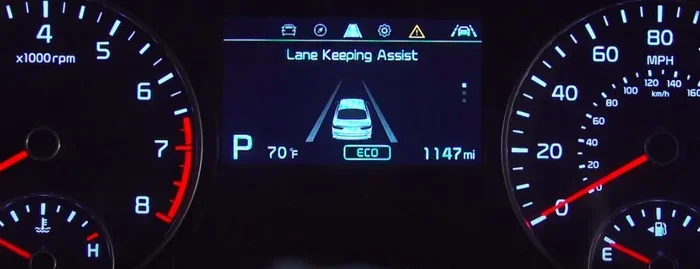
When you disable lane assist, the relevant indicator light on your dashboard will turn off or change color. Most vehicles use a green or blue icon when the system is active and a gray or white icon when it is off. Familiarize yourself with these indicators so you always know the status of your driver assistance systems.
Insurance and Warranty Considerations
Some drivers worry that disabling lane assist could affect their insurance rates or vehicle warranty. In most cases, turning off lane assist does not void your warranty or change your insurance premium. However, if a crash occurs and the investigation reveals that safety features were intentionally disabled, it could potentially influence the outcome of an insurance claim. Always check with your insurance provider if you have concerns.
Quick Tips for Managing Lane Assist
Here are some practical tips to help you get the most out of lane assist, whether you keep it on or turn it off:
- Clean Your Camera: The lane assist camera sits near the rearview mirror. Keep it clean and free of snow, dirt, or debris for accurate performance.
- Check Your Settings Regularly: After a service or battery replacement, lane assist settings may reset. Double-check that the feature is set the way you want it.
- Use the Temporary Off Option: If you only need to disable lane assist for a short stretch of road, use the steering wheel button. It is quick and easy to reactivate.
- Stay Alert Even With the System On: Lane assist is a helper, not a replacement for attentive driving. Always keep your hands on the wheel and your eyes on the road.
- Update Your Software: Automakers release updates that improve ADAS performance. Keeping your vehicle software current can reduce false alerts and improve reliability.
Common Mistakes People Make With Lane Assist
Avoid these common mistakes to get the best experience with lane assist:
- Assuming the System Works in All Conditions: Lane assist struggles in heavy rain, snow, fog, and on roads with faded or missing markings. Do not rely on it blindly in poor conditions.
- Forgetting to Reactivate After a Trip: Many drivers disable lane assist for one journey and forget to turn it back on. This can leave you without an important safety feature on your next drive.
- Relying on Lane Assist Instead of Staying Focused: Lane assist is designed to assist, not replace, driver attention. Over-reliance on the system can lead to dangerous situations.
- Ignoring Warning Lights: If your dashboard shows a lane assist warning light, do not ignore it. It could mean the camera is blocked or the system needs service.
- Not Reading the Owner’s Manual: Every vehicle handles lane assist differently. Skipping the manual means you might miss important details about how the system works and how to control it.
Expert Insights on Lane Assist and Driver Safety
We reached out to automotive safety experts to get their perspective on lane assist and the decision to disable it. Here is what they had to say.
Expert Insight: Balance Is Key
Dr. Sarah Mitchell, a road safety researcher, explains: “Lane assist technology has saved lives, but it is not perfect. Drivers should understand what the system can and cannot do. Disabling lane assist is fine in certain situations, but drivers must compensate by staying more alert and engaged behind the wheel.”
Expert Insight: Know Your Vehicle
James Carter, a certified automotive technician with over 15 years of experience, adds: “I always tell my customers to read the section on driver assistance in their owner’s manual. Every vehicle handles lane assist differently. Understanding your specific system helps you use it effectively and know when to turn it off.”
Comparison Table: Lane Assist Across Popular Brands
Not all lane assist systems are the same. Here is a quick comparison of how different brands handle the feature:
| Brand | System Name | Can It Be Disabled? | Default Behavior |
|---|---|---|---|
| Ford | Lane Keep Assist | Yes, steering wheel button | On by default |
| Toyota | Lane Tracing Assist | Yes, touchscreen or steering controls | On by default |
| BMW | Lane Departure Warning + Lane Keeping Assist | Yes, separate controls for each | On by default |
| Tesla | Autopilot Lane Centering | Yes, through Controls menu | On when Autopilot is active |
| Chevrolet | Lane Keep Assist | Yes, steering wheel button | On by default |
| Honda | Lane Keeping Assist System | Yes, steering wheel button | On by default |
As you can see from the table, most brands enable lane assist by default and offer a straightforward way to turn it off. The exact method varies, so always check your specific vehicle.
The Future of Lane Assist and Driver Assistance Technology
Lane assist technology continues to evolve rapidly. Automakers are investing heavily in automated driving technology that goes far beyond simple lane keeping. Here are some trends to watch:
- Better Camera Systems: Future vehicles will use higher-resolution cameras and sensors that work reliably in more weather conditions and on more road types.
- Driver Monitoring: Driver monitoring systems are becoming more common. These systems track eye movement and head position to ensure the driver remains attentive, even when lane assist is active.
- Smarter Algorithms: Machine learning is being used to make lane assist systems smarter. They learn from driver behavior and adjust their responses accordingly.
- Regulatory Changes: Governments around the world are considering regulations that could require certain ADAS features to remain active and not be fully disabled by the driver.
As these technologies improve, the need to disable lane assist may decrease. The systems will become more reliable, less intrusive, and better at understanding driving context. Until then, knowing how to control the feature remains essential for every driver.
Conclusion
Lane assist is a valuable safety feature, but it is not for everyone in every situation. The good news is that lane assist can be disabled in most vehicles, giving you the flexibility to decide when you want the system active and when you do not. Whether you are dealing with annoying false alerts, driving on unfamiliar roads, or simply prefer a more hands-on driving experience, you have options.
Remember that disabling lane assist removes a layer of active safety. Always stay alert, keep your hands on the wheel, and pay attention to the road. Use the tips and brand-specific instructions in this guide to find the right approach for your vehicle. Lane assist is a tool to help you drive safer, and understanding how to control it puts you in the best position to use it wisely.
Take a few minutes today to check your vehicle’s lane assist settings. Know how to turn it on, how to turn it off, and what each indicator means. That small effort can make a big difference in how you experience every drive.
Frequently Asked Questions
Can I permanently disable lane assist in my car?
Yes, most vehicles allow you to permanently disable lane assist through the settings menu. However, some brands reset the system to its default “on” state after a battery disconnect or software update. Check your owner’s manual for specific instructions on making permanent changes.
Does disabling lane assist affect my car’s warranty?
In most cases, turning off lane assist does not void your vehicle warranty. However, if a crash occurs and the investigation shows that safety features were intentionally disabled, it could influence the insurance claim process. Always consult your warranty documentation for details.
Will my adaptive cruise control still work if I disable lane assist?
Usually, yes. Disabling lane assist typically only affects the lane-keeping function. Your adaptive cruise control and other driver assistance features like blind spot monitoring often continue to work independently. Check your vehicle manual to confirm.
Why does lane assist keep turning itself back on?
Most vehicles default to having lane assist enabled every time you start the engine. This is a safety feature designed by automakers. If you want it to stay off, you need to change the default setting in your vehicle’s infotainment system under the driver assistance menu.
Is it legal to disable lane assist?
In most countries and states, it is legal for the driver to disable lane assist in their personal vehicle. However, some commercial vehicles and certain regions may have regulations requiring ADAS features to remain active. Always check local laws if you are unsure.
Can dirty roads cause lane assist to malfunction?
Yes, dirty or covered cameras can cause lane assist to malfunction. Snow, mud, or grime on the camera near the rearview mirror can block the system’s view of lane markings. This often leads to false warnings or the system failing to activate when needed. Keep the camera clean for reliable performance.