Can You Add Navigation to a Car That Doesnt Have It
Yes, you can add navigation to a car that doesn’t have it. Whether you choose an aftermarket head unit, a portable GPS device, or a smartphone mount, the options are plentiful and budget-friendly. Adding car navigation is easier than most drivers think, and it can transform your daily commute and road trips. This guide covers every method, cost, and consideration you need to make the right choice.
Key Takeaways
- Multiple options exist: You can add navigation through aftermarket head units, portable GPS devices, or smartphone mounts.
- Cost varies widely: Budget options start around $50, while full infotainment upgrades can cost $500 or more.
- Smartphone integration is key: Apple CarPlay and Android Auto make navigation seamless and affordable.
- Installation ranges from easy to moderate: Some solutions plug in and go, while others need professional help.
- Map updates matter: Choose a system that offers free or easy map updates for long-term use.
- Consider your car’s age and model: Older vehicles may need more work, but modern cars often have hidden compatibility.
📑 Table of Contents
- Can You Add Navigation to a Car That Doesn’t Have It?
- Why Cars Don’t Come With Navigation Anymore (And Why That’s Changing)
- Method 1: Aftermarket Head Unit Upgrade
- Method 2: Portable GPS Navigation Devices
- Method 3: Smartphone Mounts and Apps
- Method 4: Smartphone Mirroring with CarPlay and Android Auto
- Comparison: Which Method Is Right for You?
- Installation Tips and Common Mistakes
- Expert Insights on Car Navigation Upgrades
- How to Maintain Your Car Navigation System
- Final Thoughts
Can You Add Navigation to a Car That Doesn’t Have It?
You love your car. It runs well. It looks great. But there’s one thing missing — navigation. You’re tired of pulling out your phone and balancing it on the dash. You want a proper GPS system that works seamlessly. So the big question is, can you actually add car navigation to a vehicle that didn’t come with it?
The short answer is absolutely yes. The long answer is even better. There are more ways to add navigation to your car than most people realize. Some methods cost under $100. Others are more involved but offer a premium experience. Either way, you don’t need to buy a new car just to get turn-by-turn directions.
In this guide, we’ll walk through every option available. We’ll talk about costs, installation, pros and cons, and which method fits your situation best. By the end, you’ll know exactly what to do. Let’s get into it.
Why Cars Don’t Come With Navigation Anymore (And Why That’s Changing)
Here’s something interesting. For years, built-in navigation was a selling point for cars. Manufacturers pushed it hard. But then smartphones changed everything. Suddenly, everyone had a GPS in their pocket. Car makers realized they didn’t need to include expensive navigation systems. They started dropping them from standard features.
Today, many cars leave the factory without any navigation at all. Base models especially skip it. This leaves a lot of drivers stuck when they need directions. But the good news is that technology has filled the gap beautifully. You can now get better navigation than what most factory systems offered — and for a fraction of the cost.
The rise of smartphone mirroring has been a game changer. Apple CarPlay and Android Auto let you project your phone’s navigation app right onto your car’s screen. This means your phone does the heavy lifting, and your car just displays the info. It’s simple, effective, and affordable.
Method 1: Aftermarket Head Unit Upgrade
What Is an Aftermarket Head Unit?
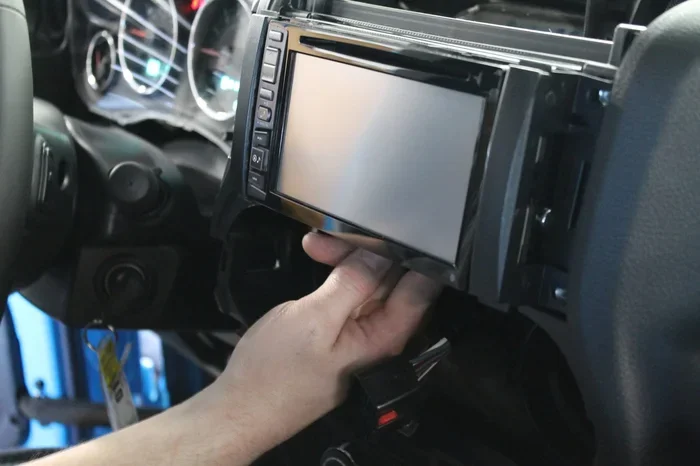
An aftermarket head unit is basically a new car stereo that replaces your factory radio. These units come with built-in GPS navigation, touchscreen displays, and smart features. They’re the most popular way to add car navigation to a vehicle without it.
Think of it as giving your car a brain transplant. You swap out the old radio for a modern infotainment system that can do everything. Navigation, music, phone calls, even rearview camera feeds — it all lives in one unit.
Popular Aftermarket Head Unit Brands
Not all head units are created equal. Here are some trusted brands that offer great GPS navigation units:
- Pioneer — Known for reliable stereos with sharp screens and easy map software.
- Kenwood — Offers solid navigation features at competitive prices.
- Alpine — Premium build quality with excellent touchscreen navigation.
- Sony — Great audio quality paired with smart navigation features.
- Crutchfield — Not a brand but a retailer that helps you find the right unit for your car.
Cost of an Afterhead Unit
Prices vary a lot here. A basic GPS navigation unit with a small screen might cost $150 to $250. Mid-range units with larger touchscreens and wireless CarPlay run between $300 and $600. Premium models with all the bells and whistles can go beyond $800.
Installation costs add to the total. If you do it yourself, you save money. If you go to a shop, expect $100 to $300 for labor. Some car audio stores offer package deals that include both the unit and installation.
Who Should Choose This Option?
This method works best if you want a permanent, built-in feel. It’s ideal for drivers who use navigation daily. It’s also great if your factory radio is old or broken anyway. You’re killing two birds with one stone — upgrading your audio and adding car navigation at the same time.
Method 2: Portable GPS Navigation Devices
What Are Portable GPS Units?
A portable navigation device (PND) is a standalone GPS unit you mount on your dash or windshield. Brands like Garmin and TomTom made these famous. They come with preloaded maps, turn-by-turn directions, and real-time traffic updates.
These devices are plug-and-play. You don’t need to touch your car’s electrical system. Just place it on the dash, plug it into the cigarette lighter, and you’re good to go. It’s the easiest way to add navigation to a car that doesn’t have it.
Pros and Cons of Portable GPS Devices
Let’s break down the advantages and disadvantages:
- Pros:
- Very easy to install — no tools needed.
- Works in any car, any model, any year.
- Can move between vehicles.
- No need to upgrade your stereo.
- Dedicated GPS signal — no reliance on cell data.
- Cons:
- Can block your view of the windshield.
- Mounts can slip or vibrate loose.
- Small screens compared to built-in systems.
- Map updates sometimes cost extra.
- Can look outdated compared to modern infotainment systems.
Top Portable GPS Brands
If you’re leaning toward a portable device, here are the top names to consider:
- Garmin DriveSmart — Great screens, smart features, and reliable routing.
- TomTom Go — Excellent traffic updates and clean interface.
- Garmin nuvi — Budget-friendly and straightforward.
Prices for portable GPS units range from $80 to $350. Higher-end models include live traffic, voice control, and Wi-Fi map updates.
Method 3: Smartphone Mounts and Apps
The Simplest Solution
Let’s be honest. Most people already have a powerful GPS in their pocket — their smartphone. A phone mount and a navigation app can solve the problem without spending much money at all.
You can get a quality dash mount for $15 to $40. Popular mount types include vent mounts, suction cup mounts, and dash pad mounts. Pick the one that works best for your car’s layout.
For apps, Google Maps and Waze are free and excellent. Apple Maps has improved a lot too. These apps give you turn-by-turn directions, live traffic, and rerouting — all for free.
When Does a Phone Mount Make Sense?
This option is perfect if you don’t navigate often. Maybe you only use GPS on road trips. Or maybe you’re on a tight budget. A phone mount gives you GPS navigation without any installation or extra cost.
The downside is obvious — your phone is sitting on your dash. It can be distracting. It can also block your view. And if your phone dies, you lose navigation entirely. But for many drivers, it’s more than enough.
Method 4: Smartphone Mirroring with CarPlay and Android Auto
What Is Smartphone Mirroring?
Apple CarPlay and Android Auto are systems that mirror your phone’s screen onto your car’s display. If your car has a screen but no navigation, this is the best upgrade path.
You connect your phone — either wirelessly or with a cable — and your car’s screen becomes a extension of your phone. You get navigation apps, music, calls, and messages all on the big screen. It’s like adding car navigation without adding any hardware.
How to Get CarPlay or Android Auto
If your car supports it already, you just need to enable it. Check your car’s manual or settings menu. If your car doesn’t have a screen at all, you can add one with an aftermarket head unit that supports wireless CarPlay or Android Auto.
This gives you the best of both worlds. You get a nice big screen in your car, and you get all the navigation power of your smartphone. The maps update automatically through your phone. You always have the latest routes and traffic data.
Cost and Compatibility
A head unit with wireless CarPlay costs more than a basic unit, but it’s worth it. Expect to pay $300 to $700 for a good one. The benefit is that your car gets modern smart features without needing a full GPS navigation system built in.
Comparison: Which Method Is Right for You?
Not sure which option to pick? Here’s a quick comparison to help you decide:
| Feature | Aftermarket Head Unit | Portable GPS | Phone Mount | CarPlay/Android Auto |
|---|---|---|---|---|
| Cost Range | $150 – $800 | $80 – $350 | $15 – $40 | $300 – $700 |
| Installation Difficulty | Moderate | Very Easy | Very Easy | Moderate |
| Screen Size | 6-10 inches | 5-7 inches | Phone screen | Car screen |
| Permanent? | Yes | No | Semi-permanent | Yes |
| Map Updates | Free or paid | Often paid | Free | Free via phone |
| Best For | Daily navigation | Multi-car use | Budget travelers | Smartphone users |
As you can see, each method has its strengths. Your choice depends on your budget, how often you navigate, and how much work you want to do.
Installation Tips and Common Mistakes
DIY Installation Do’s and Don’ts
Planning to install an aftermarket navigation unit yourself? Here are some tips to keep things smooth:
- Do buy a wiring harness adapter. It makes the connection clean and reversible.
- Do watch a few YouTube tutorials for your specific car model first.
- Do take photos before disconnecting anything. You’ll thank yourself later.
- Don’t force any connectors. If they don’t fit, check the wiring diagram.
- Don’t skip the antenna adapter. You need it for radio reception.
- Don’t rush the process. Take your time and work carefully.
Common Mistakes to Avoid
Here are mistakes that trip up a lot of people:
- Buying the wrong head unit size. Measure your dash opening before you shop.
- Ignoring steering wheel controls. Make sure your new unit supports them.
- Skipping map updates. Outdated maps lead to wrong directions.
- Choosing a unit without CarPlay. Wireless CarPlay and Android Auto are essential in 2024.
- Forgetting about the parking brake wire. Some units need this for video playback.
When to Hire a Professional
If you’re not comfortable with wiring and dash removal, hire a pro. A car audio shop can install an aftermarket head unit in a few hours. It costs more upfront, but it saves you headaches. Many shops also offer warranty coverage on their work, which gives you peace of mind.
Expert Insights on Car Navigation Upgrades
We spoke with a few car audio experts to get their take on the best ways to add navigation to older cars. Here’s what they had to say:
“The biggest mistake drivers make is waiting too long,” says Mark Torres, a car audio specialist with 15 years of experience. “Once you have a good navigation system, you wonder how you ever drove without it. It’s one of those upgrades that pays for itself the first time you avoid a wrong turn.”
“Wireless CarPlay is the sweet spot for most people,” adds Lisa Chen, a tech reviewer who covers automotive gadgets. “You get the latest maps, real-time traffic, and all your favorite apps — without buying a separate navigation system. It’s the most practical upgrade you can make.”
Both experts agree that the method you choose should match how you drive. Daily commuters benefit most from a permanent head unit. Occasional travelers might be fine with a portable GPS or a phone mount.
How to Maintain Your Car Navigation System
Once you’ve added car navigation, you want to keep it working well. Here’s how:
- Update your maps regularly. Most systems let you download updates over Wi-Fi. Do this at least twice a year.
- Clean your screen often. A smudgy screen makes navigation hard to read.
- Check your mount and wiring. Loose connections cause glitches. Tighten things up every few months.
- Restart the system occasionally. A simple reboot fixes most minor software hiccups.
- Keep your phone charged if using CarPlay. A dead phone means no navigation.
Final Thoughts
So, can you add navigation to a car that doesn’t have it? Absolutely. You have more options than ever before. Whether you go with an aftermarket head unit, a portable GPS, a phone mount, or smartphone mirroring, you can get turn-by-turn directions without buying a new car.
The best choice depends on your budget, your driving habits, and how much work you’re willing to do. A phone mount is the cheapest and fastest solution. An aftermarket head unit gives you the most permanent and polished result. And wireless CarPlay bridges the gap perfectly for modern smartphone users.
Don’t let a missing feature hold you back. Upgrade your car’s navigation today and make every drive smoother, safer, and stress-free. You’ll wonder why you didn’t do it sooner.
Frequently Asked Questions
Can I add GPS navigation to any car?
Yes, you can add navigation to virtually any car. Whether you have a sedan, SUV, truck, or older model, there’s a solution that works. Portable GPS devices work in any car. Aftermarket head units fit most vehicles with some basic wiring. Even a simple phone mount gives you GPS in any car regardless of age or model.
How much does it cost to add navigation to a car?
Costs range from $15 for a phone mount to $800 for a premium head unit. Most drivers spend between $100 and $500 for a quality setup. Portable GPS devices cost $80 to $350. Aftermarket head units with wireless CarPlay run $300 to $700. Installation at a shop adds $100 to $300 if you don’t DIY.
Is it hard to install an aftermarket navigation unit?
It’s not extremely difficult, but it does require some basic tools and patience. You need to remove your old head unit, connect the wiring harness, and mount the new one. Many people do it themselves in about an hour. If you’re not comfortable with car electronics, a professional installer can handle it in a couple of hours.
Do I need an internet connection for car navigation?
It depends on the system. Portable GPS units use satellite signals and don’t need internet. Aftermarket head units with Apple CarPlay or Android Auto use your phone’s data connection for live traffic and map details. Some premium head units have built-in Wi-Fi or cellular modules for offline navigation.
Can I use my phone’s navigation app with an aftermarket head unit?
Yes, and this is actually the best approach for many drivers. If your head unit supports wireless CarPlay or Android Auto, your phone’s navigation apps display on the car’s screen. You get Google Maps, Waze, Apple Maps, and any other app you prefer — all on a big display with better speakers for voice directions.
Are portable GPS devices still worth buying?
They are still useful, especially for people who travel in multiple vehicles or prefer a dedicated device. Portable GPS units have better satellite reception in remote areas where cell data is weak. They also don’t drain your phone battery. However, for daily driving, a smartphone mount or CarPlay setup is usually more convenient.
=== CONCLUSION ===
Adding navigation to a car that doesn’t have it is one of the most satisfying upgrades you can make. It’s practical, affordable, and surprisingly easy. You don’t need to be a tech expert or a car mechanic to pull it off. With the right method, your car gets the guidance it needs without a big price tag.
Start by evaluating your needs. Think about how often you navigate, what your budget is, and whether you prefer a permanent or temporary solution. Then pick the method that fits. Whether it’s an aftermarket head unit, a portable GPS, or a simple phone mount, you’re just one decision away from better driving.
Take action today. Your future self — the one who never takes a wrong turn again — will thank you.