Can a Speedometer Be Changed From KM to Miles Easily
Yes, you can change a speedometer from kilometers to miles, and it is easier than most drivers think. Whether your car has a digital display or an analog gauge, there are simple methods to switch the speedometer conversion from kmh to mph. This guide walks you through every option so you can get your dashboard display showing the right miles per hour in no time.
Have you ever glanced at your dashboard display and felt confused by the numbers? If you drive a vehicle where the speedometer shows kilometers per hour but you are used to thinking in miles per hour, you are not alone. This happens all the time, especially with vehicle import models or cars bought from overseas markets.
The good news is that changing a speedometer from km to miles is something most car owners can do. Whether you have a digital speedometer or an analog speedometer, there are practical ways to make the switch. In this guide, we will walk you through every method, tool, and tip you need. By the end, you will know exactly how to handle your own speedometer conversion with confidence.
Key Takeaways
- Easy Conversion: Most modern vehicles let you switch units through simple menu settings on the dashboard.
- Analog Speedometers Need Physical Changes: Older gauges may require swapping gears or recalibrating the instrument cluster.
- Digital Speedometers Are Simple: A few button presses or menu tweaks can flip the unit from km to miles.
- Vehicle Import Matters: If you imported a car from a country that uses the metric system, a conversion is often essential.
- Speedometer Calibration Is Key: After any change, verify accuracy to avoid speeding tickets or unsafe driving.
- DIY Is Possible: Many owners handle the switch themselves with basic tools and online guides.
- Professional Help Exists: Complex setups or older vehicles may benefit from a mechanic or specialist.
📑 Table of Contents
- Why Would You Change a Speedometer From KM to Miles?
- Types of Speedometers and How They Work
- How to Change a Digital Speedometer From KM to Miles
- How to Change an Analog Speedometer From KM to Miles
- Checking Speedometer Accuracy After Conversion
- Common Mistakes to Avoid When Converting Your Speedometer
- Can You Change the Speedometer Yourself or Should You Hire a Pro?
- How Tire Size Affects Speedometer Accuracy
- Frequently Asked Questions
- Final Thoughts
Why Would You Change a Speedometer From KM to Miles?
There are several real reasons why drivers look into speedometer conversion. Understanding these reasons helps you see why this small change matters so much.
You Imported a Vehicle From a Metric Country
Many popular cars come from countries like Japan, Germany, or Australia. These places use the metric system, so the speed gauge reads in kilometers per hour. If you bring one of these vehicles to the United States or the United Kingdom, you need to switch the display to miles per hour for safe and legal driving.
You Bought a Used Car With a Swapped Instrument Cluster
Sometimes a previous owner swapped the instrument cluster from a different model or market. This can leave you with a speedometer that shows the wrong unit. A quick unit conversion fixes the problem and keeps your driving experience smooth.
You Simply Prefer Miles Over Kilometers
Some drivers grew up reading mph and feel more comfortable with that unit. Even if your car already shows miles, you might want to double-check the process for future reference. Knowing how the system works gives you control over your vehicle.
Types of Speedometers and How They Work
Before you dive into the conversion process, it helps to understand the two main types of speedometers found in cars today. Each type uses a different method to display your speed, and the approach to changing units varies accordingly.
Analog Speedometers
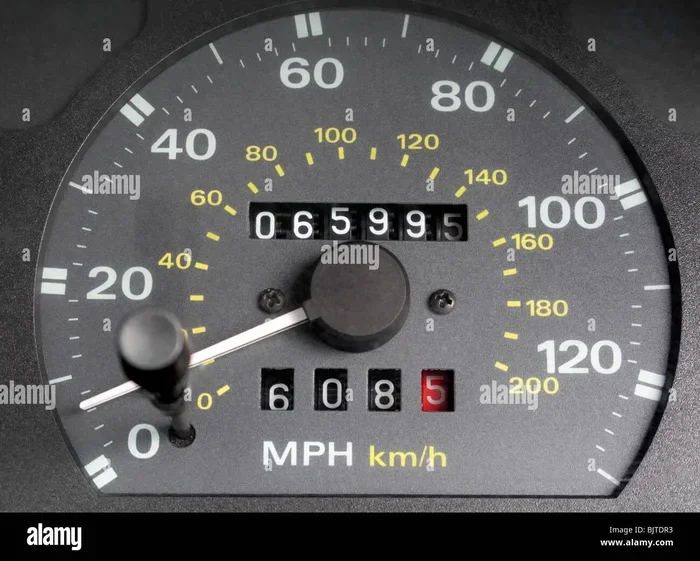
An analog speedometer uses a physical needle that moves across a dial. The needle is driven by a cable connected to the transmission or by signals from the vehicle speed sensor. These traditional gauges are common in older vehicles and classic cars. Changing the unit on an analog speed gauge usually involves swapping out gears inside the instrument or replacing the entire cluster.
Digital Speedometers
A digital speedometer uses a screen or LCD display to show your current speed in numbers. Most modern cars use this type. The vehicle speed sensor sends data to the car’s computer, which then displays the speed on the screen. Digital units are much easier to change because the speedometer calibration is often stored in software that can be adjusted through menus or with a simple tool.
Multi-Function Displays
Many newer vehicles come with a multi-function display that shows multiple pieces of information at once. These screens can display fuel level, trip distance, and speed all at the same time. The good news is that these displays usually include a built-in option to toggle between kmh and mph with just a few button presses.
How to Change a Digital Speedometer From KM to Miles
Changing a digital speedometer is the easiest path for most drivers. The process varies slightly depending on your car brand and model, but the general steps are very similar across vehicles.
Step-by-Step Process for Most Modern Cars
Follow these steps to switch your dashboard display from kilometers per hour to miles per hour:
- Start the car and let the engine idle.
- Locate the menu button on your steering wheel or dashboard controls.
- Navigate to the settings or display menu using the arrow buttons.
- Look for a unit or language option. This is often labeled as “Units,” “Display,” or “Vehicle Settings.”
- Select the speed unit option. Choose “Miles per Hour” or “mph.”
- Confirm the change. The speedometer should immediately update to show miles per hour.
Brand-Specific Tips
Different car brands hide the unit conversion setting in different places. Here are some common examples:
- Toyota and Lexus: Press the “TRIP” button on the steering wheel, scroll through the menu, and find the “Unit” setting.
- Honda and Acura: Use the steering wheel controls to access the “Display” menu, then look for “Speed Unit.”
- Ford: Go to “Settings,” then “Vehicle,” and look for “Speedometer Unit.”
- BMW and Mercedes: Use the iDrive or COMAND system to navigate to “Vehicle Settings” and select “Speed Display Unit.”
- Chevrolet and GMC: Press the steering wheel menu button, scroll to “Vehicle Preferences,” and change the speed unit.
Using a Diagnostic Tool or Scanner
If you cannot find the setting in the menu, an OBD2 scanner can help. This small device plugs into your car’s diagnostic port. Once connected, you can use the scanner software to access the vehicle settings and change the speedometer calibration. This method works well for cars where the menu option is hidden or locked.
Quick Tip: Always check your owner’s manual first. The manual will tell you exactly where the unit conversion setting lives in your specific vehicle model.
How to Change an Analog Speedometer From KM to Miles
Switching an analog speedometer takes a bit more hands-on work. Unlike digital displays, the needle and dial are physically printed or engraved with specific units. You cannot simply press a button to flip the reading.
Option 1: Swap the Instrument Cluster
The most straightforward way to change an analog speedometer is to swap the entire instrument cluster. This is the panel behind your steering wheel that holds the speed gauge, tachometer, and other gauges. You can buy a replacement cluster from a vehicle import specialist or a salvage yard that has the right unit for your car.
Here is what you need to do:
- Disconnect the battery to avoid electrical issues.
- Remove the steering column covers and any trim pieces blocking access to the cluster.
- Unplug the electrical connectors attached to the instrument cluster.
- Remove the mounting screws and carefully pull out the cluster.
- Install the new cluster with the miles per hour markings.
- Reconnect everything and test the speed gauge before driving.
Option 2: Replace the Speedometer Cable and Gears
On some older vehicles, the speedometer calibration depends on the gears inside the transmission or the speedometer cable. By changing these parts, you can shift the reading from kmh to mph. This method requires more mechanical knowledge and the right parts.
You will need to:
- Find the correct driving gear for your transmission.
- Match the gear ratio to the tire size and desired mph reading.
- Install the new gear and test the speedometer for accuracy.
Expert Insight: This method works best on older vehicles with cable-driven speedometers. If your car uses a vehicle speed sensor, the digital route is usually simpler and more reliable.
Option 3: Use a Speedometer Conversion Kit
A speedometer conversion kit is a pre-made solution designed for specific car models. These kits include the correct gears, cables, and sometimes a modified instrument cluster that reads in miles per hour. They are available online and at auto parts stores. The kits make the process much easier and reduce the risk of errors.
Checking Speedometer Accuracy After Conversion
Once you have changed your speedometer from kmh to mph, you need to verify that the reading is accurate. An inaccurate speed gauge can lead to speeding tickets or, worse, unsafe driving habits.
The GPS Method
The easiest way to check accuracy is to use a GPS device or a smartphone app. Drive at a steady speed on a known road and compare the speedometer reading to the GPS reading. If there is a significant difference, you may need to recalibrate the speedometer calibration.
The Mile Marker Method
Another approach is to use highway mile markers. Time how long it takes to travel one mile at a steady speed and compare the speedometer reading to your calculated speed. This method works well on long, straight roads with clear markers.
When to Seek Professional Calibration
If you notice a large discrepancy between your speedometer and the GPS reading, it is worth visiting a mechanic or a specialist. They have professional tools that can fine-tune the speedometer calibration to match the actual speed. This is especially important after changing tire sizes or swapping the instrument cluster.
Common Mistakes to Avoid When Converting Your Speedometer
Even with a clear guide, mistakes can happen. Here are some common errors that drivers make during the speedometer conversion process:
- Skipping the owner’s manual. Every car is different, and the manual provides the exact steps for your model.
- Forgetting to check the odometer. When you swap the instrument cluster, the odometer reading may reset or change. Make sure the odometer reset is handled correctly.
- Using the wrong gear ratio. If you are changing gears in an analog system, the wrong ratio will give you an incorrect speed reading.
- Not testing before driving. Always verify the speedometer works correctly before hitting the road.
- Ignoring the check engine light. Some digital speedometers trigger a warning light if the vehicle speed sensor data does not match expected values.
- Assuming all cars are the same. A method that works on a Honda may not work on a BMW. Always follow the steps specific to your vehicle.
Can You Change the Speedometer Yourself or Should You Hire a Pro?
This is a great question, and the answer depends on your comfort level with car work and the type of speedometer you have.
When DIY Is a Good Choice
If your car has a digital speedometer with a menu-based unit conversion option, the DIY route is simple and takes only a few minutes. You do not need any special tools, and the process is low-risk. Swapping a digital instrument cluster is also manageable for most home mechanics with basic tools.
When to Hire a Professional
If your vehicle has an analog speedometer that requires gear changes or cable swaps, hiring a professional might be the safer choice. A mechanic with experience in speedometer calibration can ensure the conversion is done correctly and the speed gauge reads accurately. This is especially true for classic cars or rare vehicle import models where parts are hard to find.
Quick Tip: If you decide to go the DIY route, watch a few video tutorials for your specific car model first. Seeing the process in action helps a lot and builds confidence.
How Tire Size Affects Speedometer Accuracy
One factor that many people overlook is the role of tire size in speedometer calibration. When you change your tires, the speedometer reading can shift, even if you do not change the unit. Larger tires cover more distance per rotation, which can make the speed gauge read lower than your actual speed.
If you have recently changed your tire size, you may want to recalibrate the speedometer at the same time as your unit conversion. Many digital speedometers have a calibration setting that accounts for tire size changes. Your owner’s manual or a speedometer calibration guide can walk you through this process.
Frequently Asked Questions
Can I change my speedometer from km to miles without any tools?
Yes, if your car has a digital dashboard display with a menu system, you can usually switch the unit by pressing a few buttons. No special tools are needed for the speedometer conversion on most modern vehicles.
Is it legal to change a speedometer from km to miles?
Yes, in most countries it is perfectly legal to change your speedometer to display miles per hour. In fact, many regions require vehicles to show the local speed unit for safety and compliance reasons.
Will changing my speedometer affect the odometer?
If you swap the entire instrument cluster, the odometer reading may carry over or reset depending on the cluster you install. Always check the odometer before and after the swap to make sure the mileage is correct.
How long does it take to convert a digital speedometer?
For most cars, the process takes between two and ten minutes. You simply navigate to the vehicle settings menu, find the speed unit option, and select miles per hour. It is one of the quickest changes you can make to your vehicle.
Can I use a GPS app to check my speedometer accuracy?
Absolutely. A GPS app on your phone is one of the best and easiest ways to verify your speedometer calibration. Just compare the GPS speed to what your speed gauge shows and adjust if needed.
Do I need a special scanner to change the speed unit?
Most modern cars do not need a scanner. The unit conversion is built into the infotainment or dashboard menu. However, an OBD2 scanner can be helpful if the setting is hidden or if you are dealing with an older model that does not have a user-friendly menu system.
Final Thoughts
Changing your speedometer from km to miles is one of the simplest and most useful modifications you can make to your vehicle. Whether you have a digital speedometer or an analog speedometer, there is a method that works for you. The speedometer conversion process is straightforward, and with the right guidance, most car owners can handle it themselves in under fifteen minutes.
Remember to verify your speedometer calibration after making the change. Use a GPS app or a mile marker test to confirm the reading is accurate. If anything feels off, take the time to recalibrate or consult a professional. A correctly set speed gauge keeps you safe, helps you avoid tickets, and gives you peace of mind on every drive.
So go ahead and make the switch. Your dashboard display will thank you, and you will feel more comfortable and confident behind the wheel knowing your speedometer is showing the right miles per hour. Safe travels and happy driving!