3d Car Images for Drawing to Take Your Art to the Next Level
3d car images for drawing are a game-changer for artists who want to create realistic, dynamic vehicle artwork. These digital references help you understand complex shapes, lighting, and perspective with ease. Whether you are a beginner or a seasoned illustrator, using 3d car references can seriously level up your skills.
Key Takeaways
- 3d car images for drawing give you accurate reference material that saves hours of guesswork and improves your proportions.
- Digital car art tools like Blender and SketchUp make it easy to generate custom 3d car models for your projects.
- Using 3d car references improves your understanding of vehicle anatomy, from body lines to wheel placement.
- Beginners and pros alike benefit from 3d car visualization techniques in their illustration workflow.
- Free and paid resources abound for finding high-quality 3d car models and scenes for drawing practice.
- Avoid common mistakes like over-reliance on references by balancing 3d tools with your own creative instincts.
- Mastering car rendering techniques opens doors to professional automotive design and concept art careers.
📑 Table of Contents
- Why 3d Car Images for Drawing Are a Must-Have for Every Artist
- How 3d Car References Improve Your Drawing Skills
- Best Tools and Software for Creating 3d Car Images
- Where to Find High-Quality 3d Car Images for Drawing
- Common Mistakes Artists Make with 3d Car References
- Taking Your Automotive Art to the Next Level
- Conclusion
Why 3d Car Images for Drawing Are a Must-Have for Every Artist
If you draw cars, you already know how tricky they can be. Curved body panels, complex wheel arches, and shiny reflections make vehicles one of the hardest subjects to illustrate. That is exactly why 3d car images for drawing have become so popular among artists of all levels.
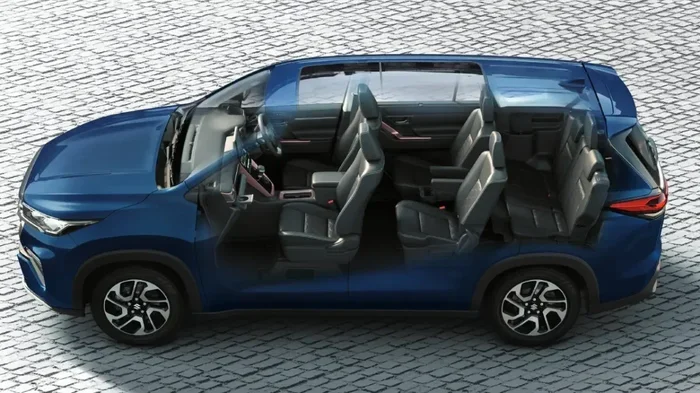
A 3d car reference image gives you a clear, accurate view of any vehicle from any angle. Instead of struggling to imagine how a hood line flows into a windshield, you can rotate a digital model and study every detail. This simple shift in your workflow can dramatically improve your car illustration skills.
Think about it. Professional automotive designers use 3d car models every single day. They build digital prototypes before a single pencil touches paper. You can use the same approach in your own art. Whether you are sketching for fun or building a portfolio, 3d car images for drawing give you a serious advantage.
The beauty of working with digital car art references is that you control everything. Change the lighting. Adjust the camera angle. Zoom in on the grille or step back to see the full profile. No more squinting at blurry photos or guessing where shadows fall. 3d car visualization puts you in the driver’s seat of your own creative process.
How 3d Car References Improve Your Drawing Skills
Understanding Vehicle Proportions Made Easy
One of the biggest challenges in automotive sketching is getting proportions right. A car that looks slightly off can ruin an entire piece. When you use 3d car images for drawing, you see the exact relationships between different parts of the vehicle. The hood length compared to the cabin. The wheel size relative to the body. All of it becomes clear.
Try this exercise. Pick a 3d car model and draw it from three different angles: front, side, and three-quarter view. Compare your sketches to the reference. You will quickly notice where your proportions need work. Over time, your car perspective drawing skills will sharpen dramatically.
Mastering Light, Shadow, and Reflections
Cars are shiny. That is just a fact. Capturing how light interacts with a vehicle’s surface is one of the most rewarding parts of digital car art. But it is also one of the hardest.
With 3d car rendering tools, you can set up specific lighting scenarios. Want to see how sunlight hits a curved fender? Done. Need to understand how reflections work on a glossy black hood? Easy. These car reference images help you learn how light behaves on different surfaces.
Here are some quick tips for studying reflections:
- Use a 3d car model with a matte material first. This helps you focus on shapes without getting distracted by shiny surfaces.
- Switch to a glossy material and observe how reflections change. Notice how the environment wraps around the car.
- Draw the shadow shapes separately before adding reflections. This builds a strong foundation for your artwork.
- Practice with different lighting setups like studio light, golden hour, and overcast conditions.
Building Your Knowledge of Car Anatomy
Every vehicle has a structure. There is the chassis, the body panels, the glass, and the mechanical components underneath. When you use 3d car images for drawing, you learn how all these parts fit together. You start to recognize terms like A-pillar, rocker panel, and wheel well without needing a dictionary.
This knowledge makes your vehicle artwork more believable. Readers and viewers can tell when an artist understands cars. Your drawings will have that professional quality that sets them apart from casual sketches.
Best Tools and Software for Creating 3d Car Images
You do not need to be a 3d modeling expert to benefit from 3d car images for drawing. Many tools are beginner-friendly and designed for artists, not engineers. Let us look at some of the best options available.
Free Options to Get Started
Blender is the king of free 3d software. It is powerful, open-source, and has a massive community. You can find thousands of free 3d car models online to import directly into Blender. The learning curve is real, but the payoff is huge.
SketchUp Free is another great option. It is simpler than Blender and perfect for beginners who just want to create basic 3d car scenes for reference. You can quickly block out a car shape and rotate it to study from any angle.
Google Poly and Sketchfab are platforms where artists share free 3d models. Search for “car” and you will find hundreds of options. These are perfect for car drawing tutorials and practice sessions.
Paid Options for Serious Artists
If you want more control and higher quality, paid tools are worth the investment.
| Software | Price Range | Best For | Difficulty Level |
|---|---|---|---|
| Blender (Pro add-ons) | Free – $100+ | Full 3d car modeling and rendering | Medium to Hard |
| Maya | $1,500/year | Professional automotive visualization | Hard |
| 3ds Max | $1,500/year | Game-ready car assets | Hard |
| Daz 3D | Free – $200 | Quick 3d car scenes with poses | Easy to Medium |
| Car Scanner | $50-$200 | Automotive design and concept art | Medium |
Quick Tips for Choosing the Right Tool
- Start with free software like Blender before spending money on expensive tools.
- Look for tutorials specific to car modeling. Many YouTube channels cover this topic in depth.
- Focus on rendering quality if your goal is photorealistic car reference images.
- Choose tools with large model libraries so you spend less time building from scratch.
Where to Find High-Quality 3d Car Images for Drawing
Finding the right 3d car images for drawing is easier than you think. There are many online resources offering everything from free low-poly models to photorealistic renders.
Top Websites for 3d Car Models
- Sketchfab – A massive library of user-uploaded 3d car models. Many are free and ready to download.
- TurboSquid – Professional-grade 3d car models for purchase. Great for high-detail work.
- CGTrader – A mix of free and paid models with good search filters for vehicles.
- GrabCAD – Focused on engineering models, but great for technically accurate car reference images.
- Pinterest – Search for “3d car rendering” and you will find tons of inspiration and direct links to models.
What to Look for in a Good Reference
Not all 3d car images for drawing are created equal. Here is what you should check before downloading a model:
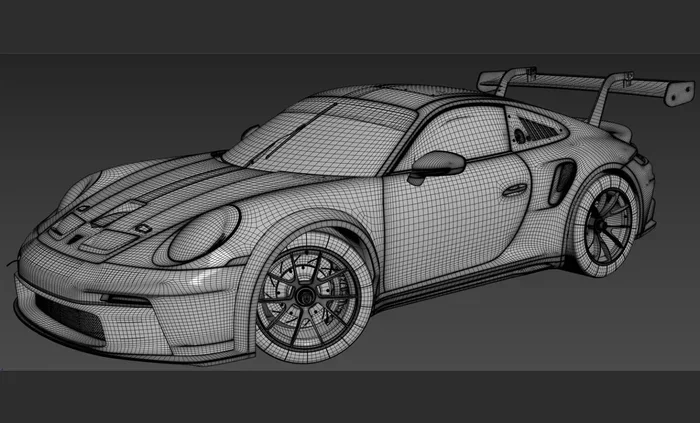
- Polygon count: Higher poly models look smoother but may be harder to work with on older computers.
- Texture quality: Look for models with realistic materials and proper UV mapping.
- Multiple angles: The best references show the car from all sides.
- Clean topology: A well-built model has smooth curves and no distracting artifacts.
- Lighting setup: Models with good lighting make it much easier to study shadows and highlights.
Building Your Own 3d Car Reference Library
Over time, you should build a personal library of 3d car models that you return to again and again. Organize them by vehicle type: sedans, SUVs, sports cars, trucks, and classics. This makes it easy to find exactly what you need when you sit down to draw.
Expert Insight: “I keep a folder of my top 50 favorite 3d car models organized by brand and style. When I need to draw a specific car, I pull it up instantly. It has saved me countless hours.” — Professional automotive illustrator
Common Mistakes Artists Make with 3d Car References
Using 3d car images for drawing is powerful, but it is easy to fall into bad habits. Here are some mistakes to watch out for.
Relying Too Much on the Reference
The biggest trap is copying the 3d model exactly instead of using it as a guide. Your drawing should still reflect your artistic style. Use the reference to understand structure and proportions, then add your own creative flair.
Ignoring the Background and Environment
3d car scenes often include environments that can inform your artwork. Many artists focus only on the car and forget to use the surrounding context. The ground plane, shadows on the pavement, and environmental reflections all add realism to your vehicle artwork.
Using Low-Quality Models
A blurry or poorly built 3d car model will teach you bad habits. If the proportions are wrong in the reference, your drawing will be wrong too. Always choose high-quality models from reputable sources.
Skipping the Fundamentals
3d car images for drawing are a supplement, not a replacement for learning the basics. You still need to understand perspective, anatomy, and composition. The 3d tools make these concepts easier to grasp, but they do not remove the need to practice fundamentals.
Not Varying Your References
Drawing the same type of car over and over limits your growth. Challenge yourself with different vehicle styles. Try a vintage muscle car one day and a modern EV the next. Variety in your car reference images builds a versatile skill set.
Taking Your Automotive Art to the Next Level
Once you are comfortable using 3d car images for drawing, you can start pushing your work further. Here are some advanced techniques to explore.
Combining 3d References with Photography
One powerful technique is to combine 3d car models with real photographs. Place your 3d car into a real-world scene and study how it interacts with the environment. This hybrid approach creates incredibly convincing digital car art.
Creating Full 3d Car Scenes for Practice
Instead of just rendering a single car, try building entire scenes. A car parked on a city street, a race car on a track, or a classic vehicle on a mountain road. These 3d car scenes for drawing give you context and atmosphere that single-car references cannot provide.
Exploring Automotive Concept Art
If you want to go professional, automotive concept art is a fantastic career path. Many concept artists use 3d car visualization as a starting point and then paint over the renders. This workflow is fast, efficient, and produces stunning results.
Quick Tip: Start by finding a 3d car model you love. Render it with dramatic lighting. Then paint over it in Photoshop or Procreate. This exercise teaches you how to blend 3d and traditional art skills seamlessly.
Building a Portfolio with 3d-Enhanced Car Art
Clients and studios love artists who can work with 3d car rendering tools. Adding 3d-enhanced pieces to your portfolio shows versatility and technical skill. It also demonstrates that you understand how real vehicles are designed and presented.
Key Takeaways:
- 3d car images for drawing bridge the gap between imagination and accuracy in your artwork.
- Tools like Blender and SketchUp make 3d car references accessible to artists at every level.
- Building a personal reference library saves time and improves consistency in your work.
- Avoiding common mistakes ensures you grow as an artist rather than developing bad habits.
- Combining 3d tools with traditional techniques creates a unique and professional style.
Conclusion
3d car images for drawing have transformed the way artists approach vehicle illustration. They give you accurate references, help you understand complex shapes, and save you hours of guesswork. Whether you are just starting out or looking to refine your skills, incorporating 3d car models into your workflow is one of the best decisions you can make.
The tools are more accessible than ever. Free software, online libraries, and a thriving community of artists make it easy to get started today. All you need is a computer, a drawing tablet, and a willingness to learn.
So go ahead. Download a 3d car model, set up your workspace, and start drawing. You will be amazed at how quickly your car illustration skills improve. The road to better automotive art starts with a single 3d car reference image.
3d car images for drawing are not just a tool. They are a gateway to a whole new level of creativity. Embrace them, practice with them, and watch your art soar.
Frequently Asked Questions
What are 3d car images for drawing and why do artists use them?
3d car images for drawing are digital three-dimensional models of vehicles that artists use as reference material. They help artists understand complex car shapes, proportions, and lighting. Many illustrators use them alongside traditional drawing techniques to create more accurate and dynamic car artwork.
Do I need expensive software to use 3d car references?
Not at all. Free tools like Blender and SketchUp Free are excellent for creating and viewing 3d car models for drawing. You can find thousands of free models online on platforms like Sketchfab and GrabCAD. You only need paid software if you want advanced features for professional work.
Can beginners use 3d car images to improve their drawings?
Absolutely. 3d car images for drawing are perfect for beginners. They simplify complex vehicle shapes and make it easier to understand proportions and perspective. Start with simple models and gradually work your way up to more detailed renders as your skills grow.
How do I find the best 3d car models for my art projects?
Look for models on Sketchfab, TurboSquid, and CGTrader. Choose models with high polygon counts and clean topology for the best results. Focus on models that show multiple angles and have good lighting setups. These car reference images will give you the most value for your drawing practice.
Is using 3d car references considered cheating in art?
Not at all. Professional automotive designers and concept artists use 3d car visualization tools every day. References of any kind are learning aids, not shortcuts. The key is to use them to understand structure and then apply your own creativity. Your unique artistic voice is what makes your work special.
What is the best way to practice with 3d car images for drawing?
Start by selecting a 3d car model and drawing it from three different angles. Focus on proportions first, then add details like headlights, grilles, and body lines. Practice shading and reflections using different lighting setups. Over time, try combining your 3d references with your own imagination for fully original vehicle artwork.