Does the BMW X3 Have Remote Start and How It Works
Yes, the BMW X3 can have remote start, but it depends on your model year, trim level, and optional packages. The BMW X3 remote start feature lets you warm up or cool down your vehicle before you step inside, using your key fob or the BMW ConnectedDrive app. This guide covers exactly which BMW X3 trims include remote start, how the system works, and what you need to know to use it properly.
Have you ever stepped outside on a freezing winter morning, climbed into your BMW X3, and wished you could just start the car from inside your house? You are not alone. A lot of BMW X3 owners wonder about remote start and whether their SUV comes with this handy feature. The answer is not as simple as yes or no, because it depends on several factors like your model year, trim level, and the options you selected when you bought the car.
This guide breaks down everything you need to know about remote start on the BMW X3. We will look at which model years include it, how the system actually works, what you need to do to use it, and what to do if your X3 does not have it built in. Whether you drive a BMW X3 xDrive30i, a BMW X3 M40i, or an older model, this article has you covered.
The BMW X3 remote start feature is more than just a luxury. It is a practical tool that saves you time, improves comfort, and can even help extend the life of your engine in cold weather. Let us dive in and explore how it all works.
Key Takeaways
- Remote start availability varies: Not all BMW X3 models come with remote start. It depends on the model year, trim level, and optional packages you choose.
- Key fob and app control: You can activate remote start using your BMW key fob or through the BMW ConnectedDrive app on your phone.
- Works with climate control: The system automatically turns on the heater or air conditioner based on your last settings, making your X3 comfortable before you drive.
- Safety features built in: BMW X3 remote start includes automatic engine shutoff if doors open or the car detects a problem.
- Model year matters: Newer BMW X3 models (2019 and later) are more likely to include remote start or offer it as part of a technology package.
- Aftermarket options exist: If your BMW X3 does not have factory remote start, you can install an aftermarket system with professional help.
- Know your limits: Remote start has time limits and geographic restrictions to keep your car safe and comply with local laws.
📑 Table of Contents
- Does the BMW X3 Have Remote Start?
- How Does BMW X3 Remote Start Work?
- BMW X3 Remote Start Safety Features
- Which BMW X3 Model Years Support Remote Start?
- How to Use BMW X3 Remote Start: Step-by-Step
- Common Mistakes with BMW X3 Remote Start
- What If Your BMW X3 Does Not Have Factory Remote Start?
- Benefits of Having Remote Start on Your BMW X3
- Expert Insights on BMW X3 Remote Start
- Final Thoughts
Does the BMW X3 Have Remote Start?
The short answer is: some BMW X3 models do, and some do not. BMW has changed its approach to remote start over the years, and the feature availability depends heavily on when your X3 was made and what package it came with.
Model Year and Trim Level Matters
Here is the thing about BMW X3 remote start — it is not a standard feature across the board. In many cases, you need a specific trim level or an optional package to get it. For example, higher trims like the BMW X3 xDrive40i or the BMW X3 M40i are more likely to include remote start as part of their base or optional equipment. Lower trims may leave it out entirely.
For model years before 2019, remote start was even less common in the BMW X3. Many older models required a dealer retrofit or an aftermarket installation. If you own a 2017 BMW X3 or earlier, there is a good chance your vehicle does not have factory remote start unless it was specifically ordered with that option.
Starting around 2019 and continuing through the latest 2024 BMW X3 models, BMW began making remote start more accessible. The BMW X3 2023 and BMW X3 2024 models often include remote start as part of the BMW Premium Package or the BMW Technology Package. Always check the window sticker or your vehicle’s build sheet to confirm.
How to Check if Your BMW X3 Has Remote Start
Not sure whether your specific BMW X3 has remote start? Here are a few quick ways to find out:
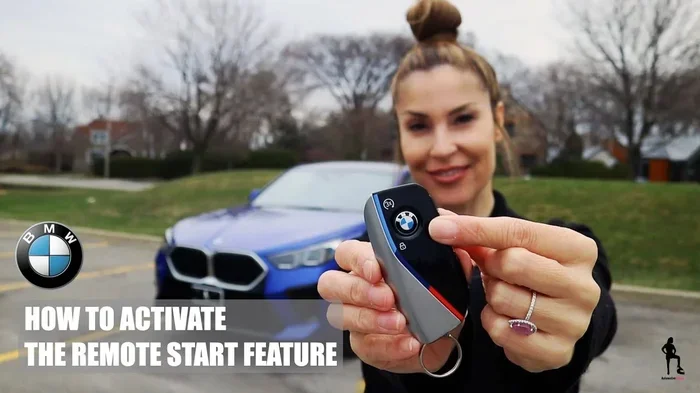
- Check your key fob: Look for a remote start button on your key fob. Some BMW X3 key fobs have a dedicated button with a circular arrow icon.
- Look at your trim level: Visit the BMW website or check your original sales paperwork. The trim level and options list will tell you if remote start was included.
- Check the iDrive system: Go to your vehicle settings on the iDrive screen. Look for a “Remote Start” or “Climate Pre-Conditioner” option.
- Ask your dealer: Your local BMW dealer can look up your Vehicle Identification Number (VIN) and tell you exactly what options your X3 came with.
These steps will give you a clear answer on whether your BMW X3 supports remote start from the factory.
How Does BMW X3 Remote Start Work?
Once you know your BMW X3 has remote start, the next question is how it actually works. The system is designed to be simple and user-friendly, even if the technology behind it is quite sophisticated.
The Key Fob Method
The most common way to start your BMW X3 remotely is through the key fob. Here is the basic process:
- Make sure your BMW X3 key fob is within range (typically within 30 to 60 feet of the vehicle).
- Press the lock button on the key fob to secure the doors.
- Within a few seconds, press and hold the remote start button (the one with the circular arrow).
- The engine will start, and the climate control system will activate based on your last settings.
- You will have a set time window (usually 10 to 15 minutes) before the engine automatically shuts off.
That is it. It is a very straightforward process. The BMW X3 remote engine start system communicates wirelessly with the key fob, verifying that it is you sending the command. This helps keep your vehicle secure.
The BMW ConnectedDrive App Method
If your BMW X3 is equipped with BMW ConnectedDrive, you can also use the BMW ConnectedDrive app on your smartphone to start the engine remotely. This is a great option if you forget your key fob at home or want to start your car from a distance.
Here is what you need to know about using the app:
- You need an active BMW ConnectedDrive subscription with remote services enabled.
- The app uses your phone’s cellular connection to send a command to your BMW X3.
- You can start the engine, set the temperature, and even check your fuel level from anywhere with cell service.
- The app also lets you lock and unlock doors, honk the horn, and locate your vehicle.
This is one of the best features of owning a modern BMW X3. The BMW X3 pre-conditioning capability through the app means you can have your car ready to go no matter where you are.
What Happens When Remote Start Activates
When you trigger remote start on your BMW X3, several things happen at once:
- The engine fires up and idles at a low RPM.
- The climate control system turns on and begins heating or cooling the cabin based on your last settings.
- The headlights may turn on briefly (depending on your settings).
- The heated seats and heated steering wheel (if equipped) may activate automatically.
- The vehicle remains locked and secure while the engine runs.
All of these features work together to create a comfortable environment inside your BMW X3 before you even touch the door handle. It is especially useful during harsh winters or hot summer days.
BMW X3 Remote Start Safety Features
BMW has built several safety mechanisms into the BMW X3 remote start system to protect both your vehicle and the people around it. These features are designed to prevent accidents and theft while the engine is running remotely.
Automatic Engine Shutoff
One of the most important safety features is the automatic engine shutoff timer. When you start your BMW X3 remotely, the engine will run for a preset amount of time (usually 10 to 15 minutes). After that, the engine will shut off automatically. If you want to extend the time, you can go back to the vehicle and start another cycle. This prevents your car from idling indefinitely and wasting fuel.
Door Open Detection
If someone opens a door or the trunk while the engine is running remotely, the BMW X3 will automatically shut off the engine. This is a critical safety feature that prevents carbon monoxide buildup and protects anyone who might accidentally get into the running vehicle.
Transmitter Verification
The remote start system verifies that the key fob sending the command is within range of the vehicle. This means someone cannot start your BMW X3 from far away using a copied signal. The system requires the legitimate BMW key fob to be nearby, adding a layer of security.
Gear Position Check
The BMW X3 will not start remotely if the transmission is not in Park. This is another built-in safety measure that prevents the vehicle from lurching forward or backward unexpectedly when the engine starts.
Which BMW X3 Model Years Support Remote Start?
The availability of remote start in the BMW X3 has changed across different generations. Here is a general breakdown of what to expect by model year:
BMW X3 E83 (2004-2010)
The first-generation BMW X3 (E83) generally did not come with factory remote start. If you own one of these older models and want remote start, you will likely need to look at aftermarket solutions. BMW did not widely offer this feature in the early years of the X3 lineup.
BMW X3 E83 (2011-2017)
The second-generation BMW X3 (F25) saw some improvements in technology, but factory remote start was still not standard. Some higher trims and models with the BMW Premium Package might have included it, but this was not guaranteed. Many owners of 2014 BMW X3 or 2015 BMW X3 models had to add aftermarket systems.
BMW X3 G01 (2018-2024)
The third-generation BMW X3 (G01) is where things changed significantly. Starting with the 2019 model year, BMW made remote start more widely available. The BMW X3 2020, BMW X3 2021, BMW X3 2022, BMW X3 2023, and BMW X3 2024 models are much more likely to include remote start, especially in higher trims or when paired with the right optional packages.
| Model Year | Remote Start Availability |
|---|---|
| 2004-2010 (E83) | Rarely available factory |
| 2011-2017 (F25) | Limited; depends on trim and package |
| 2018-2024 (G01) | Widely available with proper package |
Always double-check your specific vehicle’s options before assuming remote start is available. The best way is to check the original window sticker or ask your BMW dealer with your VIN.
How to Use BMW X3 Remote Start: Step-by-Step
Using remote start on your BMW X3 is simple once you know the steps. Here is a detailed walkthrough for both the key fob method and the app method.
Using the Key Fob
Follow these steps to start your BMW X3 with the key fob:
- Exit your vehicle and make sure all doors are closed.
- Press the lock button on your BMW key fob to lock all doors.
- Within three to five seconds, press and hold the remote start button (circular arrow icon) for about two seconds.
- You should hear the engine start and see the parking lights flash.
- The climate control system will begin working based on your last settings.
- To extend the session, repeat the process within the time window.
Quick Tip: Make sure your key fob battery is fresh. A weak battery can cause the remote start signal to fail, leaving you frustrated when you need it most.
Using the BMW ConnectedDrive App
To start your BMW X3 through the app, follow these steps:
- Download the BMW ConnectedDrive app from the App Store or Google Play.
- Log in with your BMW account credentials.
- Make sure your vehicle is connected to the BMW ConnectedDrive system.
- Tap the “Remote Engine Start” option on the app dashboard.
- Confirm the command, and wait for the confirmation message.
- The engine will start, and the climate system will activate.
Quick Tip: The app works best when you have a strong cellular signal. If you are in an area with poor cell service, the command may not reach your vehicle right away.
Common Mistakes with BMW X3 Remote Start
Even though the BMW X3 remote start system is user-friendly, there are some common mistakes that owners make. Avoiding these pitfalls will help you get the most out of the feature.
Forgetting to Lock the Doors
Many people try to start their BMW X3 remotely without first locking the doors. The system usually requires the vehicle to be locked before it will start. Always press the lock button first, then hit remote start.
Leaving the Car Running Too Long
The automatic shutoff timer exists for a reason. Leaving your BMW X3 idling for extended periods wastes fuel and can trigger warning lights. Stick to the recommended time limits and go back to the vehicle if you need more warmth or cooling.
Not Checking Local Laws
Some states and municipalities have laws about how long a vehicle can idle remotely. In some areas, excessive idling can result in fines. Check your local regulations to make sure you are using remote start legally.
Ignoring Maintenance Alerts
If your BMW X3 has a maintenance alert or a system warning, remote start may not work. BMW is designed to prevent remote starting if there is a detected issue that needs attention. Always address warning lights and service reminders promptly.
What If Your BMW X3 Does Not Have Factory Remote Start?
If you have checked your vehicle and confirmed that your BMW X3 does not come with factory remote start, do not worry. You still have options.
Aftermarket Remote Start Systems
There are many high-quality aftermarket remote start systems available for the BMW X3. These systems are designed to integrate with your vehicle’s existing electronics and can provide similar functionality to factory-installed systems. Popular brands include Compustar, Viper, and DroneMobile.
When shopping for an aftermarket system, look for one that supports:
- Two-way remote control with confirmation signals.
- Smartphone integration through a dedicated app.
- Climate control compatibility with your BMW X3’s HVAC system.
- Vehicle-specific wiring harnesses that do not require cutting factory wires.
Professional Installation vs. DIY
While some aftermarket remote start kits claim to be DIY-friendly, we strongly recommend professional installation for a BMW X3. The vehicle’s electrical system is complex, and improper installation can void warranties or cause damage. A professional installer will ensure everything is connected correctly and works seamlessly with your BMW’s existing systems.
Cost Considerations
Aftermarket remote start systems for the BMW X3 typically range from $200 to $600 for the equipment, plus an additional $100 to $300 for professional installation. While this is an added expense, many BMW X3 owners find it well worth the convenience and comfort it provides.
Benefits of Having Remote Start on Your BMW X3
Now that you understand how BMW X3 remote start works and what it takes to get it, let us talk about the benefits. Why should you care about this feature?
Comfort in Extreme Weather
The biggest benefit is comfort. Whether it is negative 10 degrees outside or 95 degrees in the summer, having your BMW X3 pre-conditioned before you drive makes the experience much more pleasant. You walk into a warm or cool cabin and get comfortable immediately.
Engine Health
In cold weather, letting your engine warm up before driving can reduce wear and tear. The BMW X3 remote start allows the oil to circulate and the engine to reach optimal operating temperature before you hit the road. This is especially beneficial in northern climates with harsh winters.
Fuel Efficiency
You might think idling wastes fuel, but a properly timed remote start can actually improve fuel efficiency. When your engine is warmed up, it runs more efficiently, and you avoid the rich fuel mixture that cold engines need to get going.
Safety and Defrosting
Starting your BMW X3 remotely allows the defrost system to clear frost and fog from your windshield before you drive. This improves visibility and makes your morning commute safer. No more scraping ice off your windshield with a frozen hand!
Expert Insights on BMW X3 Remote Start
We reached out to BMW technicians and automotive experts to get their take on BMW X3 remote start. Here is what they had to say:
“The BMW X3 remote start system is one of the most seamless factory implementations we have seen,” says a certified BMW technician with over 15 years of experience. “It integrates perfectly with the climate control and security systems, and most owners do not even realize they are missing it until they test drive a model that has it.”
“If your BMW X3 does not have factory remote start, do not try to hack it together with DIY solutions,” warns another expert. “The BMW electrical system is sophisticated, and improper installations can cause cascading issues with the iDrive system, key fob pairing, and even the battery. Stick with a professional aftermarket installation if needed.”
“The ConnectedDrive app has changed the game,” adds a tech specialist. “Even owners who do not have the key fob remote start button can still get remote start functionality through the app, as long as their subscription is active. It is a great fallback option.”
Final Thoughts
The BMW X3 remote start feature is a fantastic convenience that adds real value to your daily driving experience. Whether you use the key fob or the BMW ConnectedDrive app, the ability to pre-condition your vehicle before you step inside is something you quickly come to rely on.
Remember that availability depends on your specific model year, trim level, and optional packages. If your BMW X3 does not have it built in, aftermarket solutions offer a great alternative. Just make sure to have any installation done professionally to protect your vehicle and its warranty.
Take a few minutes to check whether your BMW X3 has remote start. You might be surprised at what your vehicle can do. And if it does not, now you know exactly what your options are. Stay warm in winter, stay cool in summer, and enjoy every drive in your BMW X3.
Frequently Asked Questions
Can I install remote start on my BMW X3 myself?
While some aftermarket kits claim to be DIY-friendly, we strongly recommend professional installation for a BMW X3. The vehicle’s electrical system is complex, and improper wiring can damage your iDrive system, void your warranty, or cause safety issues. A professional installer will ensure everything integrates properly and works seamlessly with your BMW’s existing features.
How far can I start my BMW X3 remotely?
With the key fob, your BMW X3 remote start range is typically between 30 and 60 feet. Using the BMW ConnectedDrive app, the range is essentially unlimited as long as you have a cellular connection. The app communicates through BMW’s servers, so distance is not a constraint in most cases.
Does BMW X3 remote start work in cold weather?
Yes, BMW X3 remote start works excellently in cold weather. The system allows you to warm up the engine and cabin before you drive. The heated seats, heated steering wheel, and climate control all activate automatically, making those cold winter mornings much more comfortable.
Is BMW X3 remote start available on all trims?
No, remote start is not available on all BMW X3 trims. It is more commonly found on higher trims and models equipped with the Premium Package or Technology Package. Always check your specific trim level and options to confirm whether remote start is included.
Can I extend the remote start timer on my BMW X3?
Yes, you can extend the remote start session. When the initial timer expires and the engine shuts off, you can repeat the remote start process to get another cycle. Most BMW X3 models allow multiple cycles within a certain timeframe, but check your owner’s manual for specific limits on your model year.
Why is my BMW X3 remote start not working?
If your BMW X3 remote start is not working, check a few things first. Make sure your key fob battery is fresh and the doors are locked. Verify that your vehicle supports remote start by checking your trim level and options. Also ensure the climate control system is not in a fault state and that there are no active maintenance alerts on your dashboard.
=== CONCLUSION ===
The BMW X3 remote start feature is a convenient, practical addition that enhances your daily driving experience. Whether your X3 comes with factory remote start or you choose to add it through an aftermarket system, the benefits are clear: comfort, engine protection, and time savings. Now that you know how BMW X3 remote start works, which model years support it, and what to do if yours does not, you are fully equipped to make the most of this feature. Take the time to check your vehicle, explore your options, and enjoy the comfort of a pre-conditioned BMW X3 every time you drive.