How to Set Time in Your Car Screen Without Confusion
Setting the time on your car screen is simpler than you think. This guide walks you through every method for different car brands and infotainment systems. You will learn quick fixes, common mistakes to avoid, and expert tips that save you time and frustration.
Have you ever slid into your driver seat and glanced at the dashboard, only to realize your car screen shows the wrong time? It happens to everyone. Maybe you forgot to adjust it after daylight saving. Or perhaps the clock reset after a battery change. Whatever the reason, learning how to set time in your car screen is a basic skill every driver should have.
The good news is that you do not need to be a tech expert. Most car screens make it easy to adjust the clock. Whether you drive a Toyota, Honda, Ford, or BMW, the process is straightforward once you know where to look. This guide covers everything you need to know. We will walk you through step-by-step instructions for popular car brands. You will also learn how to fix common problems and keep your car clock accurate for good.
By the end of this article, you will feel confident adjusting your car display time in under two minutes. No more guessing or fumbling through confusing menus. Let us get started.
Key Takeaways
- Multiple Methods Exist: You can set the time manually, through settings menus, or via GPS sync depending on your car.
- Brand-Specific Steps: Toyota, Honda, Ford, and BMW all have slightly different processes for adjusting the clock.
- Common Problems Have Simple Fixes: A dead battery or wrong time zone often causes clock issues.
- GPS Auto-Sync Is a Game Changer: Many modern cars update the time automatically based on your location.
- Quick Tips Prevent Future Issues: A few habits keep your car clock accurate all year long.
📑 Table of Contents
- Why Setting the Correct Time in Your Car Matters
- How to Set Time in Your Car Screen: Step-by-Step for Popular Brands
- Common Car Screen Time Problems and How to Fix Them
- Manual vs. Automatic Time Setting: Which Is Better?
- Quick Tips to Keep Your Car Clock Accurate
- Common Mistakes People Make When Adjusting Their Car Clock
- What to Do When Your Car Screen Clock Needs a Factory Reset
- How Car Clocks Sync With GPS and Smartphones
- Final Thoughts: Mastering Your Car Screen Time
Why Setting the Correct Time in Your Car Matters
You might wonder why the exact time on your car screen even matters. It seems like a small detail. But it affects more than you think. Your car clock connects to many systems that rely on accurate time.
First, consider your GPS navigation. Most infotainment systems use the current time to calculate arrival estimates. If your clock is off by even 30 minutes, your ETA could be completely wrong. This matters when you are trying to arrive on time for meetings, flights, or appointments.
Second, some cars sync safety features with time-based data. Collision alerts and maintenance reminders often depend on accurate timestamps. A wrong clock could cause confusion about when your last service was performed.
Third, think about your daily routine. You check your car clock constantly while driving. An incorrect time throws off your sense of schedule. It is one of those small things that creates low-level frustration every single day.
Setting the correct car screen time settings takes just a couple of minutes. It is worth the small effort for the peace of mind it brings.
How to Set Time in Your Car Screen: Step-by-Step for Popular Brands
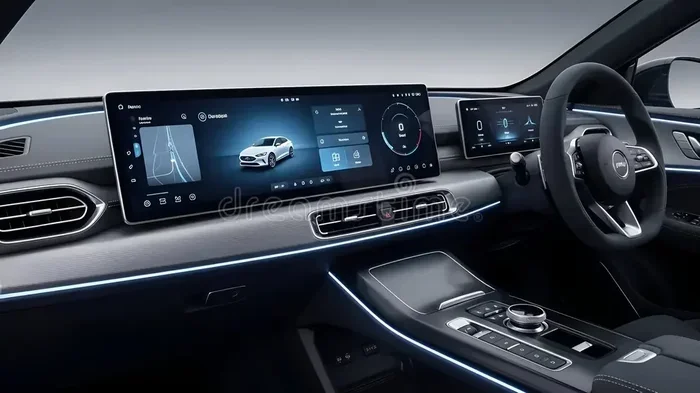
Every car brand organizes its settings menu differently. Below, we cover the most popular brands and their specific steps for adjusting the dashboard clock. Follow the one that matches your vehicle.
How to Set Time in a Toyota Car Screen
Toyota vehicles use a clear and logical menu structure. Here is how to adjust the clock on most Toyota models:
- Press the “Settings” button on your infotainment screen. It usually looks like a gear icon.
- Select “General Settings” from the menu.
- Tap “Clock” or “Date & Time.”
- Choose between manual and automatic time settings.
- If you select manual, use the up and down arrows to adjust the hour.
- Press “OK” or “Save” to confirm your changes.
Many newer Toyota models with GPS will automatically update the car display time based on your location. If your Toyota has this feature, you can skip the manual steps entirely.
How to Set Time in a Honda Car Screen
Honda vehicles have a slightly different approach. Here is the process for most Honda models:
- Press the “Setup” or “Settings” button on your dashboard.
- Scroll to “System Settings.”
- Select “Clock” from the options.
- Choose “Set Time” to enter adjustment mode.
- Use the tuning knob or touchscreen to change the hour and minute.
- Press “Set” to save your new time.
Honda also offers an automatic time sync feature on models with navigation systems. This feature connects to GPS satellites to keep your vehicle infotainment system clock accurate at all times.
How to Set Time in a Ford Car Screen
Ford’s SYNC system is widely used and generally intuitive. Follow these steps:
- Tap the “Settings” icon on your Ford touchscreen.
- Go to “System” and then “Clock & Date.”
- Toggle off “Auto Set” if you want to adjust manually.
- Use the plus and minus buttons to change the time.
- Select your time zone from the list.
- Tap “Save” to apply the changes.
Ford vehicles with SYNC 3 or SYNC 4 often include a GPS time sync feature. When enabled, your car clock updates automatically based on satellite data. This is one of the best features for keeping your car clock reset issues from happening in the first place.
How to Set Time in a BMW Car Screen
BMW iDrive systems are known for their sophistication. Here is how to set the time:
- Press the “CAR” button on your iDrive controller.
- Navigate to “Settings.”
- Select “Time & Date.”
- Choose “Manual” or “Automatic” time setting.
- If manual, use the controller to scroll and adjust the time.
- Confirm your selection to save.
BMW vehicles with the navigation system typically sync time through GPS automatically. The car dashboard clock updates based on your current time zone. This makes the process nearly effortless for BMW owners.
Common Car Screen Time Problems and How to Fix Them
Sometimes adjusting the clock does not go as smoothly as you expect. Here are the most common problems drivers face and how to solve them.
The Clock Resets After a Battery Change
This is one of the most frequent issues. When you disconnect your car battery, the clock loses its power source. After reconnecting, it often resets to 12:00 or another default time.
The fix is simple. Just follow the steps in your car’s manual to reset the clock. Most vehicles store basic settings in a small memory chip. Once you reconnect the battery, you just need to re-enter the time.
Quick Tip: Write down your correct time and time zone before disconnecting your battery. This saves you from guessing later.
The Clock Won’t Change When You Try to Adjust It
If your touchscreen or knobs are unresponsive when you try to change the time, a few things could be causing this:
- The screen is frozen: Try restarting your infotainment system. Most cars have a restart option in the settings menu.
- The system is locked: Some car screens lock certain features while driving. Pull over safely and try again.
- A software glitch: Check if there is a software update available for your infotainment system. Updates often fix minor bugs.
The Wrong Time Zone Keeps Showing
If your car clock displays the correct time but the wrong time zone, your GPS location settings might be off. Here is how to fix it:
- Go to your car’s “Settings” menu.
- Find “Location” or “GPS Settings.”
- Make sure “Automatic Time Zone” is turned on.
- If it is already on, toggle it off and back on again.
- Wait for the system to reconnect to GPS satellites.
This should resolve most car display time zone issues. The system will pull the correct time zone from satellite data.
The Clock Stops Working Entirely
A completely dead car clock is less common but more frustrating. If your clock will not turn on at all, try these steps:
- Check if other dashboard lights are working. If not, your car may have a power issue.
- Inspect your fuse box for a blown clock fuse.
- Restart the infotainment system by holding the power button for 10 seconds.
- If nothing works, consult your owner’s manual or visit a dealership.
Most of the time, a non-working car clock points to a simple electrical issue. You do not need expensive repairs in most cases.
Manual vs. Automatic Time Setting: Which Is Better?
When you learn how to set time in your car screen, you will discover two main options: manual setting and automatic GPS sync. Both have advantages.
| Feature | Manual Setting | Automatic GPS Sync |
|---|---|---|
| Accuracy | Depends on user input | Always correct |
| Convenience | Requires manual adjustment | Updates automatically |
| Time Zone Changes | You must change it yourself | Changes with location |
| Works Without GPS | Yes | No |
| Best For | Older car models | Modern infotainment systems |
For most drivers, automatic GPS sync is the better choice. It eliminates the need to adjust your clock twice a year for daylight saving. It also ensures your car screen time settings are always accurate, no matter where you drive.
However, manual setting still has its place. If you drive an older vehicle without GPS, manual adjustment is your only option. The good news is that the process is quick and easy once you know the steps.
Quick Tips to Keep Your Car Clock Accurate
Once you have set the correct time, you want it to stay that way. Here are some simple habits that help maintain accuracy.
- Enable automatic time sync: If your car supports it, turn on GPS-based time updates. This is the single best way to prevent clock issues.
- Check your time zone after road trips: Crossing into a different time zone can sometimes confuse older car systems.
- Restart your infotainment system monthly: A simple restart clears minor glitches that can affect the clock.
- Keep your software updated: Car manufacturers release updates that fix bugs, including clock-related problems.
- Note the time after battery work: If you or a mechanic disconnects your battery, reset the clock immediately afterward.
Expert Insight: According to automotive technicians, most clock problems come from a dead coin-cell battery on the car’s motherboard. This small battery keeps the clock running when your car is off. If you notice your clock resetting frequently, this battery might need replacement. It costs just a few dollars at any auto parts store.
Common Mistakes People Make When Adjusting Their Car Clock
Even simple tasks can go wrong. Here are mistakes to avoid when adjusting your car screen time settings.
Not Reading the Owner’s Manual
Every car brand organizes its settings differently. Skipping the manual means you might miss the correct path to the clock settings. Spend five minutes reading the relevant section. It will save you time and frustration.
Forgetting to Save Changes
Many car screens require you to confirm or save your time adjustment. If you change the time but do not press “Save” or “Set,” your changes will not stick. Always double-check that you have confirmed the new time.
Adjusting the Clock While Driving
It might be tempting to tap your screen while stopped at a red light. But adjusting the clock while driving takes your eyes off the road. Always pull over safely before making changes to your car dashboard clock.
Ignoring Daylight Saving Time
If your car does not have automatic time sync, you need to manually adjust for daylight saving time. Set a reminder on your phone before the clock changes each spring and fall. This prevents you from driving with the wrong time for weeks.
Assuming All Cars Work the Same Way
Even within the same brand, different model years can have very different menu structures. A 2015 Honda Civic might have a different process than a 2022 Honda Accord. Always check the specific instructions for your model and year.
What to Do When Your Car Screen Clock Needs a Factory Reset
Sometimes, none of the standard fixes work. Your clock might still show the wrong time despite your best efforts. In these cases, a factory reset of your infotainment system can help.
A factory reset wipes your car screen settings and restores them to default. This includes the clock, radio presets, and Bluetooth connections. Here is how to do it on most vehicles:
- Go to “Settings” on your car screen.
- Find “System” or “Device Preferences.”
- Select “Reset to Factory Defaults.”
- Confirm your choice when prompted.
- Wait for the system to restart completely.
- Reconfigure your settings, including the clock.
Use a factory reset as a last resort. You will need to set up your preferences again after the reset. But it often solves stubborn clock problems that nothing else can fix.
Quick Tip: Before performing a factory reset, write down your important settings. This includes your radio presets, Bluetooth pairings, and seat positions. It saves you from having to redo everything from scratch.
How Car Clocks Sync With GPS and Smartphones
Modern cars are more connected than ever. Your car screen can sync time through multiple sources. Understanding these connections helps you troubleshoot when things go wrong.
GPS Time Sync
Your car’s GPS receiver picks up signals from satellites. These signals include precise time data from atomic clocks in space. Your infotainment system uses this data to keep your digital clock in car perfectly accurate. This is why GPS-enabled cars rarely have clock problems.
Smartphone Connection
Some cars sync their clock with your connected smartphone. When your phone connects via Bluetooth, it shares its current time with the car system. If your phone clock is wrong, your car clock will be wrong too. Always make sure your phone’s time settings are correct before blaming your car.
Internet-Based Time Sync
Newer vehicles with 4G LTE connectivity can pull time data from the internet. This method is especially accurate because it connects to network time servers. If your car has this feature, make sure your data plan is active for the best results.
Knowing how your car connects to these time sources makes troubleshooting much easier. The next time your car clock reset fails, you can check which sync method is active and whether it is working properly.
Final Thoughts: Mastering Your Car Screen Time
Setting the time on your car screen is one of those small maintenance tasks that makes a big difference in your daily driving experience. A correct clock keeps you on schedule, helps your GPS work properly, and reduces that nagging feeling of being off track.
Whether you drive a Toyota, Honda, Ford, BMW, or any other brand, the process is manageable. Follow the steps outlined in this guide for your specific vehicle. If you run into problems, check the common fixes we covered. And remember to enable automatic time sync whenever possible. It is the easiest way to keep your car screen time settings accurate without any effort.
Take a moment today to check your car clock. If it is wrong, spend two minutes fixing it. You will wonder why you did not do it sooner. Your future self will thank you every time you glance at the dashboard and see the correct time.
Now that you know how to set time in your car screen without confusion, you have one less thing to worry about on the road. Drive safe, stay on time, and enjoy the journey.
Frequently Asked Questions
Why does my car clock reset after I turn off the engine?
This usually happens when the small backup battery on your car’s motherboard is dying. That battery keeps the clock running when your car is off. Replacing it costs just a few dollars and solves the problem instantly. Check your owner’s manual for the battery location.
Can I set the time on my car screen without a touchscreen?
Yes, absolutely. Most cars with physical buttons or knobs still have clock settings. Look for a “Settings” or “Clock” button on your dashboard or center console. Use the tuning knob to adjust the time, and press “Set” to save.
How do I change the time format from 12-hour to 24-hour on my car screen?
Go to your car’s Settings menu, then find the Clock or Time options. Look for a “Time Format” or “12/24 Hour” toggle. Switch it to your preferred format and save. This setting is available on most modern infotainment systems.
Does my car clock adjust automatically for daylight saving time?
Only if your car has GPS or internet connectivity and the automatic time sync feature is enabled. Older cars without these features will not adjust automatically. You will need to change the clock manually when daylight saving time begins or ends.
What should I do if my car screen clock is stuck on the wrong time?
First, try restarting your infotainment system. If that does not work, check your GPS and location settings. Ensure automatic time zone is turned on. If the problem persists, a factory reset of the system often resolves stubborn clock issues.
Can a dead car battery cause the clock to stop working?
Yes, a dead or weak battery can absolutely stop your car clock from working. The clock needs a constant power supply to keep running. If your battery is failing, you may notice the clock resetting or not turning on at all. Replacing the battery usually fixes the problem.