Does Tesla Auto Lock And How The Feature Actually Works
Yes, Tesla vehicles do auto lock. The walk-away door lock feature automatically locks your Tesla when you walk away with your key fob or phone key. This smart vehicle security system works across all Tesla models and can be customized through the Tesla settings menu on the touchscreen.
You walk away from your Tesla, arms full of groceries, phone in hand. You don’t press a button. You don’t double-check the door handle. And yet, your car locks itself behind you.
It feels like magic. But it is not magic. It is the Tesla auto lock feature, and it is one of the most convenient aspects of owning a Tesla. If you are new to the Tesla ecosystem or thinking about buying one, you have probably wondered about this feature. Does Tesla auto lock? How does it actually work? Can you change how it behaves?
In this guide, we will answer all of those questions and more. We will break down exactly how the walk-away door lock works, which Tesla models support it, and what you need to know to get the most out of your vehicle’s keyless entry system. Let us dive in.
Key Takeaways
- Tesla auto lock is real: The walk-away door lock feature locks your car automatically when you move away from the vehicle.
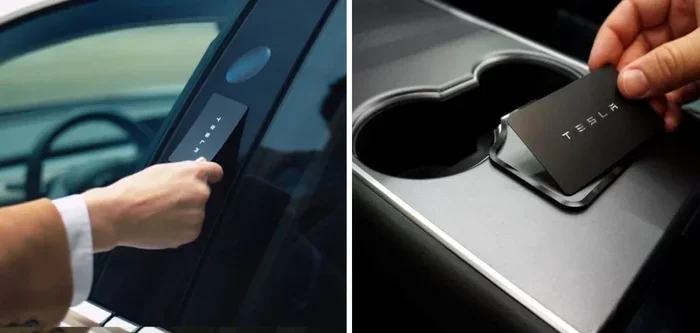
- Works with phone key and key fob: Both the Tesla phone key and the key card or key fob trigger the auto lock system.
- Customizable settings: You can turn the walk-away lock on or off and adjust related features through the Tesla touchscreen.
- Applies to all Tesla models: Model 3, Model Y, Model S, and Model X all support the auto lock feature.
- Related features enhance security: Sentry Mode, Camp Mode, and Dog Mode work alongside the locking system to protect your vehicle.
- Proximity sensors detect your presence: Tesla uses Bluetooth and Ultra-Wideband technology to sense when you are near or far from the car.
- Common issues are fixable: Most auto lock problems can be resolved with a simple reboot or firmware update.
📑 Table of Contents
- Does Tesla Auto Lock? The Short Answer
- How Does Tesla Auto Lock Actually Work?
- How to Enable or Disable Auto Lock
- Common Issues with Tesla Auto Lock and How to Fix Them
- How Auto Lock Works with Other Tesla Features
- Expert Tips for Getting the Most Out of Tesla Auto Lock
- How Tesla Auto Lock Compares to Other Automakers
- Final Thoughts
Does Tesla Auto Lock? The Short Answer
The short answer is yes. Tesla vehicles come with an automatic locking feature called the walk-away door lock. When you walk away from your car while carrying your paired phone key or key fob, the doors lock themselves automatically. You do not need to press any button on the key card or the Tesla app.
This feature is designed to make your life easier and your vehicle more secure. It eliminates the need to remember to lock your car every time you leave it. Whether you are at the grocery store, the office, or your front driveway, your Tesla handles the locking for you.
But there is more to it than just walking away. The Tesla auto lock system relies on Bluetooth Low Energy and Ultra-Wideband technology to detect your proximity. It knows when you are close and when you are far. This smart detection system is what makes the whole experience seamless.
Which Tesla Models Support Auto Lock?
Every Tesla model currently in production supports the walk-away door lock feature. Here is a quick breakdown:
- Tesla Model 3: Fully supports auto lock with walk-away door lock enabled by default.
- Tesla Model Y: Same as the Model 3. Auto lock works with both phone key and key fob.
- Tesla Model S: Supports the feature across all trims and configurations.
- Tesla Model X: Includes auto lock with the same walk-away functionality.
Older Tesla models that received firmware updates also support this feature. Tesla regularly pushes Tesla firmware updates that add and refine features. So even if you own an earlier model year, your car may still have the auto lock capability.
How Does Tesla Auto Lock Actually Work?
Understanding how the Tesla auto lock feature works helps you troubleshoot issues and get the most out of it. The system uses a combination of sensors, Bluetooth connections, and software logic to determine when to lock your doors.
The Role of the Phone Key and Key Fob
When you pair your phone as a key, your Tesla establishes a Bluetooth connection with your device. This connection acts as a virtual tether between you and your car. As long as your phone is within a certain range, the car knows you are nearby and stays unlocked.
The key fob works the same way. It uses Bluetooth to communicate with the vehicle. When you walk beyond the Bluetooth range, the car interprets this as you leaving and triggers the lock sequence.
Proximity Detection and Bluetooth Range
Tesla vehicles use Bluetooth Low Energy to estimate your distance. The typical Bluetooth range is around 30 to 50 feet. Once you move beyond this range, the walk-away door lock engages. The doors lock, the mirrors fold (if configured), and the Sentry Mode camera system becomes fully active if it is enabled.
Newer Tesla vehicles with Ultra-Wideband technology offer even more precise proximity detection. This means the car can tell exactly how far away you are, reducing false lock triggers. If you are standing next to the car but just out of direct Bluetooth range, the Ultra-Wideband chip helps the car understand that you are still nearby.
The Lock Sequence Explained
When the auto lock triggers, here is what happens in sequence:
- The Tesla system detects that your phone key or key fob has moved beyond the Bluetooth range.
- A brief delay of a few seconds allows time for you to return if you forgot something.
- The doors lock automatically.
- The turn signal lights flash once to confirm the lock.
- The touchscreen displays a notification that the car is now locked.
- If Sentry Mode is active, it transitions to its full monitoring state.
This entire process happens in the background without any input from you. It is designed to be invisible and effortless.
How to Enable or Disable Auto Lock
Not everyone wants their Tesla to lock automatically. Some owners prefer to have manual control. The good news is that you can customize the Tesla auto lock behavior to suit your preferences.
Step-by-Step Instructions
Here is how you can toggle the walk-away door lock on or off:
- Tap the Tesla logo at the top center of the touchscreen.
- Navigate to Controls.
- Select Locks.
- Find the Walk-Away Door Lock option.
- Toggle it on or off based on your preference.
That is it. When the walk-away door lock is turned off, you will need to manually lock your Tesla using the touchscreen, the Tesla app, or the key fob button.
Custom Lock Settings You Should Know About
Beyond the walk-away door lock, Tesla offers several related vehicle security settings you can adjust:
- Lock on Drive: Automatically locks the doors when you start driving.
- Unlock on Park: Unlocks the doors when you shift into Park.
- Lock on Sleep: Locks the car when it goes to sleep after a period of inactivity.
- Remote Lock: Allows you to lock the car from the Tesla app from anywhere.
These settings give you fine-grained control over your keyless entry experience. You can mix and match them to create a locking routine that works for your daily life.
Common Issues with Tesla Auto Lock and How to Fix Them
The Tesla auto lock feature is reliable, but like any technology, it can sometimes behave unexpectedly. Here are the most common issues owners report and how to resolve them.
Car Does Not Lock When You Walk Away
This is the most common complaint. If your Tesla is not locking automatically, the first thing to check is whether the walk-away door lock is enabled. Go to Controls, then Locks, and make sure the toggle is on.
If it is already on, the next most common cause is a weak Bluetooth connection on your phone. Try the following:
- Restart your phone’s Bluetooth.
- Move closer to the car and then walk away again to re-establish the connection.
- Check that your phone battery is not in low power mode, which can limit Bluetooth range.
- Remove and re-pair your phone key in the Tesla settings.
Car Locks Too Early or Too Late
Sometimes the proximity sensor triggers the lock before you expect it or after you have already walked a good distance away. This usually happens when there are Bluetooth signal interferences nearby. Other phones, Bluetooth devices, or even Wi-Fi routers can confuse the system.
To fix this, try walking a different route away from your car. Avoid passing near other Bluetooth devices. If the problem persists, a Tesla firmware update may address the timing calibration.
Doors Unlock When You Return
When you walk back toward your Tesla, the doors should unlock automatically. If they do not, your phone key may not be connecting properly. Check that your phone is not in airplane mode or that Bluetooth is turned on. Restarting the Tesla system by holding the scroll wheels on the touchscreen for about 10 seconds can also help.
How Auto Lock Works with Other Tesla Features
The Tesla auto lock feature does not exist in isolation. It interacts with several other Tesla systems that enhance your vehicle’s security and convenience.
Auto Lock and Sentry Mode
When your Tesla locks automatically through the walk-away door lock, it also activates Sentry Mode if you have it turned on. Sentry Mode uses the car’s external cameras to monitor the surrounding area. If someone approaches your vehicle, Sentry Mode enters an alert state and records video.
This combination of auto lock and Sentry Mode creates a powerful vehicle security system. You can leave your Tesla parked with confidence, knowing it is both locked and monitored.
Auto Lock and Camp Mode
Camp Mode keeps the interior temperature comfortable while you sleep in your Tesla. One important thing to know is that Camp Mode keeps the doors unlocked by default. This is a safety feature in case of emergencies.
If you want your Tesla to lock while in Camp Mode, you will need to manually lock the doors. The walk-away door lock does not override the safety unlock behavior during Camp Mode.
Auto Lock and Dog Mode
Similar to Camp Mode, Dog Mode keeps the cabin at a safe temperature for your pet. The doors remain unlocked so your dog can exit if needed. Auto lock does not interfere with this safety feature.
However, once you walk away and the walk-away door lock triggers, the car will lock even if Dog Mode is active. This is intentional and keeps your pet safe while the car maintains a comfortable temperature.
Auto Lock and the Tesla App
The Tesla app gives you remote control over your locking system. You can lock or unlock your car from anywhere using your phone. The app also shows the current lock status of your vehicle in real time.
If the auto lock feature is not working as expected, you can always use the Tesla app as a backup. Simply open the app, tap Lock, and your car will secure itself immediately.
Expert Tips for Getting the Most Out of Tesla Auto Lock
Here are some practical tips from experienced Tesla owners to help you get the best experience with the auto lock feature.
Keep Your Phone Key Charged
Your phone needs a working Bluetooth connection for the auto lock to function. If your phone battery dies, the car will not detect your key and will not auto lock. Keep your phone charged, especially on days when you rely heavily on the keyless entry system.
Use a Phone Case That Does Not Block Bluetooth
Some thick phone cases or cases with metal plates can interfere with Bluetooth signals. This can cause the auto lock to fail or trigger inconsistently. If you notice issues, try removing your phone case temporarily and see if the problem goes away.
Update Your Tesla Firmware Regularly
Tesla releases firmware updates that improve the Bluetooth range, lock timing, and overall reliability of the auto lock system. Keep your car updated to ensure you have the latest improvements.
Pair a Key Fob as a Backup
While the phone key works great most of the time, it is always good to have a backup. Tesla sells a key fob that you can pair to your car. If your phone dies or the Bluetooth connection fails, the key fob ensures you can still lock and unlock your vehicle.
Be Mindful of the Delay
The walk-away door lock has a built-in delay of a few seconds. This gives you time to return if you forgot your keys inside. However, if you are in a hurry, do not walk too far too fast. Give the system a few seconds to detect that you have truly left the vehicle.
How Tesla Auto Lock Compares to Other Automakers
Many modern cars now offer keyless entry and auto lock features. Here is how Tesla compares to the competition.
| Feature | Tesla | Most Traditional Brands |
|---|---|---|
| Walk-Away Auto Lock | Standard on all models | Available on select models only |
| Phone as Key | Yes, via Bluetooth and Ultra-Wideband | Limited to select phone models |
| Customizable Lock Settings | Full control via touchscreen | Basic on/off only |
| App Remote Lock | Yes, real-time status updates | Yes, but fewer features |
| Integration with Security Features | Sentry Mode, Camp Mode, Dog Mode | Separate systems, less integration |
Tesla’s auto lock system stands out for its seamless integration with other vehicle features. The walk-away door lock works hand in hand with Sentry Mode, the Tesla app, and the keyless entry system to create a unified experience.
Final Thoughts
The Tesla auto lock feature is one of those small conveniences that quickly becomes indispensable. Once you experience the ease of walking away from your car and having it lock itself, you will not want to go back to manually pressing a button every time.
It works reliably across all Tesla models, it is highly customizable, and it integrates beautifully with other Tesla security features like Sentry Mode and the Tesla app. Whether you use a phone key or a key fob, the walk-away door lock delivers a smooth and secure experience.
If you have not yet explored your Tesla’s locking settings, now is a great time. Head to Controls, then Locks, and take a look at all the options available to you. A few small adjustments can make a big difference in how your Tesla feels to drive and own every day.
Embrace the convenience of keyless entry and auto lock. It is one of the many reasons why Tesla owners love their vehicles so much.
Frequently Asked Questions
Does Tesla auto lock work with the key card?
Yes, the Tesla auto lock feature works with the key card as well. When you walk away from the vehicle while carrying the key card, the walk-away door lock will engage automatically. The key card uses the same Bluetooth-based proximity detection as the phone key and key fob.
Can I lock my Tesla remotely if auto lock is turned off?
Absolutely. Even if you disable the walk-away door lock, you can still lock your Tesla remotely using the Tesla app. The app provides real-time lock status and lets you secure your vehicle from anywhere with an internet connection.
Why does my Tesla sometimes not auto lock when I walk away?
The most common reason is a weak Bluetooth connection between your phone and the car. Other causes include being too close to other Bluetooth devices, having your phone in low power mode, or a software glitch. Restarting the Tesla system or re-pairing your phone key usually resolves the issue.
Does the auto lock feature drain the Tesla battery?
No. The Tesla auto lock feature uses minimal energy. The Bluetooth Low Energy connection is designed to be power-efficient, and the lock mechanism itself draws very little power from the vehicle battery. You should not notice any meaningful impact on your range or battery health.
Can passengers trigger the auto lock?
No. The walk-away door lock only triggers when the primary phone key or key fob moves beyond Bluetooth range. Passengers who are still inside the vehicle or walking alongside it will not cause the car to lock. The system is designed to detect the owner’s key specifically.
Is the Tesla auto lock feature available on older model years?
Yes. Tesla has rolled out the walk-away door lock feature through firmware updates to many older model years. Check your Tesla software version in the Controls menu. If your car is running a recent firmware, the auto lock feature should be available and ready to use.
=== CONCLUSION ===
The Tesla auto lock feature is a standout convenience that makes daily driving smoother and more secure. From the walk-away door lock to the seamless integration with Sentry Mode and the Tesla app, this feature exemplifies why Tesla vehicles feel so modern and intuitive. Whether you drive a Model 3, Model Y, Model S, or Model X, the auto lock system works reliably and is easy to customize to your preferences.
Take a few minutes today to explore your locking settings. Enable the walk-away door lock if it is not already on, adjust the related options, and enjoy the peace of mind that comes with knowing your Tesla locks itself every time you walk away.