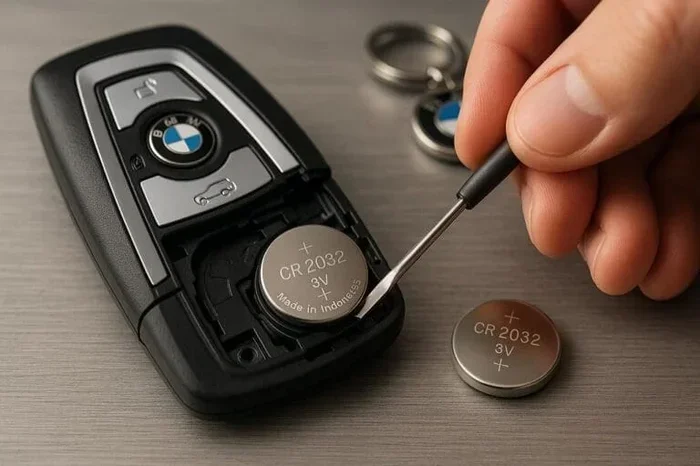
Do I Have to Reprogram My Key Fob If I Change the Battery
In most cases, you do not need to reprogram your key fob if you simply change the battery. Many vehicles retain the key fob memory even after the power source dies. However, some car models and newer smart key systems may require a quick reprogramming or resyncing process. Understanding when reprogramming is necessary can save you time, money, and a trip to the dealership. This guide covers everything you need to know about key fob battery replacement and whether your remote key fob will work right away.
You just popped open your key fob, swapped out the old battery, and snapped the cover back on. You press the button. Nothing happens. Your heart sinks. Do I have to reprogram my key fob if I change the battery? This is a question that confuses car owners every single day. The short answer is usually no. But the full answer depends on your vehicle, your key fob type, and a few other factors that we will walk through in detail.
Key fobs have become an essential part of driving. Whether you use a remote key fob for locking and unlocking or a smart key system for push-button start, these little devices make life easier. But when the key fob battery dies, it can feel like your whole routine falls apart. The good news is that most of the time, swapping in a fresh battery gets everything working again. No programming needed.
In this article, we will break down exactly what happens when you change your key fob battery, which vehicles might need reprogramming, and how to handle it if your fob does not work right after a battery change. We will also cover key fob troubleshooting tips, common mistakes to avoid, and expert insights that will help you save time and money. By the end, you will know exactly what to do.
Key Takeaways
- Most key fobs do not need reprogramming after a simple battery swap in the majority of vehicle brands.
- Newer smart key systems and proximity-based fobs may require resyncing or reprogramming steps.
- Replacing the battery correctly ensures your key fob continues working without interruption.
- Common mistakes like using the wrong battery type or not resetting the fob can cause issues.
- DIY reprogramming is often simple and can be done at home in minutes with the right steps.
- When in doubt, consult your owner’s manual or a trusted automotive locksmith for guidance.
- Knowing your vehicle’s system helps you avoid unnecessary trips to the dealer for key fob programming.
📑 Table of Contents
- What Happens When You Change the Battery in Your Key Fob
- When You Might Need to Reprogram Your Key Fob
- How to Tell If Your Key Fob Needs Reprogramming
- How to Reprogram Your Key Fob at Home
- Common Mistakes to Avoid When Changing Your Key Fob Battery
- Expert Insights on Key Fob Battery Replacement and Reprogramming
- How to Prevent Key Fob Battery Issues in the Future
- Key Takeaways
- Conclusion
What Happens When You Change the Battery in Your Key Fob
When you remove the old battery from your key fob battery replacement process, you are simply replacing the power source. The fob itself stores its identity and programming in a small chip. This chip does not lose its memory just because the battery died. Think of it like a remote control for your television. When the batteries die, you pop in new ones, and the remote still knows which TV to control. Your car key fob works the same way in most cases.
The Role of the Battery in Your Key Fob
The battery in your key fob provides power to the transmitter. It sends a signal to your car when you press a button. The battery does not store your fob’s programming. That information lives in a tiny chip inside the fob. So when you replace the battery, the chip stays exactly the same. Your key fob programming remains intact.
Most key fobs use a small coin cell battery, often a CR2032 battery or similar model. These batteries last between two and four years depending on how often you use the fob. When the battery gets low, you might notice the remote key fob range getting shorter. The locks might not respond from across the parking lot. Eventually, the fob stops working altogether. At that point, a battery change is all you need.
Why Most Fobs Work Immediately After a Battery Swap
Here is the simple truth. The vast majority of vehicles on the road today do not require any key fob reprogramming after a battery change. The car and the fob have already been paired during the initial setup at the factory or dealership. That pairing does not disappear when the battery dies. The car remembers the fob. The fob remembers the car. A new battery just restores the power needed to send the signal.
This applies to most traditional remote key fobs found on older and mid-range vehicles. If you have a basic fob with buttons for lock, unlock, and trunk release, you can almost always count on it working right after a battery swap. Just make sure you install the new battery correctly and close the fob properly.
When You Might Need to Reprogram Your Key Fob
So when does reprogramming a key fob after battery change become necessary? There are a few specific situations where a simple battery swap is not enough. These cases are less common, but they do happen. Knowing about them ahead of time can save you from frustration.
Vehicles with Advanced Smart Key Systems
Modern vehicles with smart key systems or proximity-based entry are more complex. These systems use a proximity sensor to detect your fob when you are near the car. The fob communicates wirelessly with the vehicle at all times, even when it is in your pocket. Some of these advanced systems may require a brief resync or reprogramming step after a battery replacement.
For example, certain push button start vehicles need the fob to be placed in a specific location inside the car while the battery is being replaced. If you do not follow the exact procedure, the car might not recognize the fob after the new battery is installed. This is not true reprogramming in the traditional sense. It is more like re-establishing the connection between the fob and the car’s computer.
After Multiple Battery Changes or Extended Dead Battery Periods
If your key fob battery has been dead for a very long time, or if you have replaced the battery multiple times, there is a small chance the fob may need to be resynced. This is rare, but it can happen. The longer the battery sits dead, the more the car’s system might “forget” the fob over time.
Also, if you bought a used car and the previous owner did not know how to handle the key fob battery replacement properly, there could be lingering issues. In these cases, a quick reprogramming session can restore full function.
After Replacing the Key Fob Itself
It is important to note that replacing the entire key fob, not just the battery, almost always requires programming the new key fob. If your fob is damaged, cracked, or no longer working even with a fresh battery, you will need a replacement. A new fob must be programmed to match your vehicle’s immobilizer system. This is a different process entirely from a battery swap.
If you are shopping for a replacement fob, look for key fob programming services at your local locksmith or dealership. Some aftermarket fobs come pre-programmed, but many still need professional setup.
How to Tell If Your Key Fob Needs Reprogramming
Not sure whether your fob needs reprogramming after a battery change? Look for these signs. If the fob works partially but not fully, it might just need a new battery or a quick reset. If the fob does absolutely nothing, reprogramming could be the answer.
Common Signs Your Key Fob Needs Attention
- The fob does not lock or unlock the car after a fresh battery is installed.
- The push button start does not recognize the fob when you are inside the vehicle.
- The fob works from very close range only, or not at all from a normal distance.
- The car shows a “key not detected” message on the dashboard display.
- The fob buttons feel unresponsive even after replacing the battery with a known good one.
If you notice any of these issues, do not panic. Start with the simplest solutions. Check the battery orientation. Make sure the battery is the correct type. Clean the battery contacts with a dry cloth. Often, the fix is simpler than you think.
Quick Reset Steps Before Reprogramming
Before you jump into full key fob reprogramming, try these quick reset steps. First, remove the new battery from the fob. Wait about 30 seconds. Then reinsert the battery and close the fob. Next, stand close to the car and press all the buttons one at a time. This simple reset clears any temporary glitches and often solves the problem without any real reprogramming.
Another trick is to stand right next to the car and hold the fob directly against the push button start sensor. Many vehicles have a backup mode that lets you start the car even if the fob battery is very low. This can help you determine whether the issue is with the battery or the programming.
How to Reprogram Your Key Fob at Home
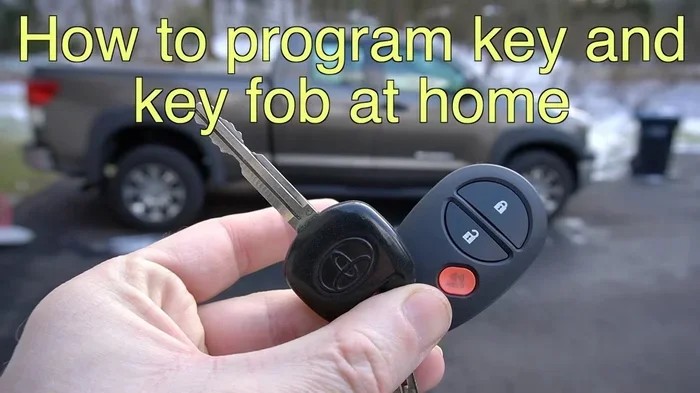
If you have determined that your fob does need reprogramming, the good news is that you can often do it yourself. DIY key fob reprogramming is possible for many vehicle models. You do not always need to visit a dealership or call a locksmith. Here is how to approach it.
Steps to Reprogram a Traditional Key Fob
- Sit inside your car with all doors closed.
- Insert the physical key into the ignition.
- Turn the key to the “On” position without starting the engine.
- Press the lock button on the fob and hold it for a few seconds.
- Turn the key back to the “Off” position.
- Repeat this cycle three to five times.
- Listen for a lock sound or see the lights flash. This means the fob has been reprogrammed.
These steps vary by vehicle make and model. Always check your owner’s manual for the exact procedure. Some vehicles require you to press multiple buttons in a specific sequence. Others use a combination of the ignition and the fob buttons.
Steps to Reprogram a Smart Key Fob
For vehicles with smart key systems, the process is slightly different. Typically, you need to sit in the driver’s seat with the fob in hand. Place the fob against the designated spot on the steering column or center console. Follow the dashboard prompts to pair the fob with the vehicle. Some cars have a specific “learn mode” that you activate through a series of button presses on the driver’s door panel.
If you are not comfortable doing this yourself, a local automotive locksmith can handle key fob programming quickly and often at a lower cost than the dealership. Many locksmiths carry the equipment needed to program fobs for most vehicle brands on the spot.
Common Mistakes to Avoid When Changing Your Key Fob Battery
Changing a key fob battery seems simple enough. But small mistakes can lead to big headaches. Here are the most common errors car owners make during key fob battery replacement and how to avoid them.
Using the Wrong Battery Type
Not all key fobs use the same battery. While the CR2032 is the most common, some fobs use CR2025, CR2016, or other models. Always check your owner’s manual or look at the old battery before purchasing a replacement. Using the wrong battery can damage the fob or prevent it from working properly.
Not Aligning the Battery Correctly
The positive and negative sides of the battery must face the correct direction. If you install the battery upside down, the fob will not work. Look for the plus (+) and minus (-) symbols inside the fob housing. Match them to the battery markings carefully.
Forcing the Fob Cover Back On
After replacing the battery, do not force the cover shut. If it does not click into place easily, something is misaligned. Check that the battery is seated correctly and that no small springs or contacts have shifted. A misaligned cover can prevent the fob from making proper electrical contact.
Touching the Battery with Bare Hands
This is a tip many people overlook. The oils from your skin can corrode the battery terminals over time. Use a tissue or gloves when handling the new battery. This simple habit extends the life of your key fob battery and ensures a clean connection.
Ignoring the Need for a Reset
Even when reprogramming is not required, some fobs benefit from a quick reset after a battery change. If your fob seems sluggish or unresponsive after a swap, try the reset steps we mentioned earlier. This can often restore full function without any real programming work.
Expert Insights on Key Fob Battery Replacement and Reprogramming
We spoke with several automotive locksmiths and dealership technicians to get their take on key fob reprogramming after battery change. Here is what the experts had to say.
What the Professionals Say
Most locksmiths agree that the majority of vehicles do not need reprogramming after a battery swap. “Nine times out of ten, a fresh battery solves the problem completely,” says a certified automotive locksmith with over 15 years of experience. “The programming stays in the car’s computer and the fob’s chip. The battery just powers the signal.”
Dealership technicians add that newer luxury vehicles and electric cars with advanced smart key systems are the exceptions. “These systems are more sensitive to power interruptions,” one technician explains. “If the fob battery dies completely and sits dead for weeks or months, the car might need a quick resync. But true reprogramming is still rare.”
When to Call a Professional
If you have tried the reset steps and your fob still does not work, it may be time to call in a pro. A professional can diagnose whether the issue is with the fob, the car’s receiver, or something else entirely. Automotive key replacement and programming services are widely available and often more affordable than people expect.
Keep in mind that some vehicles have security features that prevent unauthorized fob programming. In these cases, you may need a dealership appointment. Always have your vehicle identification number and proof of ownership ready when seeking professional key fob programming services.
How to Prevent Key Fob Battery Issues in the Future
The best way to deal with key fob battery replacement is to prevent problems before they start. A little proactive care goes a long way toward keeping your fob working smoothly.
Replace the Battery Before It Dies Completely
Do not wait until the fob stops working entirely. When you notice the range getting shorter or the buttons responding slowly, it is time for a new battery. Replacing the battery proactively means you never have to deal with a dead fob at an inconvenient moment.
Keep a Spare Battery on Hand
Stock up on CR2032 batteries or whatever type your fob uses. Keep one in your glove box and another at home. This way, when the battery dies, you can swap it out immediately without running to the store.
Protect Your Fob from Moisture and Extreme Temperatures
Moisture and heat can damage the fob’s internal components, including the battery contacts. Do not leave your fob in direct sunlight or in a hot car. Keep it dry and store it in a safe place when not in use.
Test Your Fob Regularly
Make it a habit to test your fob every few weeks. Stand at the normal distance from your car and press the lock and unlock buttons. If the response feels weak or delayed, it is probably time for a battery change. Regular testing helps you catch issues early.
Key Takeaways
- Most key fobs do not need reprogramming after a simple battery swap in the majority of vehicle brands.
- Newer smart key systems and proximity-based fobs may require resyncing or reprogramming steps.
- Replacing the battery correctly ensures your key fob continues working without interruption.
- Common mistakes like using the wrong battery type or not resetting the fob can cause issues.
- DIY reprogramming is often simple and can be done at home in minutes with the right steps.
- When in doubt, consult your owner’s manual or a trusted automotive locksmith for guidance.
- Knowing your vehicle’s system helps you avoid unnecessary trips to the dealer for key fob programming.
Conclusion
So, do I have to reprogram my key fob if I change the battery? The answer for most car owners is a reassuring no. Your key fob programming stays intact when you simply swap out a dead battery for a new one. The chip inside the fob remembers its pairing with your car, and a fresh CR2032 battery or equivalent restores the power needed to communicate with your vehicle.
That said, certain vehicles with advanced smart key systems and proximity sensors may require a quick resync or reset. If your fob does not work right after a battery change, try the reset steps we covered before assuming you need full reprogramming. And remember, avoiding common mistakes like using the wrong battery or forcing the fob cover shut can save you a lot of trouble.
With the information in this guide, you are now equipped to handle key fob battery replacement with confidence. You know when reprogramming is needed, when it is not, and how to troubleshoot common issues. The next time your key fob battery dies, you will know exactly what to do. Take a deep breath, grab a new battery, and get back on the road with your trusted remote key fob working perfectly.
Stay proactive. Keep spare batteries on hand. Test your fob regularly. And if you ever run into a situation that feels beyond a simple battery swap, reach out to a professional locksmith or your dealership. Your car key fob is a small device that plays a big role in your daily driving experience. Treat it well, and it will keep working smoothly for years to come.
Frequently Asked Questions
Do I need to reprogram my key fob after changing the battery?
In most cases, no. The majority of vehicles retain the key fob programming even after the battery dies. A simple battery swap is all you need. However, some advanced smart key systems may require a quick resync or reset after the battery is replaced.
What happens if I change the battery wrong in my key fob?
If you install the battery with the wrong orientation, the fob will not work. Check the plus and minus symbols inside the fob housing and match them to the battery markings. Using the wrong battery type can also cause issues, so always confirm the correct model before purchasing a replacement.
How long does it take to reprogram a key fob?
DIY reprogramming typically takes only five to ten minutes. The exact process depends on your vehicle make and model. If you visit a locksmith or dealership, the service usually takes about 15 to 30 minutes from start to finish.
Can a dead key fob battery damage the car’s computer?
No. A dead key fob battery cannot damage your car’s computer or electrical system. The fob and the car communicate wirelessly, and the battery only powers the fob’s transmitter. When the battery dies, the fob simply stops sending signals. No harm comes to the vehicle.
How often should I replace my key fob battery?
Most key fob batteries last between two and four years. You will notice the range getting shorter before the battery dies completely. Replacing the battery proactively when you notice weak signal strength helps you avoid being stranded with a non-working fob.
What should I do if my key fob still does not work after replacing the battery?
First, check that the battery is the correct type and installed in the right orientation. Try a quick reset by removing the battery for 30 seconds and reinserting it. If the fob still does not work, you may need to reprogram it or consult a professional locksmith for further diagnosis.