Can a Tesla Overheat And What You Should Do About It
Can a Tesla overheat? Yes, it can, but Teslas have advanced cooling systems designed to prevent this. Understanding Tesla overheating signs and causes helps you act fast and protect your vehicle. This guide covers everything you need to know about Tesla thermal management and what to do when things get too hot.
Key Takeaways
- Tesla vehicles can overheat: Even though they have advanced cooling, extreme conditions can push them past safe limits.
- Warning signs are clear: Dashboard alerts, reduced power, and unusual sounds all point to overheating.
- Battery thermal management is key: Tesla uses liquid cooling and heat pumps to regulate temperature.
- Immediate action matters: Pull over, turn off non-essential systems, and let the car cool down.
- Prevention is simple: Regular maintenance, smart charging habits, and avoiding extreme heat go a long way.
- Warranty may cover you: Tesla’s warranty often includes thermal system components.
📑 Table of Contents
- Can a Tesla Overheat? Understanding the Basics
- How Tesla’s Cooling System Works
- Common Signs Your Tesla Is Overheating
- What Causes a Tesla to Overheat
- What You Should Do When Your Tesla Overheats
- Preventing Overheating: Tips and Best Practices
- Tesla Model-Specific Overheating Concerns
- Warranty Coverage for Overheating Issues
- Final Thoughts on Tesla Overheating
Can a Tesla Overheat? Understanding the Basics
So, can a Tesla overheat? The short answer is yes. Even though Tesla builds some of the most advanced electric vehicles on the road today, no car is completely immune to heat problems. Teslas are engineered with strong thermal systems, but extreme conditions can still push them past safe limits.
Many people think electric cars cannot overheat because they don’t have engines like gas cars. That is a common myth. Electric vehicles still have batteries, motors, and electronics that all generate heat. When that heat builds up faster than the system can manage, things get risky.
Understanding Tesla overheating starts with knowing how the car works. Teslas use a liquid cooling system, heat pumps, and smart software to keep temperatures in check. But when any part of that system fails or faces extreme stress, overheating can happen.
This article will walk you through everything you need to know. We will cover the cooling system, warning signs, causes, and what to do if your car gets too hot. By the end, you will feel confident about handling electric vehicle overheating situations.
Let us start with the most important question: how does a Tesla stay cool in the first place?
Why Overheating Matters for Electric Vehicles
Heat is the enemy of performance. When a Tesla overheats, the battery loses efficiency. The motor may reduce power. And in worst cases, you could face long-term damage. That is why Tesla battery cooling is so important.
Tesla designed its vehicles to handle hot weather. But summer driving, fast charging in high heat, and towing heavy loads can all add stress. Knowing the limits helps you protect your investment.
How Tesla’s Cooling System Works
Tesla uses a multi-part cooling setup that keeps the battery, motor, and electronics at safe temperatures. This system is called Tesla thermal management. It is one of the reasons Teslas perform so well in different climates.
The main parts include a liquid coolant loop, a radiator, a heat pump, and temperature sensors. These work together to pull heat away from key components. The coolant flows through channels wrapped around the battery cells. It carries excess heat to the radiator, where it gets released into the air.
Here is a simple breakdown of how the system functions:
- Liquid coolant: Circulates through the battery pack and motor.
- Radiator: Releases heat from the coolant into the outside air.
- Heat pump: Moves warm air out and cool air in during summer.
- Temperature sensors: Monitor each component and adjust cooling as needed.
- Software control: Tesla’s computer manages the whole system in real time.
Battery Thermal Management System
The battery thermal management system is the heart of Tesla’s cooling design. It keeps the battery pack at the ideal temperature range, usually between 60 and 80 degrees Fahrenheit. When the battery gets too hot, the system ramps up coolant flow. When it is too cold, the system can even warm it up.
This is why Tesla battery thermal regulation is a big deal. It keeps the battery healthy and extends its lifespan. A well-managed battery also charges faster and delivers more range.
The Role of the Heat Pump
Newer Tesla models come with a heat pump. This is different from older models that used resistive heating. A heat pump moves heat instead of creating it. In summer, it pulls warm air from inside the cabin and pushes it outside. In winter, it does the reverse.
The heat pump also helps cool the battery. It is a two-for-one benefit that makes Tesla climate control more efficient. If your heat pump is not working right, your car may struggle with overheating.
Common Signs Your Tesla Is Overheating
Knowing the warning signs of Tesla overheating can save you from expensive repairs. Most Teslas give you clear alerts before things get serious. But some signs are subtle and easy to miss.
Here are the most common signs to watch for:
- Dashboard warning lights: A red or yellow thermometer icon means the system is too hot.
- Reduced driving power: Your Tesla may slow down to protect the battery and motor.
- Unusual smells: A sweet or chemical smell could mean coolant is leaking.
- Strange sounds: Gurgling or bubbling noises may point to air in the coolant lines.
- Slow charging: If your car takes longer to charge, heat may be the cause.
- AC blowing warm air: The cooling system may be redirecting power to the battery.
Dashboard Alerts Explained
Tesla’s dashboard is designed to keep you informed. When the car detects high temperatures, it will show a message on the screen. You might see a warning like “Temperature过高” or “Service Required.” These alerts are not something to ignore.
If you see a temperature warning, pull over safely. Turn off the air conditioning and other non-essential systems. Let the car idle for a few minutes to cool down. If the warning does not go away, call Tesla roadside assistance.
When Overheating Affects Performance
One of the first things you will notice is a drop in performance. Your Tesla might feel sluggish. Acceleration may feel weaker. Range could drop significantly. This is the car protecting itself from damage.
In extreme cases, the car may go into a limited power mode. This is also called “limp mode.” It reduces speed and limits features to keep the temperature down. While it is frustrating, it is a safety feature designed to protect you.
What Causes a Tesla to Overheat
Several factors can lead to Tesla overheating. Some are environmental, and some are related to how you use the car. Understanding the causes helps you prevent problems before they start.
Extreme External Heat
Living in a hot climate puts extra stress on your Tesla. Desert environments, summer heat waves, and parking in direct sunlight all raise the car’s base temperature. Even with a strong cooling system, the car has to work harder in extreme heat.
If you live somewhere very hot, try to park in shaded areas or garages. This simple habit reduces the load on your Tesla cooling system and keeps the battery happier.
Fast Charging in Hot Weather
Supercharging generates a lot of heat. When you fast charge on a hot day, the battery heats up fast. The cooling system has to work overtime to keep up. Doing this repeatedly can strain the system.
To avoid this, try to charge during cooler parts of the day. Early morning or evening charging is best in summer. Also, avoid charging right after a long drive when the battery is already warm.
Heavy Towing or Carrying Loads
Towing a trailer or carrying heavy cargo adds stress to the motor and battery. More weight means more energy use, which means more heat. If you tow often, your Tesla thermal management system needs to work harder.
Check your owner’s manual for towing limits. Staying within those limits keeps the cooling system from being overwhelmed.
Coolant Leaks and System Failures
A coolant leak is one of the most common reasons for overheating. If the liquid coolant level drops too low, the system cannot pull heat away from the battery and motor. This can happen over time or after an accident.
Other failures include a broken radiator fan, a faulty temperature sensor, or a malfunctioning pump. These are less common but can still happen. Regular service checks help catch these issues early.
Software Glitches
Tesla cars run on software. Sometimes a software bug can cause the cooling system to misbehave. The system might not turn on when it should, or it might misread temperature data.
This is why keeping your Tesla software updated is important. Tesla often releases updates that fix bugs related to thermal management. If your car shows overheating signs, check for updates first.
What You Should Do When Your Tesla Overheats
If you suspect your Tesla is overheating, stay calm. There are clear steps you can take to protect yourself and the car. Here is exactly what to do.
Step-by-Step Response Plan
- Pull over safely: Find a safe spot to stop. Turn on your hazard lights.
- Turn off the AC: This reduces the load on the cooling system.
- Turn off non-essential systems: Disable the stereo, seat heaters, and other extras.
- Let the car idle: Give the cooling system time to bring temperatures down.
- Check the dashboard: Watch for warning messages and temperature readings.
- Contact Tesla Support: If the warning persists, call for help or roadside assistance.
Do not keep driving if the temperature warning stays on. Continuing to drive can cause permanent damage to the battery and motor.
When to Call for Help
Some overheating situations can be handled on your own. But others need professional attention. Call Tesla support if you see any of these signs:
- The temperature warning stays on after 10 minutes of idling.
- You see fluid leaking under the car.
- The car shuts down completely.
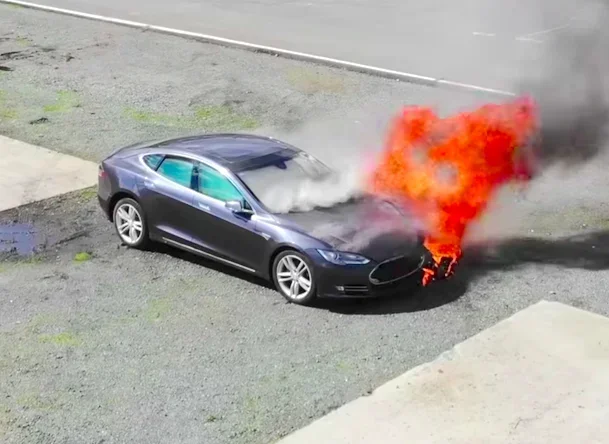
- You smell burning or see smoke.
- The dashboard shows multiple warning lights at once.
Tesla roadside assistance is free for covered vehicles. They can help you get to a service center safely.
Long-Term Steps After an Overheating Event
After your Tesla cools down, take it to a service center for a checkup. Even if the car seems fine, internal damage may have already started. A technician can inspect the coolant system, battery health, and motor condition.
Keep records of any overheating events. This can be useful for warranty claims or future service appointments. Tesla’s warranty covers many thermal system components, so you may not have to pay out of pocket.
Preventing Overheating: Tips and Best Practices
The best way to deal with Tesla overheating is to prevent it from happening in the first place. A few smart habits can keep your car running cool and efficient all year long.
Smart Parking Habits
Where you park matters more than you might think. Direct sunlight can raise your car’s interior temperature by 30 to 40 degrees. This extra heat soaks into the battery and cabin, making the cooling system work harder.
Try these parking tips:
- Park in garages or covered areas when possible.
- Use a sunshade for the windshield.
- Tint your windows to reduce heat absorption.
- Open the windows slightly to let hot air escape.
Charging Best Practices
How and when you charge affects your car’s temperature. Follow these tips to keep things cool:
- Charge during cooler hours, like early morning or evening.
- Avoid charging immediately after a long drive.
- Do not leave the car plugged in at 100% in extreme heat.
- Use destination charging when available instead of frequent Supercharging.
Regular Maintenance
Tesla cars need less maintenance than gas cars, but they still need care. Regular checks of the coolant level, radiator, and fans keep the system running smoothly. Tesla recommends service inspections at regular intervals.
Also, keep your software up to date. Tesla pushes updates that improve thermal management and fix bugs. An up-to-date car is a cooler car.
Driving Habits That Help
How you drive affects your car’s temperature. Aggressive driving, rapid acceleration, and high speeds all generate more heat. Smooth, steady driving is easier on the battery and motor.
In hot weather, avoid pushing the car to its limits for long periods. Take breaks on long road trips to let the system cool down. This is especially important when towing or carrying heavy loads.
Using Pre-Conditioning
Tesla’s pre-conditioning feature is a great tool for hot weather. It cools the cabin and battery before you start driving. You can set it to activate while the car is still plugged in.
This means the cooling system does its work before you even start the trip. It saves battery range and reduces the load on the cooling system while driving. Use the Tesla app to set pre-conditioning from anywhere.
Tesla Model-Specific Overheating Concerns
Different Tesla models have slightly different cooling setups. Here is a quick look at what to watch for in each model.
Tesla Model 3
The Model 3 uses a compact liquid cooling system. It is efficient but has less room for error in extreme heat. Model 3 owners in hot climates should be extra careful about charging habits and parking.
Tesla Model S
The Model S has a larger battery pack and more powerful motor. This means more heat to manage. The Model S also has an advanced heat pump system that helps with both heating and cooling.
Tesla Model X
The Model X is heavier than other models due to its falcon-wing doors and large frame. This extra weight can lead to more heat during driving and towing. Keep an eye on the temperature gauge when hauling heavy loads.
Tesla Model Y
The Model Y shares many systems with the Model 3. It has a similar cooling setup and the same heat pump technology. Overheating risks are comparable, and the same prevention tips apply.
Warranty Coverage for Overheating Issues
Tesla’s warranty covers many components related to thermal management. The basic warranty lasts 4 years or 50,000 miles. The battery and drive unit warranty lasts 8 years or 120,000 miles (varies by model).
If your Tesla overheats due to a manufacturing defect, the warranty may cover repairs. This includes the battery cooling system, coolant lines, and thermal management components. Keep all service records and contact Tesla if you believe your car has a defect.
However, warranty does not cover damage from misuse or neglect. That is why following the maintenance schedule and driving best practices is so important.
Final Thoughts on Tesla Overheating
So, can a Tesla overheat? Yes, but with the right knowledge and habits, you can keep it from becoming a serious problem. Teslas are built with strong thermal management systems that handle most situations well. But extreme heat, fast charging, heavy loads, and system failures can all push the limits.
Knowing the signs of Tesla overheating gives you a big advantage. Dashboard warnings, reduced power, and unusual smells are all clues that something is wrong. Acting quickly and following the right steps can prevent long-term damage.
Prevention is always better than repair. Smart parking, good charging habits, regular maintenance, and smooth driving all help keep your Tesla cool. Use pre-conditioning in summer and keep your software updated. These small steps add up to a big difference.
If your car does overheat, stay calm and follow the response plan. Pull over, turn off non-essential systems, and let the car cool. Contact Tesla support if needed. And always follow up with a service check to make sure everything is okay.
Your Tesla is a sophisticated machine built to handle a lot. But it still needs your help to stay in top shape. With the tips in this guide, you are well prepared to handle any electric vehicle overheating situation that comes your way.
Frequently Asked Questions
Can a Tesla overheat while driving in hot weather?
Yes, a Tesla can overheat in hot weather, especially during heavy use. Extreme heat puts extra stress on the battery and cooling system. However, Teslas are designed with Tesla battery cooling systems that handle most hot conditions. If you notice warnings, pull over and let the car cool down.
How do I know if my Tesla is overheating?
Look for dashboard warning lights, reduced power, unusual smells, or a temperature alert on the screen. These are the main Tesla overheating symptoms. Your car will also may enter a limited power mode to protect itself. Always take these warnings seriously and pull over safely.
Is Tesla overheating covered under warranty?
In most cases, yes. Tesla’s warranty covers the battery and drive unit for 8 years or 120,000 miles. The basic warranty covers 4 years or 50,000 miles. If the overheating is caused by a defect, repairs are likely covered. Check with Tesla for specific details about your model.
Should I charge my Tesla less in hot weather?
You do not need to charge less, but you should be smart about when and how you charge. Avoid fast charging during the hottest part of the day. Charging in the early morning or evening reduces heat stress on the battery. This is one of the best Tesla maintenance tips for summer.
Can a Tesla coolant leak cause overheating?
Yes, a coolant leak is a common cause of Tesla overheating. If the coolant level drops, the system cannot remove heat properly. Check for puddles under the car or unusual smells. If you suspect a leak, get the car inspected right away.
What should I do immediately if my Tesla overheats?
Pull over safely, turn off the AC and non-essential systems, and let the car idle to cool down. Do not continue driving if the warning stays on. Contact Tesla roadside assistance if the temperature does not drop after 10 minutes. Taking quick action can prevent serious damage to the battery and motor.
=== CONCLUSION ===
Can a Tesla overheat and what should you do about it? Now you have the answers. Tesla vehicles are built with advanced thermal management systems that handle most heat challenges. But no system is perfect, and extreme conditions can still cause problems.
By understanding the signs, causes, and prevention tips in this guide, you are ready to protect your car. Smart charging, good parking habits, regular maintenance, and quick action during overheating events all make a difference. Your Tesla is a powerful machine, and with the right care, it will keep you cool and safe for years to come.