How Do I Add a Second Phone to My Car Complete Guide
Adding a second phone to your car is easier than you think. Whether you need a backup device, want to keep your personal and work phones separate, or share driving duties with a passenger, setting up a second phone in your vehicle opens up new possibilities. This guide covers everything from the best car phone mounts to Bluetooth pairing tricks and wireless charging solutions. You will learn practical steps, expert tips, and common mistakes to avoid for a smooth dual-phone experience.
Have you ever been driving and wished you had a second phone ready in your car? Maybe you carry a work phone and a personal phone. Perhaps you share your vehicle with a partner or a teen driver. Or maybe you just want a backup device for navigation and music. Whatever your reason, adding a second phone to your car is a practical move that can make your daily drives smoother and safer.
The good news is that you do not need to be a tech expert to pull this off. With the right car phone mount, a few simple connections, and some basic know-how, you can set up a dual phone setup in minutes. This guide walks you through every step of the process. We will cover the best methods, the gear you need, and tips to keep everything running without a hitch.
Key Takeaways
- Multiple Methods Available: You can add a second phone to your car using mounts, Bluetooth pairing, USB connections, or wireless charging pads.
- Compatibility Matters: Check your car infotainment system to ensure it supports dual device connections and your phone models.
- Safety First: Always use a secure car phone mount and enable hands-free calling to stay safe while driving.
- Wireless Options Exist: Wireless charging and Bluetooth connectivity eliminate cable clutter and make switching phones effortless.
- Avoid Common Mistakes: Don’t ignore signal interference, overheating, or incompatible adapters when setting up your second phone.
- Apple CarPlay and Android Auto Help: Both platforms support phone mirroring and make managing a second phone much simpler.
- Power Management Is Key: Use a quality car charger and consider a dual-port adapter to keep both phones powered on long trips.
📑 Table of Contents
- Why Add a Second Phone to Your Car?
- Methods to Add a Second Phone to Your Car
- Best Phone Mounts for a Dual-Phone Setup
- How to Connect Two Phones to Your Car’s Bluetooth
- Wireless Charging and Power Solutions
- Common Mistakes to Avoid When Adding a Second Phone
- Expert Tips for a Seamless Dual-Phone Car Setup
- Conclusion
Why Add a Second Phone to Your Car?
Before we dive into the “how,” let us talk about the “why.” There are many real-world reasons people want a second phone in car setups. Understanding your goals will help you choose the best approach.
Some drivers use two phones to keep work and personal life separate. You might have a company-issued phone for navigation and calls during work hours, and your personal phone for music and podcasts on the weekend. Others share a vehicle with a spouse or partner and each want their own phone connected to the car infotainment system. Teen drivers often need a dedicated phone loaded with maps and music, keeping their personal device free for other uses.
Whatever your reason, the benefits are clear. You get better organization, fewer cable tangles, and a more personalized driving experience. A well-setup smartphone integration system means you can switch between phones without unplugging and replugging cords every time.
Common Scenarios for a Second Phone
- Work and personal separation: Keep your job phone on a dedicated mount for calls and GPS during the week.
- Shared vehicle use: Two drivers in one household each want their own phone connected to the car.
- Teen driver setup: A dedicated phone for a new driver with maps, music, and emergency contacts.
- Long road trips: One phone handles navigation while the other streams music or podcasts.
- Backup device: A second phone as a safety net if your primary phone dies or runs out of battery.
Methods to Add a Second Phone to Your Car
Now let us get into the meat of the guide. There are several ways to connect a second phone to your car, and the right one depends on your vehicle, your phone type, and your budget. Let us explore each method.
Method 1: Bluetooth Pairing
Bluetooth pairing is the most popular way to add a second phone. Most modern cars support multiple Bluetooth connections, which means you can pair both phones at the same time. This method is wireless, so you avoid cable clutter entirely.
Here is how to do it step by step:
- Open your car’s infotainment settings and go to Bluetooth.
- Put your first phone in pairing mode and connect it.
- Repeat the process with your second phone.
- On most systems, you can set one phone as the “priority” device for calls and audio.
Once both phones are paired, you can switch between them using your car’s audio controls. Some vehicles let you answer calls from either phone without any extra steps. Others require you to select which phone to use before making a call. Check your car’s manual for specific instructions.
Quick Tip: If your car only supports one Bluetooth connection, you can use a Bluetooth adapter plugged into the auxiliary port. This small device adds a second wireless connection for a low cost.
Method 2: USB Connection
Using a USB connection is another reliable option. Many cars have multiple USB ports, which makes it easy to plug in two phones at once. This method works well for charging and for connecting to Apple CarPlay or Android Auto.
The advantage of USB is that it provides a stable data connection. You get faster charging and more reliable phone mirroring compared to Bluetooth. The downside is that cables can get tangled, and you may need a USB splitter if your car only has one port.
If you go the USB route, invest in a quality car charger with multiple ports. A dual-port USB car charger keeps both phones powered without needing two separate wall adapters. Look for one that supports fast charging so your phones juice up quickly during your commute.
Method 3: Wireless Charging and Phone Docking
Wireless charging has come a long way in recent years. If your car supports Qi wireless charging, you can simply place your phone on a charging pad and it starts powering up. For a dual phone setup, you can use a wireless charging pad that holds two phones at once.
Some phone docking stations are designed specifically for cars. These units hold your phone securely, charge it, and sometimes even connect to your car’s audio system. They are a great option if you want a clean, cable-free dashboard.
Expert Insight: Wireless charging pads work best when they are mounted at eye level. This makes it easy to glance at your phone for navigation without taking your eyes off the road for too long. A dashboard mount with a built-in wireless charger is a popular choice among drivers.
Method 4: AUX and Auxiliary Input
Older cars may not have Bluetooth or multiple USB ports. In that case, an AUX cable can still get the job done. You can plug a second phone into the auxiliary input using a simple 3.5mm cable. This method handles audio playback but does not charge your phone or support hands-free calling.
For a more polished setup, consider a phone adapter that connects to your AUX port and also provides a charging output. These adapters are small and easy to install. They turn any older car into a capable smartphone integration hub.
Best Phone Mounts for a Dual-Phone Setup
Choosing the right car phone mount is critical when you are managing two phones. You want something secure, easy to access, and sturdy enough to handle daily use. Let us look at the top options.
Dashboard Mounts
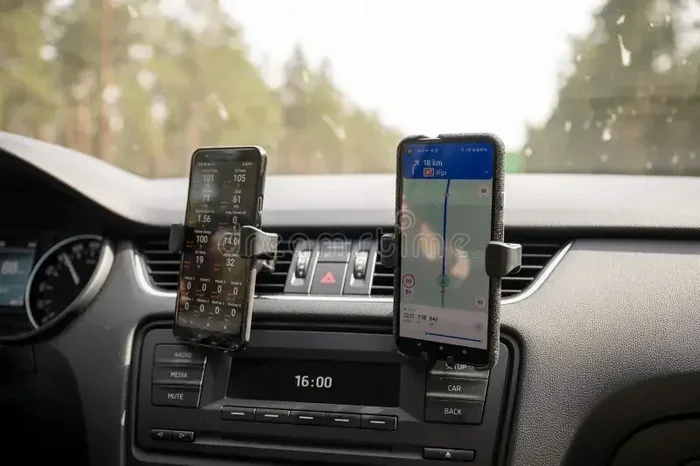
Dashboard mounts are the most versatile option. They use adhesive pads or suction cups to stick to your dashboard or windshield. You can position them anywhere within easy reach. For a dual setup, you might place one mount on the left side of the dashboard and another on the right.
Look for mounts with a strong grip mechanism. Phone locking systems that use spring-loaded arms or twist-lock mechanisms hold your phone firmly in place, even on bumpy roads. Avoid mounts that use weak adhesives, as they can fall off in hot weather.
Vent Mounts
Vent mounts clip onto your car’s air conditioning vents. They are compact, lightweight, and easy to install. These mounts work well for a single phone, but they can be tricky for a dual phone setup because most cars do not have enough vents close together.
If you want to use vent mounts for two phones, look for a car with multiple vents on the same side of the dashboard. Some aftermarket vent mounts also include a phone charging feature, which adds extra convenience.
CD Slot Mounts
If your car still has a CD player, a CD slot mount is a great option. These mounts insert directly into the CD slot and hold your phone at eye level. They are very stable and do not require any adhesive or suction. Some models even support two phones stacked side by side.
However, CD slot mounts are not an option for newer cars that have done away with CD players. If that is your situation, stick with dashboard or vent mounts.
Comparison Table: Best Mount Types for Dual Phones
| Mount Type | Stability | Ease of Installation | Works with Two Phones? | Price Range |
|---|---|---|---|---|
| Dashboard Mount | High | Easy | Yes, with two units | $10 – $40 |
| Vent Mount | Medium | Very Easy | Limited | $5 – $25 |
| CD Slot Mount | Very High | Easy | Yes, on some models | $10 – $30 |
| Wireless Charging Dock | High | Easy | Yes, dual models available | $20 – $60 |
How to Connect Two Phones to Your Car’s Bluetooth
Bluetooth connectivity is the backbone of most modern car phone integration setups. Connecting two phones via Bluetooth is straightforward, but there are a few things to keep in mind for the best experience.
First, check your car’s manual to confirm it supports multi-device Bluetooth. Most cars made after 2018 handle this just fine. If your vehicle only supports one Bluetooth connection, you will need a Bluetooth multiplexer or an auxiliary adapter to add a second device.
Once you confirm compatibility, follow these steps:
- Go to your car’s settings menu and select Bluetooth.
- On Phone A, open Bluetooth settings and set it to discoverable.
- Select Phone A from your car’s list of available devices.
- Repeat the process with Phone B.
- Test both phones by making a call from each one.
Most cars let you assign a priority phone. This means one phone will automatically connect when you start the car, while the other connects manually. This feature is handy if one phone is your daily driver and the other is occasional.
Quick Tip: Give each phone a distinct name in your Bluetooth settings. For example, label one “My Phone” and the other “Work Phone.” This makes it easy to switch between them without confusion.
Hands-Free Calling with Two Phones
Hands-free calling is one of the biggest benefits of connecting a second phone. You can answer calls from either phone through your car’s speakers and microphone. This keeps your hands on the wheel and your eyes on the road, which is the whole point of phone synchronization in a vehicle.
Make sure both phones have voice command features enabled. On iPhone, this means setting up Siri. On Android, use Google Assistant. Voice commands let you make calls, send texts, and start navigation without touching your phone. This is especially useful when you are managing two devices at once.
Wireless Charging and Power Solutions
Running two phones in your car means you need reliable power management. Nothing is more frustrating than a dead phone halfway through a road trip. Let us look at the best ways to keep both devices charged.
Dual USB Car Chargers
A dual USB car charger is the simplest solution. Plug it into your cigarette lighter or USB port, and you get two charging ports. Look for a charger that supports fast charging on both ports. Cheap chargers often split power unevenly, which means one phone charges slowly while the other charges normally.
Brands like Anker, Belkin, and Nomad make reliable dual-port car chargers. They are compact, affordable, and work with both iPhone and Android devices.
Wireless Charging Pads
If you want to ditch the cables, a wireless charging pad is a clean and elegant solution. You simply place your phone on the pad, and it starts charging. For a dual phone setup, look for a charging pad with two charging zones.
Wireless charging is slower than wired charging, but it is more convenient. You do not have to fumble with cables in the morning rush. Just grab your phone, place it on the pad, and go.
Common Mistake: Do not use a wireless charger and a wired charger on the same circuit. This can overload your car’s electrical system and cause the charger to shut off. Stick to one method per charging port.
Battery Management Tips
- Turn off unnecessary apps on both phones to reduce battery drain.
- Lower screen brightness to save power during long drives.
- Use battery saver mode on both phones when charging in the car.
- Keep a portable power bank in your glove box as a backup.
- Avoid charging both phones while streaming music at the same time, as this can slow down charging speeds.
Common Mistakes to Avoid When Adding a Second Phone
Setting up a second phone in car setups can go wrong if you are not careful. Here are the most common mistakes and how to avoid them.
Ignoring Signal Interference
When two phones are connected to the same car infotainment system, they can sometimes interfere with each other. This shows up as dropped calls, choppy audio, or slow data speeds. To minimize interference, keep your phones at least a few inches apart on the mount.
Using Incompatible Mounts
Not every car phone mount works with every phone. If you have a phone with a thick case, make sure the mount can accommodate it. Similarly, wireless chargers may not work well with very thick or metal cases. Always check compatibility before buying.
Overlooking Software Updates
Both phones and your car’s infotainment system need to be up to date for the best experience. Software updates often fix Bluetooth connectivity issues and improve phone mirroring performance. Make it a habit to check for updates on both your phones and your car’s system every few weeks.
Skipping the Test Drive
After you set everything up, take a short test drive before relying on the system for a long trip. Make test calls, try switching between phones, and check that both devices charge properly. Fixing a problem at home is much easier than dealing with it on the highway.
Expert Tips for a Seamless Dual-Phone Car Setup
Here are some extra tips from experienced drivers who use dual phone setups every day:
- Use a single mount with a dual phone holder. These holders fit two phones side by side and save space on your dashboard.
- Set up automated driving modes. Both iPhone and Android have driving modes that silence notifications and auto-reply to texts. This keeps you focused and reduces distractions.
- Label your USB cables. Use colored cable ties or labels to tell which cable belongs to which phone. This prevents confusion and saves time.
- Keep a spare cable in your car. Cables break and wear out over time. Having a backup cable in the glove box can save you from a dead phone at the worst possible moment.
- Use a single Bluetooth audio source. If both phones are connected, designate one phone as the primary audio source and the other as a backup. This prevents audio from jumping between devices unexpectedly.
With the right setup, managing two phones in your car becomes second nature. You will wonder how you ever drove with just one phone.
Conclusion
Adding a second phone to your car is a simple upgrade that pays off every time you get behind the wheel. Whether you use Bluetooth pairing, a USB connection, or a wireless charging dock, the key is to choose a setup that fits your daily routine. A good car phone mount, a reliable dual charger, and a solid understanding of your car’s infotainment system are all you need to get started.
Take the time to set up your dual phone setup properly. Test everything before a long drive, keep your cables organized, and enjoy the convenience of having both phones ready and connected. With this guide, you have everything you need to make phone synchronization in your vehicle a seamless part of your daily life.
Start today. Pick the method that works best for you, gather your gear, and enjoy a smarter, safer driving experience with both phones at your fingertips.
Frequently Asked Questions
Can I connect two phones to my car’s Bluetooth at the same time?
Yes, most cars made after 2018 support multiple Bluetooth connections. Check your car’s manual to confirm it allows dual device pairing. If not, a Bluetooth adapter can add a second connection.
What is the best car phone mount for two phones?
Dashboard mounts and dual wireless charging docks are the best options for a two-phone setup. They are stable, easy to install, and keep both phones within reach. Choose a mount that fits your phone sizes and your car’s dashboard layout.
Will a second phone drain my car battery?
Charging one or two phones uses very little power and will not drain your car battery under normal conditions. However, if you leave both phones charging overnight with the engine off, it could slowly drain the battery. Always charge your phones while the engine is running.
Do I need special cables to charge two phones in my car?
No special cables are needed. A standard dual USB car charger works with most phones. Just make sure the charger supports fast charging and is compatible with both your iPhone or Android device.
Can I use Apple CarPlay and Android Auto with two phones?
Yes, but only one phone can use Apple CarPlay or Android Auto at a time through a wired connection. You can use Bluetooth for the second phone’s calls and audio. Some newer cars support both systems simultaneously through different inputs.
How do I stop my two phones from interfering with each other?
Keep the phones a few inches apart on the mount and avoid using the same Bluetooth profile for both devices. Updating your car’s infotainment software and both phones to the latest version also helps reduce signal interference.